
How to Choose the Right Network Switch for Your Home Network
Learn to confidently choose between managed and unmanaged network switches for your home. This guide explains the differences and helps you select the perfect plug-and-play solution for reliable wired connections, ensuring you get optimal network performance.
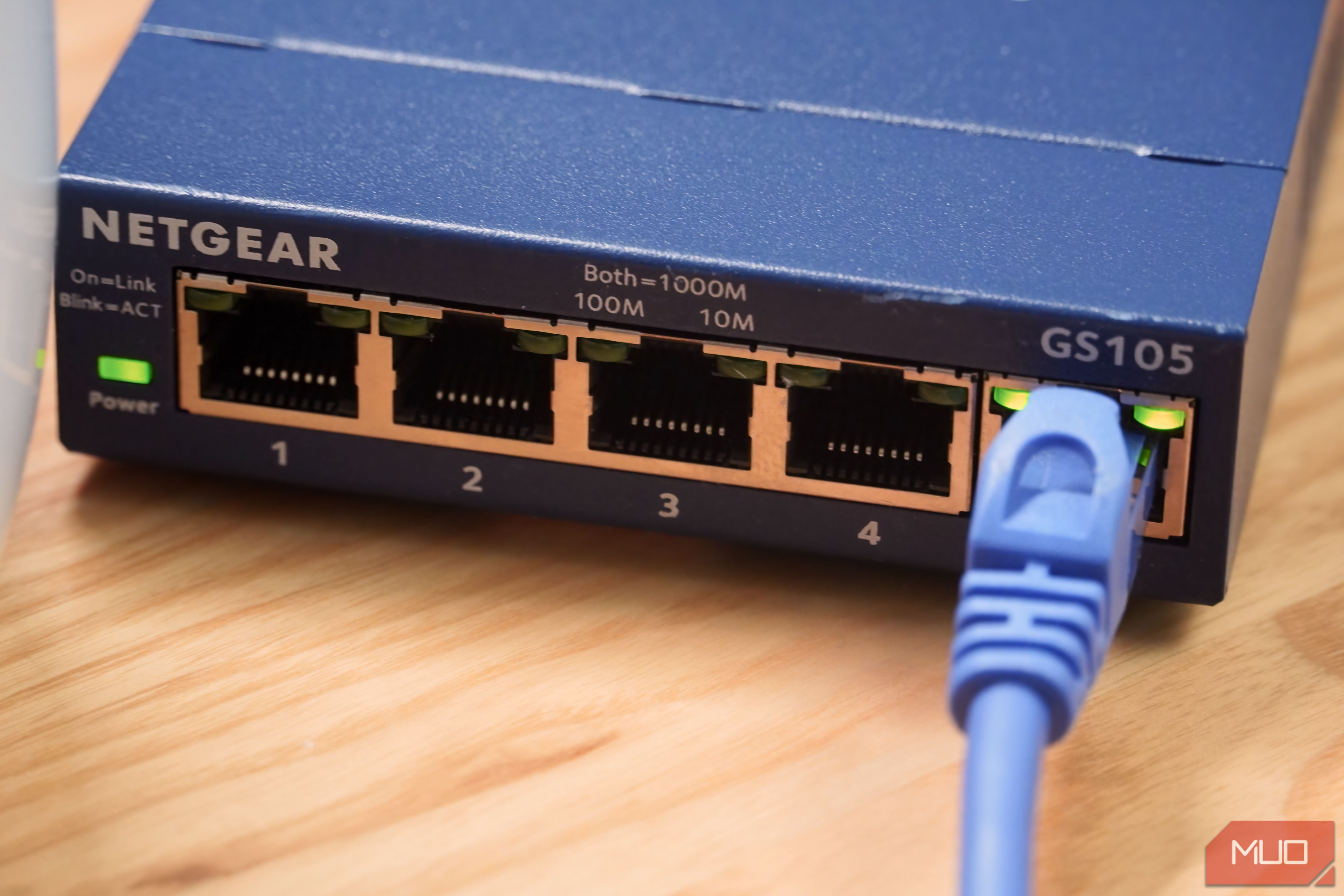
Ever found yourself staring at a bewildering array of network switches, wondering if you're about to make a costly mistake? You're not alone! Many of us, myself included, have discovered that not all network switches are created equal – often right when we're on the verge of buying the wrong one. With more devices than ever needing to get online, a network switch is an essential tool for achieving peak performance and reliability in your home. It effectively multiplies a single Ethernet port into several, allowing more of your gadgets to enjoy a stable, wired connection. But here's the kicker: there are two main types, and knowing which one you need is crucial. This guide will clarify the differences between managed and unmanaged switches, helping you confidently choose the perfect fit for your home network.
What You'll Accomplish
By the end of this guide, you will be able to:
- Understand the fundamental difference between managed and unmanaged network switches.
- Identify which type of switch is best suited for your specific network needs, particularly for a home environment.
- Confidently purchase and set up your new network switch, ensuring your devices get the best possible wired connection.
Prerequisites
Before diving in, all you need is:
- An understanding of why you need more Ethernet ports (e.g., you have multiple devices that benefit from a wired connection).
- A basic grasp of your current network setup (e.g., where your router is, which devices you want to connect).
Understanding Network Switches: The Basics
As our homes become smarter and more connected, the demand for reliable internet access grows. While Wi-Fi is incredibly convenient, a wired Ethernet connection often delivers superior speed and stability, especially for bandwidth-intensive tasks like gaming, streaming, or large file transfers. A network switch is the bridge that makes this possible, expanding your router's single Ethernet output into multiple ports. This ensures that all your essential devices can enjoy the benefits of a direct, cable-based connection, unlocking the pinnacle of network performance and reliability.
Step 1: Discovering the Two Main Types of Network Switches
The critical distinction many people miss is that network switches come in two distinct 'flavors': unmanaged and managed. These aren't just different models; they offer fundamentally different levels of control and complexity. Your choice between them will depend entirely on how you plan to use your network.
Step 2: Getting to Know the Unmanaged Switch (Your Most Likely Choice)
Let's be clear upfront: for the vast majority of home users, the unmanaged switch is the ideal choice. It's designed for simplicity, making it incredibly quick and easy to get up and running, with virtually no ongoing management required – hence its name.
What makes unmanaged switches so great for home use?
- Plug and Play Simplicity: They are the epitome of "plug and play." You simply connect your devices, plug the switch into your router, and you're done. No technical expertise or configuration is needed.
- Flexibility and Speed: Don't let the 'simple' label fool you; unmanaged switches are highly flexible. You can find them supporting speeds from 100 Mbps all the way to 2.5 Gbps and beyond, often significantly faster than typical Wi-Fi connections. They also support duplex mode, meaning your devices can upload and download data simultaneously at full speed.
- Direct Communication: An unmanaged switch acts as a central hub where any device connected to one port can seamlessly send and receive data to any other connected device. It just works.
- Cost-Effective: Generally, unmanaged switches are considerably more affordable than their managed counterparts.
Because of this ease of use and effective performance, unmanaged switches are the default, go-to option for typical home networks.
Step 3: Exploring Managed Switches (The Powerhouse Option for Specific Needs)
If the unmanaged switch is built for the home, the managed switch is the workhorse of the enterprise. While it performs the same fundamental task – connecting multiple devices to share data – it provides network administrators with a profound level of control over how the network operates and how data moves between devices.
Key features that set managed switches apart:
- VLAN Support (Virtual Local Area Network): This is one of the most vital features. VLANs allow an administrator to segment a single physical switch into multiple isolated, logical networks. This is crucial for separating different types of traffic or user groups, even if they're physically connected to the same switch. For instance, you could separate sensitive server data from general user traffic.
- QoS (Quality of Service) Controls: Managed switches can be configured to prioritize specific types of network traffic. This is incredibly useful in environments where certain applications absolutely need guaranteed bandwidth. A business using a Voice over IP (VoIP) phone system, for example, can prioritize phone traffic to ensure crystal-clear calls, even if other network activities are consuming significant bandwidth.
- Redundancy: Network architects can implement redundancy by using two managed switches. If one switch experiences a failure, data can be quickly rerouted to the second, minimizing downtime and ensuring continuous operation.
- Enhanced Security: Managed switches offer robust security features, allowing administrators to require authentication before data can be transmitted over specific ports or protocols. This adds an extra layer of protection to the network.
Managed switches are far more configurable but also much more complex to set up and maintain. They require technical expertise to deploy and manage effectively, which is why they are typically reserved for business or advanced network environments.
Step 4: Making Your Confident Decision
Now that you understand the core differences, making your choice becomes straightforward.
The Golden Rule: If you are asking yourself which type of switch you need, you almost certainly need an unmanaged switch.
Unmanaged switches offer the perfect balance of convenience and capability for the vast majority of home users. They are easy to install, require no ongoing configuration, and are significantly more affordable. The advanced features of a managed switch – like VLANs, QoS, redundancy, and port security – are typically unnecessary for a home environment and introduce complexity you likely don't need or want to manage.
Conversely, if a managed switch is truly what your network requires, it's highly probable that you're already familiar with these advanced networking concepts and understand precisely how a managed switch will address your very specific, technical needs. For everyone else, simplicity is key!
Ensuring Your Switch Works Smoothly: Tips and Best Practices
Once you've chosen your unmanaged switch, a few best practices will ensure you get the most out of your wired network:
- Use the Right Ethernet Cables: This is critical! Using outdated or incorrect Ethernet cables can significantly throttle the speed you get from your internet service provider (ISP), negating the benefits of your switch. Always ensure you're using modern cables (e.g., Cat5e, Cat6, or Cat6a) that are suitable for your internet speed.
- Prioritize Wired Connections for Key Devices: While Wi-Fi is convenient, some devices truly benefit from a wired connection. Consider connecting gaming consoles, smart TVs, desktop computers, network-attached storage (NAS) devices, and streaming boxes directly to your switch. These are often among the '7 devices in your home that really shouldn’t be on Wi-Fi' if you care about a reliable and fast home network.
- Simple Setup: Remember, for an unmanaged switch, the setup is incredibly simple. Just connect an Ethernet cable from one of your router's LAN ports to any port on your switch. Then, connect your devices to the remaining ports on the switch. There's no software to install or settings to configure.
- Power Cycle if Needed: Like any electronic device, occasionally power cycling your switch (unplugging it for 30 seconds and plugging it back in) can resolve minor connectivity glitches.
Next Steps & Related Topics
Congratulations! You're now equipped to choose and set up the right network switch for your home. To further enhance your network experience, consider exploring:
- Upgrading Your Ethernet Cables: Invest in high-quality cables for all your wired connections to maximize speed and reliability.
- Optimizing Wi-Fi Coverage: While you're wiring up key devices, look into mesh Wi-Fi systems or Wi-Fi extenders to improve wireless coverage in areas where you still need it.
- Network Attached Storage (NAS): If you have multiple users or large media libraries, a NAS connected to your switch can provide centralized, fast storage accessible by all your devices.
FAQ
Q: Can I use an unmanaged switch with my existing home router, which might have some basic "managed" features?
A: Absolutely! An unmanaged switch is designed to integrate seamlessly into any home network, regardless of your router's capabilities. It simply expands the number of available wired ports. Your router will continue to handle IP addresses and other core network functions, while the unmanaged switch efficiently directs traffic between the devices connected to it without needing any configuration from your side. It’s truly plug-and-play compatible.
Q: Do I need special Ethernet cables for my new network switch?
A: You don't necessarily need "special" cables, but you do need the right cables for modern network speeds. The source content emphasizes that using the wrong Ethernet cables can throttle your speed. For most home gigabit (1 Gbps) networks, Cat5e or Cat6 cables are excellent choices. If you have a multi-gig internet connection (2.5 Gbps or higher) or future-proof your setup, consider Cat6a cables. Always avoid very old or damaged cables.
Q: What if I accidentally bought a managed switch for my home? Can I still use it?
A: Yes, you can generally still use a managed switch in a basic "unmanaged" capacity by simply plugging in your devices. However, you won't benefit from its advanced features unless you know how to configure them, and it will have cost you more than an unmanaged equivalent. If you're a home user and don't need its complex capabilities, it's often more cost-effective and simpler to return it and get an unmanaged switch instead. The managed switch's additional complexity and cost won't provide any practical advantage for a typical home setup if you're not utilizing its specialized functions.
Related articles

Ditch Merge & Center: The Better Way to Align Text in Excel
Learn to use Excel's "Center Across Selection" to align text across cells without merging, avoiding common data manipulation issues. This guide provides steps to utilize this newly accessible feature and add it to your Quick Access Toolbar.

Ars Technica's Rocket Report: Your Essential Space Industry Briefing
Quick Verdict Ars Technica's Rocket Report, presented by veteran space reporter Stephen Clark, offers an invaluable and meticulously organized weekly (or similar frequency, implied by "Edition 9.15") digest of the most

Amazon Prime Video Launches AI-Powered Prime 360 for NBA Coverage
Amazon Prime Video is elevating its NBA coverage with the introduction of Prime 360, an AI-powered replay system offering immersive, 'fly through' views of the action. Kicking off its second season, Prime Video also adds Yahoo fantasy integration and gains exclusive Eastern Conference Finals rights, expanding its tech-driven sports broadcast. The new features aim to deliver a unique and interactive viewing experience for basketball fans.

Stop Android Auto Battery Drain: Essential Features to Disable and
Android Auto offers unparalleled convenience, bringing your phone's most useful features directly to your car's display. From navigation and calls to messages and music, it keeps you connected without distracting you

Apple’s new HomeView smart display is $10 cheaper at Amazon: latest
In a rare move for a new Apple product, the highly anticipated HomeView smart display is already available at a discount on Amazon, weeks before its official launch. Consumers can now pre-order Apple's first dedicated
Turn Your Android Phone into a Powerful Desktop Replacement
Learn how to transform your Android phone into a full-fledged desktop computer using external displays and accessories, providing a cost-effective and integrated alternative to new Googlebooks.