
Build Your Own Pocket EDC Toolbox: 6 Tools & Phone-Attachable
Do you often find yourself needing a compact set of tools for quick fixes and everyday tasks? Imagine having a small, portable toolbox that fits right in your pocket or even attaches magnetically to your phone. This
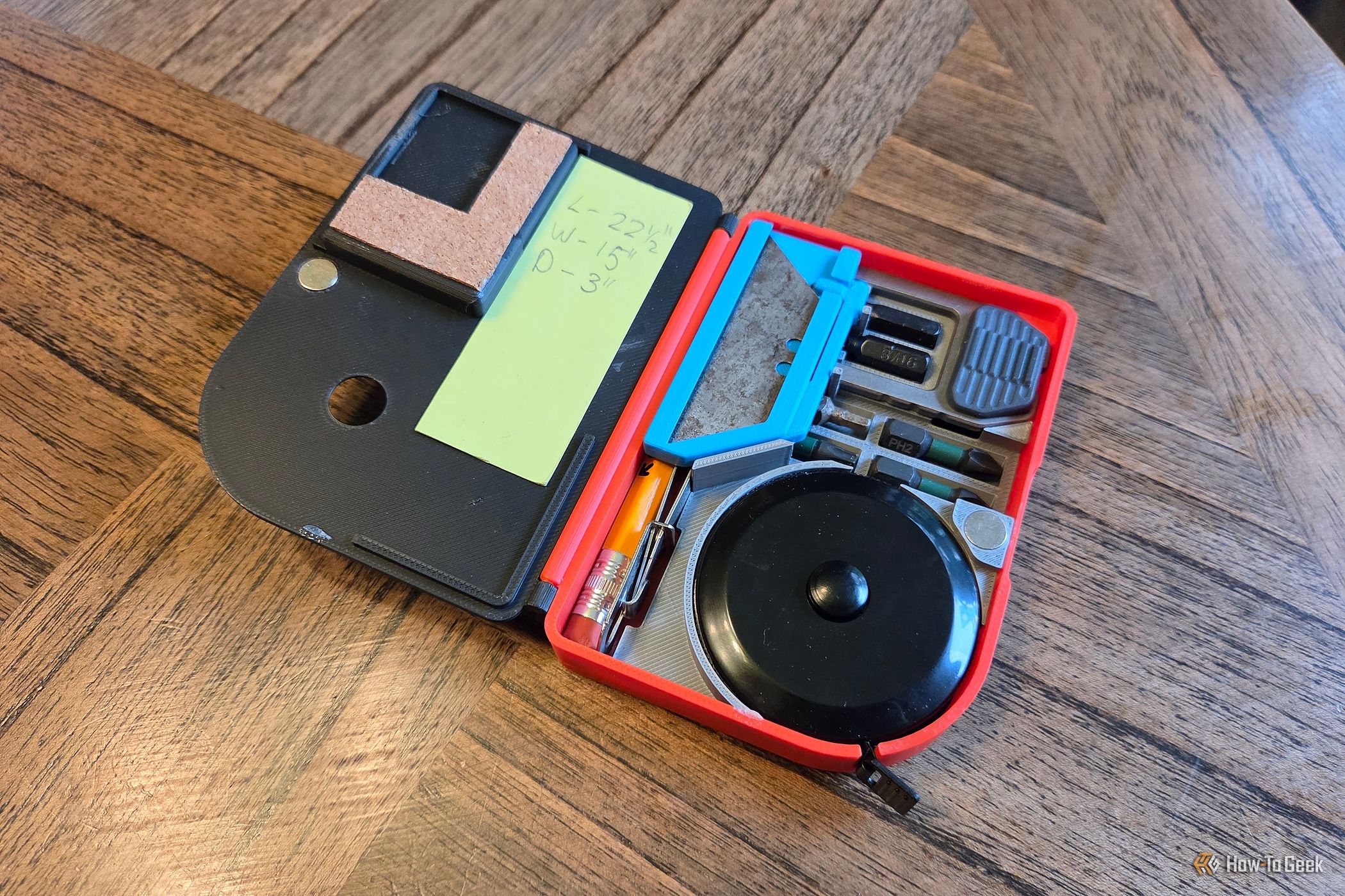
Do you often find yourself needing a compact set of tools for quick fixes and everyday tasks? Imagine having a small, portable toolbox that fits right in your pocket or even attaches magnetically to your phone. This guide will walk you through the process of creating your own 3D-printed Everyday Carry (EDC) toolbox, allowing you to keep essential tools always within reach. We'll cover two versions: an original magnetic model that includes a tape measure, and a smaller, non-magnetic alternative for a more minimalist approach.
Crafting this custom toolbox allows you to personalize your everyday carry, ensuring you have the right tools for your specific needs, whether it's tightening a loose screw or opening a package.
Prerequisites and Requirements
Before you begin, gather the following:
- 3D Printer: Essential for printing the toolbox model.
- Filament: The material your 3D printer uses.
- Design Software (Optional): If you plan to customize the design, tools like Fusion 360 and an SVG editor (for initial drawing) are useful.
- Measuring Tools: For accurately sizing your tools and designing the compartments.
- Patience and Iteration: 3D printing and custom design often involve trial and error.
- Chosen Tools: Select the specific tools you want to include. Here are the recommendations from the original project:
- Gerber Gear Driver Keychain Multitool: Offers a screwdriver and bottle opener, accommodates six 1/4-inch bits (Large Phillips, Small Phillips, Flat head, Square, Torx, Hex).
- Uncle Bill's Tweezers: Compact and effective.
- Utility Knife Blade: A slim blade for various tasks.
- For the Original (Larger) Version Only:
- Compact Tape Measure: A 5-foot/150cm model with a retract button.
- Small Pencil and Notepad: For jotting notes.
- MagSafe Ring (2-pack available): For magnetic phone attachment and sticking to metal surfaces.
Step 1: Define Your Toolbox Size and Select Core Tools
Your first task is to determine the overall dimensions of your EDC toolbox and identify the essential tools you'll carry. The original design aimed for a size that could comfortably attach to a phone, using a standard MagSafe organizer as a starting point. This ensures broad compatibility if you choose the magnetic version.
When selecting tools, consider your most frequent needs. The creator prioritized a multi-bit screwdriver, a blade, a measuring device, and a writing utensil. These form the core of a practical EDC kit. The Gerber Gear Driver Keychain was a key discovery for its thin profile and torque, solving the screwdriver challenge. A compact tape measure was chosen for its unique integrated design, and Uncle Bill's Tweezers were added for precision tasks.
- Action: Research common MagSafe accessory dimensions or choose a size that suits your pocket. List your absolute must-have tools.
- Tip: Think about how often you use each tool. The goal is utility in a compact form, not to replicate a full workshop.
Step 2: Design the Internal Layout and Compartments
Once you have your desired tools, the challenge is fitting them efficiently into a small space while ensuring easy access. This step combines physical and digital design.
Start by creating simple physical prototypes. Print thin walls without a bottom to physically arrange your tools. This tactile approach helps visualize the optimal placement and identify any clearance issues. For example, the original design found that a traditional pocket knife wouldn't fit, leading to a pivot to a utility knife blade.
After a rough physical layout, take precise measurements of the arranged tools. Transfer these measurements into a digital drawing, such as an SVG file. Then, import this into a 3D modeling software like Fusion 360. Here, you'll sculpt the compartments, walls, and lid. This iterative process of modeling, test printing, and tweaking is crucial for a perfect fit. The hinges and closing mechanisms are often the most complex parts, so be prepared for multiple revisions.
- Action: Experiment with physical tool arrangements. Take detailed measurements. Model the toolbox digitally, focusing on snug compartments and a functional hinge/latch.
- Troubleshooting: If tools don't fit, re-measure and adjust your digital model. If the hinge or latch isn't smooth, simplify the design or refine its geometry in your 3D software.
Step 3: Print Your EDC Toolbox
With your design finalized, it's time to bring your toolbox to life with a 3D printer. The project creator spent many hours tweaking the design and went through four prints to achieve the desired fit.
If you prefer to use pre-designed models, the original MagSafe EDC toolbox model is available on MakerWorld. For the smaller, non-magnetic version, you can download the model from MakerWorld.
- Action: Load your chosen model onto your 3D printer and begin printing. Monitor the print for any issues.
- Tip: Use a filament type known for its durability and ease of printing for functional parts. PLA is often a good starting point for prototypes.
Step 4: Assemble Your EDC Toolbox
After printing, it's time to load your tools. Carefully insert each tool into its designated compartment. The two versions offer different tool sets:
Original MagSafe Version Tools:
- Screwdriver (Gerber Gear Driver Keychain)
- Six 1/4-inch bits (Large Phillips, Small Phillips, Flat head, Square, Torx, Hex)
- 5-foot/150cm tape measure
- Utility knife blade
- Bottle opener (integrated into the Gerber tool)
- Uncle Bill's Tweezers
- Pencil and notepad
Smaller, Non-Magnetic Version Tools:
- Screwdriver (Gerber Gear Driver Keychain)
- Six 1/4-inch bits
- Utility knife blade
- Bottle opener
- Uncle Bill's Tweezers
For the original MagSafe version, affix your MagSafe ring to the back of the toolbox to enable phone attachment and magnetic adhesion to other metal surfaces. This magnetic feature is excellent for keeping your tools secure and accessible during projects.
- Action: Insert all selected tools into their respective slots. Attach the MagSafe ring if building the original version.
- Best Practice: Ensure all tools fit snugly but can still be easily removed. If any fit too tightly, consider light sanding or minor model adjustments for future prints.
Next Steps
Now that you have your custom EDC toolbox, carry it with confidence! You'll likely find it incredibly useful in everyday situations. Consider exploring other small tools or modifying your design further based on your evolving needs. You could also experiment with different filament colors or add personalized engravings to make your toolbox truly unique.
FAQ
Q: What if I don't have a 3D printer? A: Many local libraries, schools, or makerspaces offer 3D printing services. You can also find online services that will print and ship models to you. Alternatively, connect with a friend or local hobbyist who owns a printer.
Q: Can I customize the tools included in the toolbox? A: Absolutely! The beauty of a 3D-printed EDC toolbox is its customizability. You can adapt the digital model to fit different tools you prefer, as long as they fit within the overall dimensions you've chosen. Just remember that changing tools will likely require adjustments to the internal compartments of the 3D model.
Q: Is the MagSafe attachment necessary for the toolbox? A: No, the MagSafe attachment is optional. The original larger version includes it for convenient phone attachment and adherence to metal surfaces during tasks. However, the smaller version was specifically designed to be non-magnetic and more compact, making it purely pocket-friendly. You can choose the version that best suits your carrying preference.
Related articles

AI Model Lock-in? It's Not the Model, It's Everything Else
A recent survey reveals that while swapping AI models is becoming common, the real lock-in risk for enterprises lies in the surrounding infrastructure: integrations, agent workflows, and guardrails. Despite concerns about vendor lock-in, it often ranks lower than immediate priorities like security and cost in AI purchasing decisions. However, multi-model adopters are proactively building open, flexible architectures, demonstrating a path to mitigate future migration headaches.

Get Ready for iQOO 16: India Launch, Expected Features & Specs
Discover the highly anticipated iQOO 16, confirmed for India. This guide covers its expected features, powerful specifications, design, camera, battery life, and potential pricing to help you prepare for its launch.

Secure Your Secrets: Lock ChatGPT Conversations with a PIN
Worried about curious eyes peeking at your private ChatGPT conversations? You're in luck! ChatGPT now offers a "Locked Chats" feature, allowing you to hide your sensitive discussions behind a four-digit PIN or biometric
Turn Your ESP32 into a Surveillance Detector for Enhanced Privacy
Turn Your ESP32 into a Surveillance Detector for Enhanced Privacy In an increasingly connected world, privacy concerns are more prevalent than ever. From ubiquitous street cameras to personal smart glasses, it can feel

How to Subscribe to Spotify Podcast Memberships - Support Your
Learn to easily subscribe to Spotify podcast Memberships directly within the app, supporting creators with perks like exclusive content and early access, and understand the financial implications for podcasters.

Empower Your Coding Agent: Browser Verification with Playwright MCP
As senior developers, we've all encountered the scenario: a coding agent proudly declares frontend work "implemented and verified." The linter's green, the type checker's silent, and all tests pass. Yet, upon opening