
Choose the Best Display Connection - Maximize Your Visual & Audio
In the world of display connections, DisplayPort (DP) has long been the go-to recommendation, especially for PC monitors, thanks to its superior bandwidth. However, raw speed isn't the whole story. Depending on your
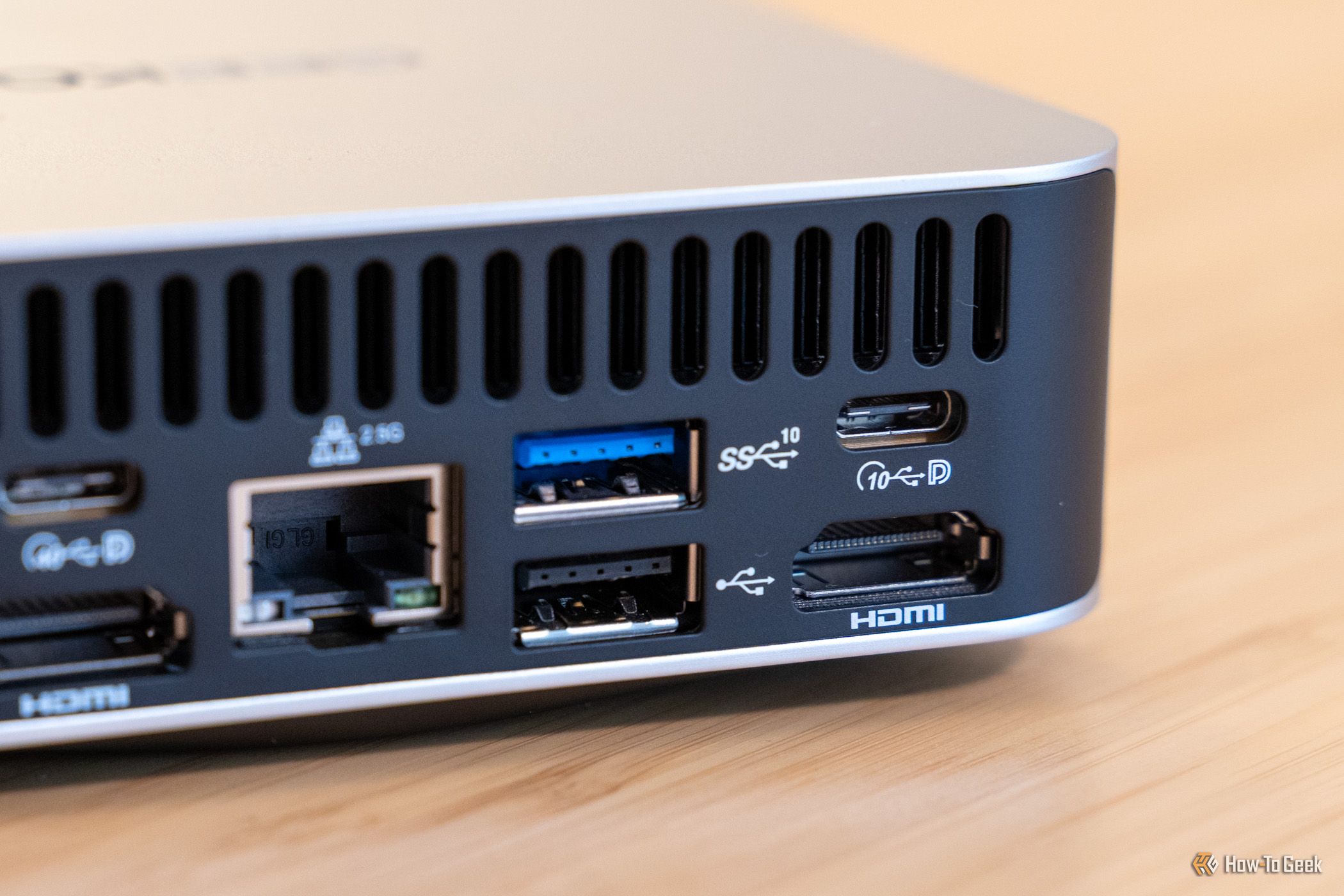
In the world of display connections, DisplayPort (DP) has long been the go-to recommendation, especially for PC monitors, thanks to its superior bandwidth. However, raw speed isn't the whole story. Depending on your setup and needs, High-Definition Multimedia Interface (HDMI) often emerges as the smarter, more feature-rich choice. This guide will help you understand when HDMI truly wins, ensuring you pick the best connection for your devices and get the most out of your visual and audio experience.
What You'll Accomplish
By the end of this guide, you'll be able to confidently identify specific scenarios where HDMI is the optimal display connection, moving beyond common assumptions and making informed decisions for your gaming, entertainment, and work setups.
Prerequisites
Before diving in, ensure you have:
- A basic understanding of common video connections like HDMI and DisplayPort.
- Access to the specifications of your display devices (monitors, TVs) and source devices (PC, gaming console, AV receiver) to check port versions.
- An idea of your primary usage, such as PC gaming, home theater entertainment, or professional audio/video work.
Understanding DisplayPort's Edge (and its Limitations)
It's true that DisplayPort, particularly the latest DP 2.1 with UBR20, boasts impressive bandwidth of up to 80Gbps—almost double HDMI 2.1's 48Gbps. This high bandwidth allows DP to handle extremely high resolutions, refresh rates, and color depths without needing compression, making it a favorite for power users with cutting-edge PC monitors. Even modern GPUs like Nvidia's RTX 50-series often prioritize DP for their highest performance specs (e.g., 8K at 165Hz with Display Stream Compression (DSC) compared to HDMI's 8K at 120Hz with DSC).
However, this raw speed advantage only matters if your hardware can fully utilize it. Most users don't have 8K displays running at triple-digit refresh rates. For typical setups, the practical differences in video quality for equivalent resolutions and refresh rates might be negligible, opening the door for HDMI to shine with its unique features.
When HDMI Clearly Takes the Lead
Here are the key scenarios where choosing HDMI over DisplayPort will significantly enhance your experience:
1. Connecting to a TV or Home Entertainment System
If your PC or gaming console is connecting to a television, HDMI is almost always the superior choice. The entire home theater and entertainment ecosystem is built around HDMI, making it the universal standard for compatibility and integrated functionality.
- Universal Compatibility: Gaming consoles like the PlayStation 5, Xbox Series X/S, and Nintendo Switch exclusively use HDMI. The same goes for AV receivers, soundbars, and streaming devices. Using HDMI streamlines your connections and avoids the need for adapters.
- Enhanced TV Features: Modern HDMI 2.1 ports on TVs support crucial features for an optimal entertainment experience:
- 4K at 120Hz: Enjoy smooth, high-resolution gaming and video.
- Variable Refresh Rate (VRR): Synchronizes the display's refresh rate with the source device's frame rate, reducing screen tearing for smoother gameplay.
- Auto Low Latency Mode (ALLM): Automatically switches your TV into a low-latency mode when it detects a game console or PC, minimizing input lag.
- Consumer Electronics Control (CEC): This feature allows compatible devices connected via HDMI to communicate and control each other. For example, your TV might automatically switch inputs or turn on your soundbar when you power on your console, simplifying your control scheme.
2. Optimizing Audio with eARC
For audiophiles or anyone integrating dedicated audio equipment into their setup, HDMI's advanced audio capabilities are a significant advantage that DisplayPort cannot match.
- Enhanced Audio Return Channel (eARC): HDMI's eARC feature enables your television to send high-quality, uncompressed audio back to a compatible sound system (like a soundbar or AV receiver) over the same HDMI cable used for video. This means you can run your PC or console directly into the TV, and still pass high-bitrate audio formats such as Dolby TrueHD, Dolby Atmos, DTS-HD Master Audio, and DTS to your external audio system. This simplifies cabling and ensures the best possible audio fidelity.
- Integrated Ecosystem: While DisplayPort can carry audio, it lacks the broader home entertainment ecosystem and specific audio return channel technologies like eARC and CEC, which are invaluable for complex audio setups.
3. When HDMI on Your PC Monitor or GPU is a Newer Standard
While less common, there are scenarios where your PC monitor or graphics card might actually offer a newer or more capable HDMI standard than its DisplayPort counterpart. For instance, you might have a monitor with HDMI 2.1 but only DisplayPort 1.4.
- Check Port Versions, Not Just Types: Don't rely solely on the connector type. Always verify the specific HDMI and DisplayPort versions supported by both your GPU and your monitor. If the HDMI port on your monitor or GPU supports a newer standard (e.g., HDMI 2.1) than its DisplayPort equivalent (e.g., DP 1.4), the HDMI connection could potentially offer higher resolutions, refresh rates, or better feature support.
- Practical Impact: In such cases, using the technically superior HDMI port can unlock better performance for your display. If both inputs allow you to run your monitor at its maximum resolution and refresh rate, support HDR, and offer the same color depth, the practical difference might be minimal. However, checking the specs ensures you're utilizing your hardware to its fullest potential.
Best Practices for Choosing Your Connection
- Prioritize Your Setup: If your setup includes a TV, gaming consoles, or dedicated audio equipment, HDMI is generally the most compatible and feature-rich choice.
- Verify Port Specifications: Always check the specific version numbers for both HDMI and DisplayPort on your devices. A newer version of HDMI might outperform an older version of DisplayPort.
- Consider Future Upgrades: Think about your future needs. If you plan to add a soundbar with eARC or upgrade to a high-refresh-rate 4K TV, planning with HDMI in mind can save you headaches later.
Troubleshooting Common Issues
- Not getting expected resolution/refresh rate? Ensure both your source device (PC/console) and display (monitor/TV) support the desired resolution and refresh rate on the specific HDMI or DisplayPort version you are using. Older cables or ports may not support newer standards.
- Audio issues with an HDMI connection? If you're using eARC, verify that both your TV and sound system support eARC and that the HDMI cable is connected to the designated eARC port on your TV. Also, check your TV's audio output settings to ensure eARC is enabled and configured correctly.
Next Steps
Now that you understand the nuances of HDMI and DisplayPort, take the time to inspect the ports on your devices. Compare their version numbers and consider your entire entertainment and computing ecosystem. This informed approach will lead to a more optimized and enjoyable setup.
FAQ
Q: Should I always use DisplayPort for my PC monitor if available? A: Not always. While DisplayPort often has a bandwidth advantage, HDMI can be better if your monitor or GPU has a newer HDMI standard (e.g., HDMI 2.1 vs. DP 1.4), or if you integrate audio equipment that benefits from HDMI's eARC features. Always check the specific port versions on your hardware.
Q: What is eARC and why is it important for audio? A: eARC (Enhanced Audio Return Channel) is an HDMI feature that allows your TV to send high-quality audio, including uncompressed surround sound formats like Dolby Atmos and DTS-HD Master Audio, back to a compatible soundbar or AV receiver using the same HDMI cable. This simplifies your audio setup and ensures the best possible sound fidelity for your home theater.
Q: Can I use an adapter to convert DisplayPort to HDMI and still get all features? A: While adapters exist, using them can sometimes limit performance or feature support (like VRR or eARC), especially for high resolutions and refresh rates or advanced audio functions. For the best experience, it's always recommended to use a direct connection that matches the native ports on both your source and display devices.
Related articles
howto: 4 Photoshop plugins so essential they should be built-in
Discover four essential Photoshop plugins that streamline your workflow, save time, and unlock new creative possibilities, making you wonder why they aren't built-in features.

Here’s where you can preorder the new OLED-equipped iPad Mini: Apple
Apple has officially opened preorders for its eighth-generation iPad Mini, featuring a vibrant 8.5-inch OLED display and powerful A20 Pro chip. Starting at $699, the device can be preordered from Apple and Best Buy before its November 6th release, promising significant upgrades in visual technology and performance.
Solve Annoying PDF Problems Locally in Your Browser with BentoPDF
Dealing with PDFs can often feel like a never-ending series of small, annoying tasks. You might need to combine several documents, reduce the size of a bulky file, or even make an image-only scan searchable. Typically,

Your Guide to LG's 115-inch QNED evo TV: Features, Gaming & Price
Welcome to an exciting exploration of LG's latest innovation in home entertainment: the colossal 115-inch QNED evo AI Mini LED TV. This guide is designed to walk you through everything you need to know about this

The Super Mouse puts a touchscreen macro pad under your hand: Tech
Arctic Fox Technologies has launched the Super Mouse, an innovative peripheral featuring a 3.1-inch touchscreen for dynamic app controls, macros, and enhanced productivity. Available on Kickstarter for $199, this wired mouse aims to consolidate multiple desktop devices into one intuitive command center. Its contextual display and advanced features redefine user interaction.

Sculpture Re-creates Lycurgus Cup Effect: A Glimmering Triumph of Art
The University of Sheffield successfully re-creates the 1,600-year-old dichroic glass recipe of the Lycurgus Cup. A new sculpture by artist Elliott Walker displays the stunning green-to-red optical effect, blending ancient tech with modern art. A significant scientific and artistic achievement.