
3D Print Custom Cable Organizers for a Tidy, Professional Desk
Imagine a desk free from tangled wires, where every cable has its place and your workspace looks intentionally organized. This guide will show you how to leverage your 3D printer to create custom cable management
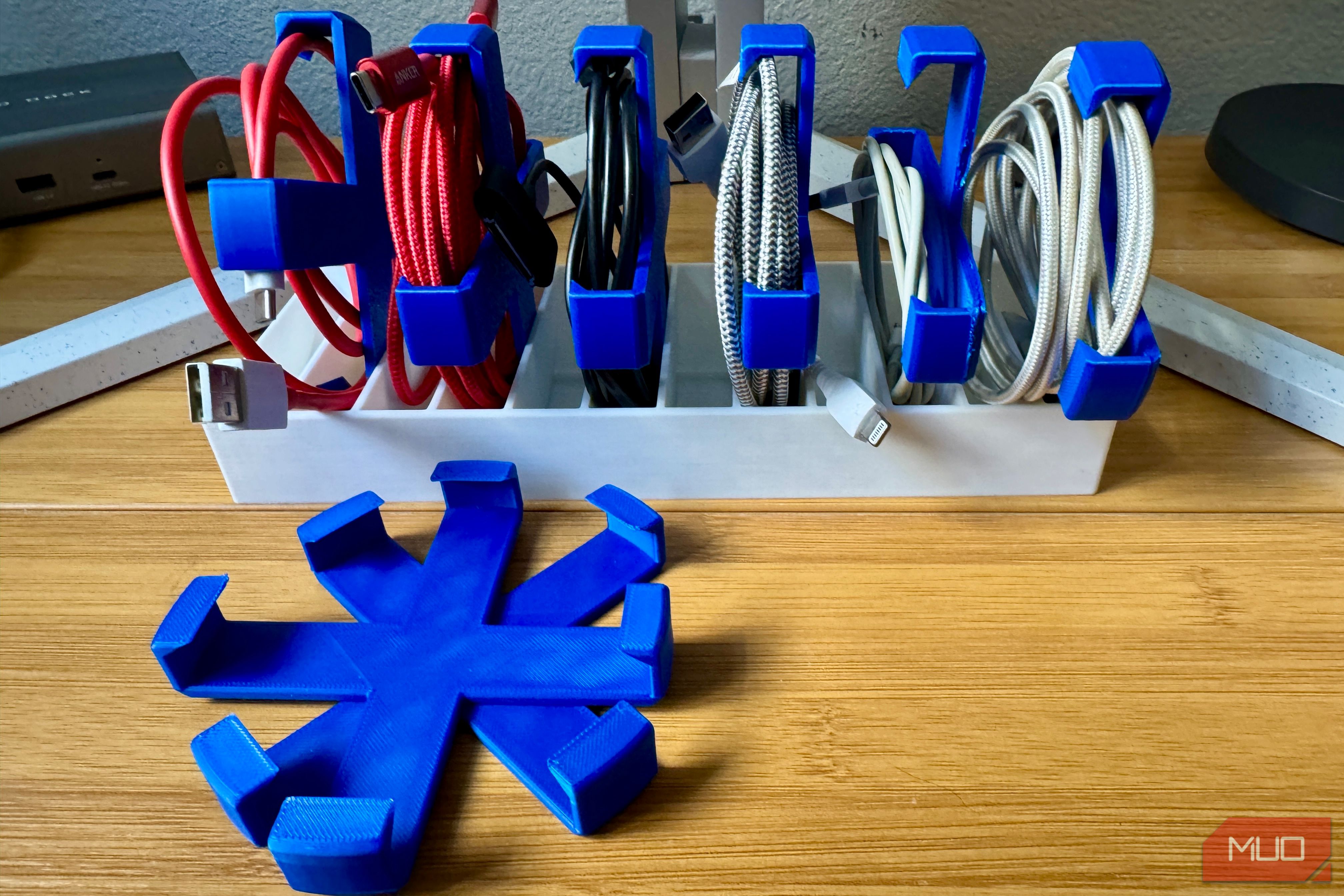
Imagine a desk free from tangled wires, where every cable has its place and your workspace looks intentionally organized. This guide will show you how to leverage your 3D printer to create custom cable management solutions, transforming your cluttered desktop into a model of efficiency and aesthetic appeal. Say goodbye to frustrating cable chaos and hello to a setup that looks like you truly know what you're doing, all with just a few hours of printing and minimal filament.
What You'll Accomplish
By following this guide, you will 3D print and implement a comprehensive system for managing all types of cables on and around your desk. This includes individual charging cables, routing cables along desk edges, organizing longer extension cords, and concealing unsightly power strip cables beneath your desk. You'll gain a customized, cost-effective, and long-lasting solution to desk clutter.
Prerequisites
Before you begin, ensure you have the following:
- A 3D Printer: Any FDM (Fused Deposition Modeling) 3D printer will work, but models like the Bambu Lab P1S or A1 Mini are noted for their efficiency with these designs.
- Filament: The type of filament (e.g., PLA) is generally flexible for these functional prints. Choose colors that complement your desk or personal preference.
- Access to MakerWorld: This online repository is where you'll find the free, support-free models mentioned in this guide.
- Optional Adhesives: Command strips or double-sided tape for mounting some organizers.
- Optional Cardboard Filament Spools: For the cable reel project, you'll need empty spools.
Step 1: Tame Individual Cables with a Modular Organizer
Start by bringing order to your collection of charging cables and shorter cords that frequently get tangled.
- Locate the Model: Search on MakerWorld for a "Simple modular and extensible cable organizer." The original model description mentions a base with slots and individual clips.
- Print the Components: Print a base piece and several cable clips. The modular design allows you to print as many clips as you need. For example, a base for 12 cables and 8 clips can be printed in under two hours.
- Assemble and Organize: Insert the clips into the base slots. Coil your USB-C, USB-A, or other charging cables to a suitable size and slip them into the clips. The natural tendency of the coiled cable to uncoil will keep it securely in place.
- Benefits: This system keeps cables accessible yet neatly stored, preventing tangles and making it easy to grab the cable you need. It's also less prone to attracting dust and pet hair than Velcro straps.
Step 2: Route Cables Along the Desk Edge
Next, manage the cables that run along the back or sides of your desk, preventing them from hanging loose.
- Find the Model: Look for the "Universal Cable Holder V2" on MakerWorld.
- Print the Holders: Print several of these folded ribbon-style holders. They are designed to be fast prints, allowing you to produce a handful in under an hour.
- Mount to Your Desk: Attach a Command strip or a piece of strong double-sided tape to the flat side of each holder. Then, stick them along the edge of your desk where cables need to be routed. An alternative screw-enabled version is also available if you prefer a more permanent attachment.
- Secure Cables: Thread your cables (up to 8mm in diameter) through the clips. The V2 design features thicker clip walls for improved stability.
- Benefits: These holders effectively guide cables along the desk, keeping them out of sight and preventing them from falling behind your workspace.
Step 3: Organize Longer Cables with a Reel
For longer, stiffer cables that don't fit into smaller clips, a winding reel is an excellent solution.
- Identify the Model: Search MakerWorld for an "Extension Cable Reel" that utilizes leftover cardboard filament spools.
- Gather Materials: You'll need an empty cardboard filament spool in addition to printing the reel halves.
- Print the Reel: Print the two halves of the extension cable reel. You can also find and print a matching "cardboard spool cable clip" to secure the wound cable.
- Assemble and Wind: Snap the two printed halves around an old filament spool. Then, wind your longer Ethernet, HDMI, or power cables onto the reel. Use the optional printed clip to hold the end in place.
- Benefits: This repurposes old spools and provides a neat, compact way to store bulky cables that are often left in loose, messy coils.
Step 4: Hide Under-Desk Cables with a Channel
Finally, tackle the power cables and power strips that create clutter beneath your desk.
- Locate the Model: Search MakerWorld for an "under-desk cable organizer channel." These models typically print as modular sections.
- Print Channel Sections: Print as many modular channel sections as needed to cover the desired length under your desk. Look for models that offer a 90-degree corner piece for turns.
- Mount Under Your Desk: Use Command strips or strong double-sided tape to attach the channel sections to the underside of your desk surface. Ensure they are aligned to create a continuous track.
- Route and Conceal: Guide all the cables from your power strip and other devices into these channels. This effectively hides them from view, creating a much cleaner look.
- Benefits: This solution eliminates the visual clutter of dangling power cables, giving your entire desk setup a much more polished and professional appearance.
Tips for Success
- Filament Choice: While most PLA will work, consider different colors to match your aesthetic or even differentiate cable types.
- Cable Coiling: For modular clips, practice coiling your cables consistently to ensure they sit snugly without popping out.
- Adhesive Application: When using Command strips or tape, clean the surface of your desk thoroughly before application for the best adhesion.
- Batch Printing: Print multiple small items (like the desk-edge holders) in one go to save time and filament changes.
Troubleshooting Common Issues
- Cables Slipping Out of Modular Clips: If smaller or thinner cables don't stay, try wrapping them a bit tighter or experimenting with different coiling methods to increase the inherent tension that holds them in place.
- Adhesive Not Sticking: Ensure the surface is clean, dry, and free of dust or oils before applying Command strips or double-sided tape. For heavier cables or high-traffic areas, consider models with screw-mounting options if available.
- Flimsy Prints: If your prints feel weak, check your printer's settings. Increasing wall thickness (perimeter count) or infill density can improve durability, especially for cable holders that experience regular pulling.
Next Steps for a Truly Tidy Workspace
With your cables expertly managed, consider exploring other 3D printable desk organizers or general cable management tricks. Platforms like MakerWorld offer endless possibilities for custom-fit solutions, from pen holders to tool caddies, further enhancing the functionality and aesthetics of your workspace. A tidy desk can inspire creativity and improve focus, making these small printing projects well worth the effort.
FAQ
Q: What kind of 3D printer do I need to make these organizers?
A: Any FDM 3D printer can be used. The original author mentioned using Bambu Lab P1S and A1 Mini printers, noting they are particularly efficient for quick, support-free prints available on MakerWorld.
Q: Are the 3D models for these cable organizers difficult to print?
A: No, the models highlighted in this guide are specifically designed to print without the need for support structures, making them relatively easy and fast to produce, even for those new to 3D printing.
Q: Can I choose the colors for my cable organizers?
A: Absolutely! One of the significant advantages of 3D printing these organizers is the freedom to select any filament color you desire, allowing you to perfectly match your desk setup or add a personalized touch.
Related articles

Ditch Merge & Center: The Better Way to Align Text in Excel
Learn to use Excel's "Center Across Selection" to align text across cells without merging, avoiding common data manipulation issues. This guide provides steps to utilize this newly accessible feature and add it to your Quick Access Toolbar.

Stop Android Auto Battery Drain: Essential Features to Disable and
Android Auto offers unparalleled convenience, bringing your phone's most useful features directly to your car's display. From navigation and calls to messages and music, it keeps you connected without distracting you
Turn Your Android Phone into a Powerful Desktop Replacement
Learn how to transform your Android phone into a full-fledged desktop computer using external displays and accessories, providing a cost-effective and integrated alternative to new Googlebooks.

howto: Four Ways the Fitbit Edge Is Better Than the Charge 6, and Two
Learn the key differences between the Fitbit Edge and Charge 6, including four advantages of the Edge and two areas where it falls short, to help you choose the best fitness tracker for your needs.
How to Connect Your Googlebook to a Printer - Print Documents with
Learn to quickly connect your Googlebook to a printer via Wi-Fi, USB, or Bluetooth and print documents in minutes. This guide covers direct printing, app-specific connections, troubleshooting, and even printing screenshots as a workaround.
How to Debloat Windows 11 for a Faster, Cleaner PC
Learn to reclaim your Windows 11 PC's performance by removing bloatware, disabling ads, and optimizing startup processes in five easy steps.