
Streamline Your Essentials: Embrace the Magnetic Phone Wallet
Are you a "Phone Guy" or simply someone seeking a more organized, minimalist approach to your daily carry? Like many, you might find yourself unexpectedly attached to a phone accessory you never thought you needed. This
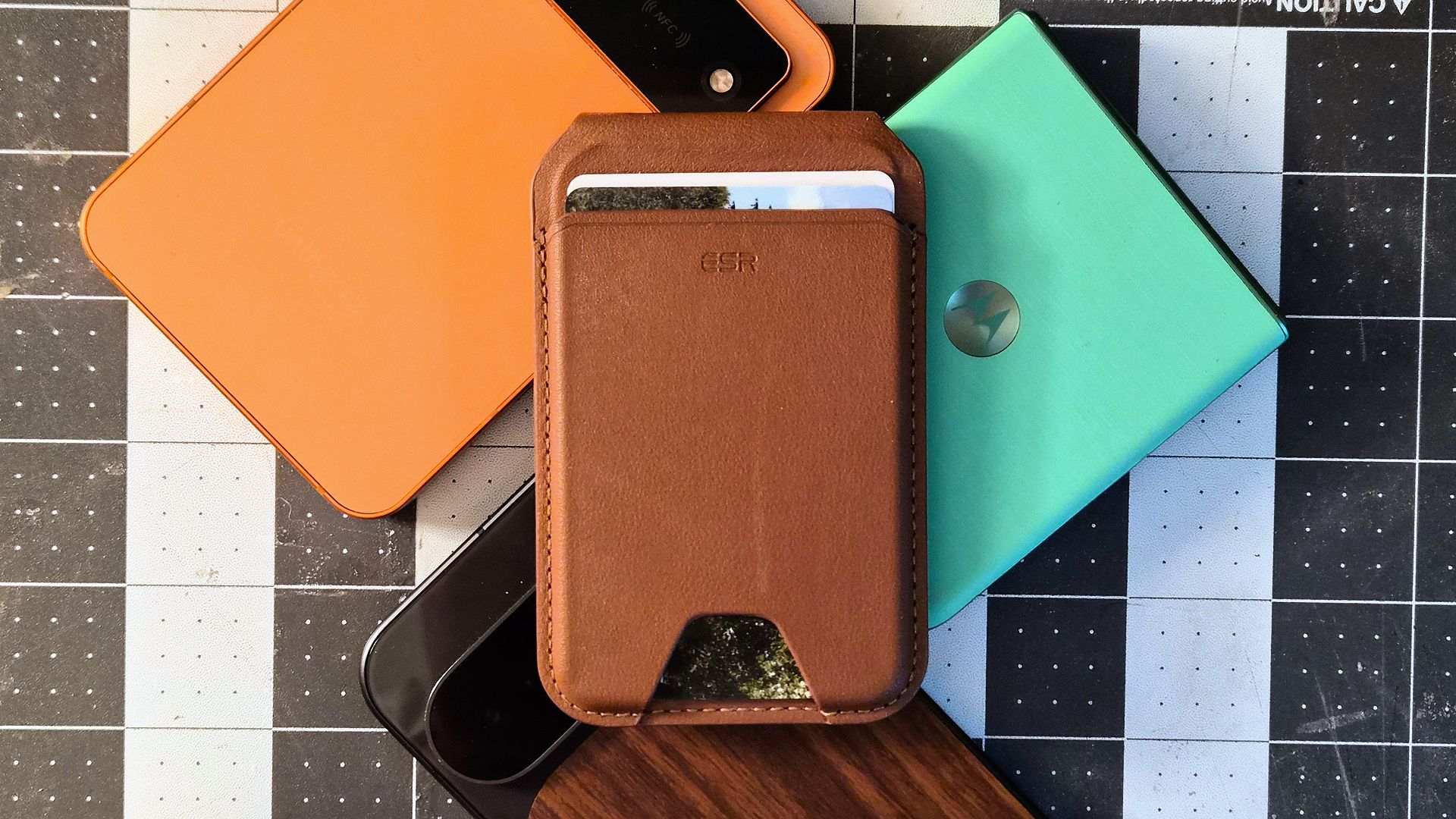
Are you a "Phone Guy" or simply someone seeking a more organized, minimalist approach to your daily carry? Like many, you might find yourself unexpectedly attached to a phone accessory you never thought you needed. This guide will walk you through integrating a magnetic phone wallet into your life, leveraging the convenience and organizational benefits that can make it an indispensable part of your routine.
Originally conceived as a compact solution for specific activities, the magnetic wallet has evolved for many into a preferred method of carrying essential items. By following these steps, you'll learn to simplify your daily carry, reduce clutter, and ensure your most important items are always together, helping you avoid that frantic search for a misplaced wallet.
Prerequisites: What You'll Need
Before diving in, gather a few key items to ensure a smooth transition to your new streamlined setup:
- A Smartphone: The central piece of this setup.
- A MagSafe-Compatible Phone or Case: Your phone needs to have built-in magnetic capabilities (like many newer models) or be housed in a MagSafe-compatible case. This is crucial for securely attaching the magnetic wallet.
- A Magnetic Phone Wallet: Choose one that fits your style and holds your intended number of cards (e.g., an ESR Magnetic Wallet, as mentioned in one user's experience).
Keep in mind that some phone form factors, especially smaller or folding devices, may not be compatible with magnetic wallets due to their size. It's always a good idea to check dimensions and compatibility before committing to a specific wallet, as this can be an unforeseen hurdle for users who enjoy diverse phone designs.
Step 1: Assess Your Daily Carry and Identify Core Essentials
The first step to adopting a magnetic wallet is understanding what you truly need on a day-to-day basis. One user's experience revealed that despite having a minimalist traditional wallet (like a Herschel Charlie that held up to five cards and some cash), they quickly realized they only needed two cards for almost all daily outings: a primary credit card and a driver's license.
- Empty Your Current Wallet: Lay out everything you typically carry in your traditional wallet.
- Categorize Your Items: Separate them into "daily essentials" (items you use multiple times a week) and "secondary/infrequent" (items used rarely or for specific occasions, such as loyalty cards, membership cards, or secondary credit cards).
- Prioritize for Your Magnetic Wallet: Select only the absolute necessities for your magnetic wallet. Aim for 1-3 cards that are truly indispensable. This minimalist approach is key to the system's effectiveness.
Step 2: Choose Your Magnetic Wallet and Ensure Compatibility
Once you know what you'll carry, it's time to select the right magnetic wallet and confirm it works seamlessly with your device.
- Select a Magnetic Wallet: Brands like ESR offer reliable magnetic wallets. Consider factors like material, capacity, and design. Remember, the goal is minimalism, so avoid wallets that encourage carrying too much.
- Verify Phone or Case Compatibility: If your phone doesn't have integrated MagSafe-like magnets, you'll need a MagSafe-compatible case. This case will provide the necessary magnetic attachment points for your new wallet. Ensure the case is specifically designed for your phone model to guarantee a secure fit.
- Consider Phone Size: Be aware that some of the most interesting and compact phone designs, such as folding phones (like the Samsung Galaxy Flip 7 or Moto Razr 2025) or unique form factors (like the Unihertz Titan 2 Elite), may be too small for most magnetic wallets. If you frequently switch to these types of devices, this magnetic accessory might not be a consistent option for you.
Step 3: Digitize Your Secondary Cards
Many of those "secondary/infrequent" cards you identified in Step 1 don't need to take up physical space. Leveraging digital wallet services is a game-changer for reducing clutter.
- Utilize Digital Wallets: For Android users, Google Wallet is an excellent platform for storing loyalty cards, membership cards (like Costco), library cards, and even secondary payment methods. Apple users have similar functionality with Apple Wallet.
- Scan or Manually Enter: Most digital wallet apps allow you to scan the barcode or manually enter the details of your various cards. This process is usually quick and straightforward.
- Confirm Digital Acceptance: While widely accepted, it's good practice to confirm if your frequently visited stores or institutions accept digital versions of their cards.
Step 4: Integrate Your Magnetic Wallet as Your Primary Carry
This is where the magic happens – literally sticking your wallet and phone together to simplify your life.
- Attach Your Essentials: Place your chosen essential cards (e.g., driver's license, primary credit card) into your magnetic wallet.
- Secure to Your Phone: Attach the magnetic wallet to the back of your MagSafe-compatible phone or case. You'll feel a satisfying click as the magnets align, ensuring a secure hold.
- Embrace the Unified Carry: Your phone and wallet are now one. This singular unit dramatically reduces the chances of forgetting your wallet, as your phone is nearly impossible to leave home without. As one user noted, while a phone often has a known resting place (like a charger), a wallet can end up anywhere – on a nightstand, end table, or kitchen counter. Combining them eliminates this variable.
- Enjoy One-Pocket Convenience: With your essentials consolidated, you can often fit everything comfortably in a single pocket, making your daily movements lighter and more organized.
Tips for Maximizing Your Magnetic Wallet Experience
- Continual Re-evaluation: Periodically review the contents of your magnetic wallet. Habits can lead to carrying unnecessary items again. Ensure only your true daily essentials remain.
- Leverage Phone Tracking Features: If you do misplace your phone (and thus your attached wallet), use your phone's built-in tracking features (like Google's Find My Device or Apple's Find My) to locate it. This provides an additional layer of security and peace of mind that a standalone wallet often lacks.
- Mind Your Magnets: While strong, the magnetic connection isn't indestructible. Be mindful when pulling your phone out of tight pockets or bags to ensure the wallet doesn't accidentally detach.
Troubleshooting Common Challenges
Even with the best intentions, you might encounter a few hiccups:
- "My Phone Isn't Attaching Securely": First, ensure your phone or case is indeed MagSafe-compatible. If so, check for any debris or obstructions between the phone and the wallet. Sometimes, an overly thick case that isn't MagSafe-specific can also interfere.
- "My Magnetic Wallet Doesn't Fit My Specific Phone Model": As noted earlier, some smaller or non-standard phone form factors are simply incompatible. In this case, you might need to revert to a traditional minimalist wallet or explore other compact card-carrying solutions not directly integrated with the phone.
- "I Keep Forgetting My Other Cards I Digitized": This is a habit-breaking process. Give yourself time. If you find yourself consistently needing a digitized card, consider if it's truly a "secondary" card or if it should be part of your core essentials, space permitting.
- "My Cards Feel Loose or Might Fall Out": This could indicate an overfilled wallet (exceeding its intended capacity) or a design flaw in the wallet itself. Try reducing the number of cards, or consider a different magnetic wallet model known for better card retention.
FAQ
Q: Can a magnetic wallet truly replace my traditional wallet?
A: Based on user experience, yes, for most daily needs. By carrying only primary essentials like a driver's license and a main credit card, and effectively digitizing secondary cards (such as loyalty or membership cards), many individuals find a magnetic phone wallet entirely sufficient for their day-to-day requirements.
Q: What if my phone doesn't have built-in MagSafe-like capabilities?
A: You can still benefit from a magnetic wallet by purchasing a MagSafe-compatible case for your phone. These cases are designed with integrated magnets that allow for a secure and easy attachment of magnetic accessories like phone wallets.
Q: How many cards can a typical magnetic wallet hold?
A: While capacities vary by brand and design, most magnetic phone wallets are crafted for a minimalist approach. They are generally designed to securely hold 1-3 essential cards. This capacity encourages users to streamline their carry and utilize digital alternatives for less frequently used cards, aligning with the core benefit of the accessory.
Next Steps
With your daily carry streamlined, consider exploring other areas for simplification. Delve deeper into the capabilities of your phone's digital wallet for additional cards, or look into other minimalist accessories that can further enhance your organized lifestyle. Enjoy the freedom that comes with having fewer variables to manage in your busy day.
Related articles

How to Quote Movies Accurately - Avoid Common Misquotes
Learn to identify and correct 10 frequently misquoted movie lines to impress your friends and become a true cinematic aficionado.
Unofficial Sony Headphone PC Apps: Ditch Your Phone, Take Control
Tired of Sony's mobile app? These unofficial, open-source PC tools like Sony Device Center and SonyBridge offer desktop control over your Sony headphones' ANC, EQ, and more. A convenient, albeit unofficial, solution for Windows, Linux, and Mac users looking to ditch their phone for audio adjustments.

How to Choose and Maximize Your Bissell Pet Carpet Cleaner Deal
Dealing with unexpected pet messes or persistent carpet stains can be a real headache. Whether it’s muddy paw prints, accidental spills, or allergens from pet dander, keeping carpets clean and fresh is an ongoing

How to Pick and Play Top Roblox Games with Your Siblings This Weekend
Looking for the perfect way to connect and have fun with your siblings this weekend? Roblox offers a vast universe of experiences designed to entertain players across various age groups and preferences. Whether you have

How to Choose Your Next AirPods - Comparing 5, 4, and Pro 3
Navigating Apple's AirPods lineup can be tricky. With the new AirPods 5 potentially offering a better, cheaper option than the AirPods 4, and the AirPods Pro 3 still a premium contender, how do you decide which is right
Stop Random USB Disconnections: Disable Windows Power Saving
Learn to fix random USB device disconnections by disabling Windows' power-saving features in Settings, Control Panel, and Device Manager.