
Samsung Secure Folder: More Than Just a Vault
Samsung's Secure Folder is a highly underrated Galaxy feature that goes far beyond a photo vault, offering advanced security, productivity, app cloning, and work-life balance benefits. It's a must-use for Galaxy owners.
Quick Verdict
Samsung's Secure Folder, often dismissed as merely a place to hide private photos, is in fact a robust and surprisingly versatile feature that can dramatically enhance the functionality, security, and productivity of your Galaxy phone. Its ability to create an isolated environment for apps and data makes it indispensable for everything from digital decluttering to fortifying financial security and maintaining work-life balance. If you own a Samsung Galaxy device, you're likely overlooking one of its most powerful integrated tools.
Introduction: Redefining Digital Privacy and Productivity
For years, Samsung's Secure Folder has held a reputation as a digital strongbox for sensitive files and apps. Many Galaxy users, myself included, have primarily used it for locking away private pictures or documents, if they used it at all. However, a deeper dive reveals that this tool is far more potent than its modest marketing suggests. Once you shift your perspective from seeing it as a mere vault to viewing it as a completely separate, sandboxed space within your phone, its true potential unfolds.
Secure Folder has fundamentally changed how I interact with my Galaxy phone, allowing me to manage distractions, bolster app security, clone applications for multiple accounts, compartmentalize work and personal life, and safely test unverified apps. It's a testament to how an often-overlooked feature can become an essential part of daily smartphone usage.
The Versatility of Secure Folder: A Deep Dive into Its Capabilities
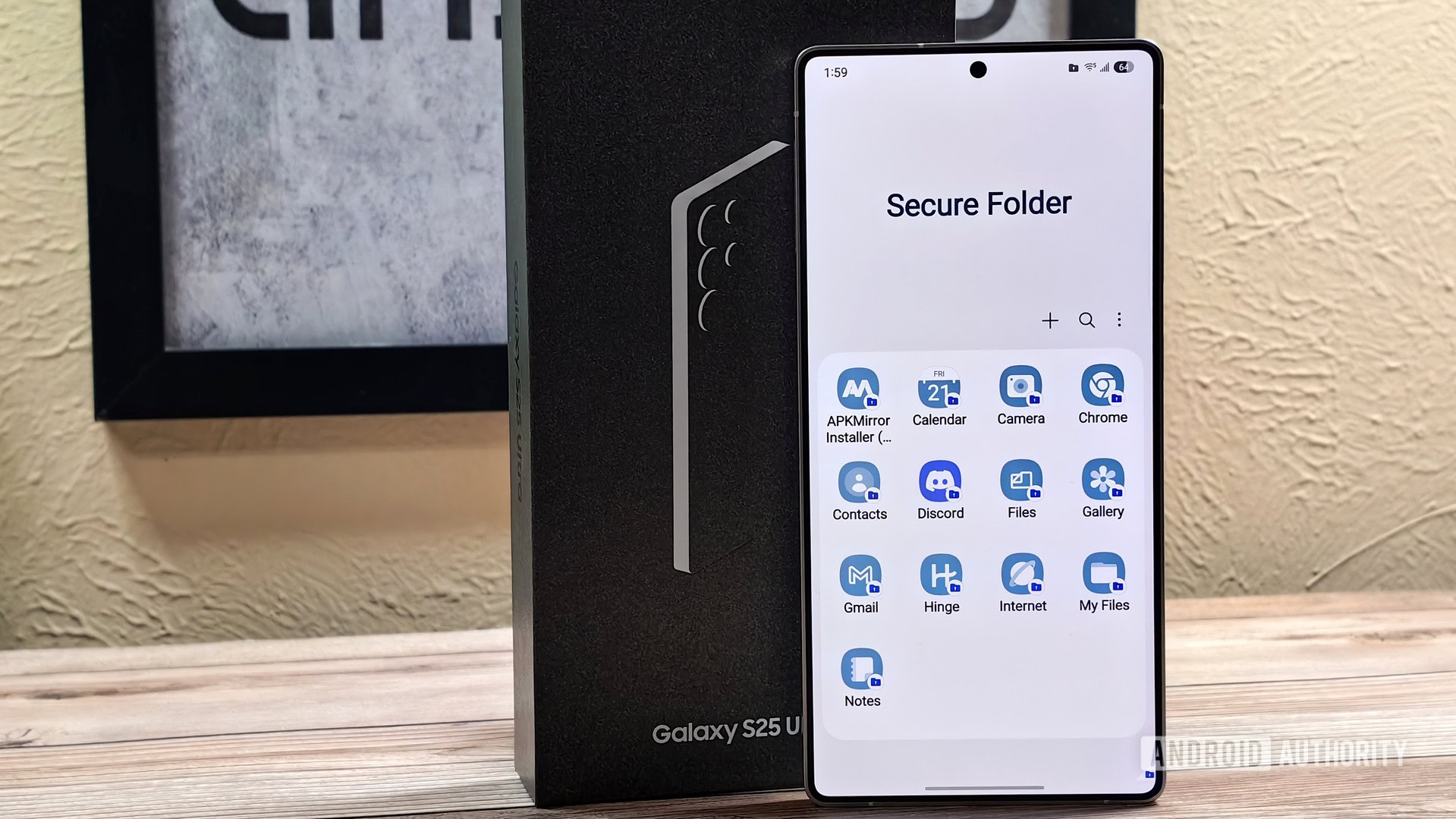
Secure Folder operates by creating an encrypted, isolated space on your device, accessible only via a separate lock (PIN, pattern, password, or biometric). Apps and data stored within it are completely separate from your main profile, offering a unique blend of privacy, security, and organizational power.
A Sanctuary for Focus: Hiding Distracting Apps
One of the most immediate benefits I've discovered is using Secure Folder to combat digital distractions. Apps like Instagram or X, which are notorious time sinks but difficult to completely uninstall, find a new home here. The simple act of moving them into the Secure Folder introduces a crucial bit of friction. Instead of mindlessly tapping an icon on my home screen, I now have to consciously open the Secure Folder and authenticate, breaking the automatic reflex. This, combined with disabling notifications for these apps, effectively puts them 'out of sight, out of mind' – a strategy far more effective than easily bypassed app timers. This technique is applicable to any app that threatens your productivity, from games to streaming services or online shopping platforms.
Fortifying Your Finances: Enhanced App Security
While convenience is key, security for financial applications should never be compromised. Secure Folder provides an invaluable extra layer of protection for banking, payment, and investment apps. By placing these critical applications inside the Secure Folder, they are protected by two separate lock screens: your phone's primary lock and the Secure Folder's own authentication. This means that even if someone manages to bypass your device's main security (perhaps through face unlock trickery or an exploited 'Extend Unlock' feature), they still face a second, formidable barrier.
For maximum security, I've disabled the 'Allow lock reset with Samsung account' option within Secure Folder settings. This eliminates any potential backdoor, ensuring that my financial data remains exceptionally secure and providing significant peace of mind.
Unlocking Dual Identities: The Ultimate App Cloner
Samsung's One UI offers a 'Dual Messenger' feature for cloning certain messaging apps, but its scope is limited. Secure Folder steps in to fill this gap, allowing you to create a second instance of virtually any application. Whether it's a separate Reddit account for niche interests, another Google Photos account, a distinct Spotify profile, or even a second Chrome browser with different bookmarks and login credentials, Secure Folder handles it effortlessly.
Setting up these duplicated apps is straightforward, and Secure Folder even tags each cloned app with a small icon, making it easy to distinguish between the primary and secondary instances. The only minor consideration is increased storage consumption, as each cloned app stores its own data. However, for the flexibility and convenience it offers, this is a negligible trade-off.
Bridging Work and Life: Your Personal Android Profile
Galaxy phones notably lack Android's native multi-user profile feature, which creates entirely separate user environments. Secure Folder, however, offers a compelling workaround, functioning as a 'second Android instance' for effective work-life separation. I leverage it to keep my professional and personal digital lives completely siloed. My main profile hosts my personal Gmail, WhatsApp, and Google accounts, while inside the Secure Folder, I maintain a separate Gmail for work, a different WhatsApp linked to my work SIM, and a distinct Chrome profile for professional browsing and bookmarks. This setup ensures that once I exit Secure Folder, work distractions, like email notifications, don't intrude on my personal time, yet critical alerts (e.g., Slack) can still be managed. While it doesn't offer a separate home screen or guest account like a true multi-user profile, it's remarkably effective for its primary purpose.
The Safe Experiment: Sandboxing Unfamiliar Apps
In an age where app permissions and privacy concerns are paramount, Secure Folder serves as an excellent testing ground for new or unverified applications. Rather than installing an untested app directly onto my main profile, it first goes into the Secure Folder. Whether it's an app from the Play Store/Galaxy Store I'm unsure about, or an APK sideloaded from an unknown source, it remains confined within this isolated environment.
This sandboxing capability protects my main profile from potentially sketchy permission requests, unexpected background activity, or other undesirable behaviors. If an app proves to be problematic or malicious, I can simply delete it from the Secure Folder, ensuring no trace of it remains on my primary system. This habit significantly enhances my digital security and peace of mind when experimenting with new software.
Secure Folder: The Pros and Cons
Here's an honest look at what makes Secure Folder great and where it falls short:
Pros:
- Enhanced Security: Provides a robust second layer of protection for sensitive apps and data.
- Productivity Booster: Effectively reduces distractions by creating friction for time-consuming apps.
- Versatile App Cloning: Allows duplication of almost any app, far beyond Dual Messenger's limitations.
- Work-Life Separation: Creates an effective 'second profile' for compartmentalizing personal and professional digital lives.
- Safe Sandboxing: Offers a secure environment for testing unknown or sideloaded applications.
- Easy Management: Simple setup, clear visual tagging for cloned apps.
- Customizable Security: Option to disable Samsung account reset for uncompromised security.
Cons:
- Not a True Multi-User Profile: Lacks features like separate home screens, dedicated notification panels, or guest accounts found in full Android multi-user profiles.
- Increased Storage Usage: Duplicating apps and data can consume more internal storage.
- Under-advertised Potential: Samsung's marketing often limits user perception to merely a 'private vault'.
- Samsung Exclusive: Only available on Galaxy devices, limiting accessibility for non-Samsung users.
Secure Folder in Perspective: How It Compares
Secure Folder isn't a unique concept, but its implementation and versatility on Galaxy devices make it stand out. Here's how it stacks up against some comparable functionalities:
| Feature | Samsung Dual Messenger | Samsung Secure Folder | Android Multi-user Profile (not on Galaxy) |
|---|---|---|---|
| App Cloning | Limited to specific messaging apps | Clones almost any app | Requires app installation per user |
| Data Isolation | Separate app data for cloned apps | Full isolation of apps, data, and accounts | Complete separation of user data & settings |
| Security Layer | No additional lock screen | Protected by an independent lock screen | Each user profile can have its own lock |
| Profile Management | Single purpose (app duplication) | Acts as a 'second Android instance' | Full separate environment, home screen |
| Scope of Use | Messaging apps | Distraction, security, work-life, testing | Shared devices, guest access |
Secure Folder clearly extends beyond the basic functionality of Dual Messenger and, while not a complete replacement for Android's full multi-user profiles, offers a compelling alternative for Galaxy users seeking similar benefits.
Is Samsung Secure Folder Right for You?
Absolutely, if you own a Samsung Galaxy phone. Secure Folder is a profoundly underrated feature that, once understood, can genuinely transform your device usage. It's an essential tool for anyone looking to improve their digital security, reduce screen time, streamline work-life balance, or simply explore new apps safely.
If you've dismissed Secure Folder in the past, I strongly recommend revisiting it with an open mind. Its capabilities stretch far beyond hiding personal photos, making it a powerful asset for enhancing your overall smartphone experience. It's not just a feature; it's a strategic way to manage your digital life more effectively.
FAQ
Q: Is Secure Folder only for hiding photos and private documents?
A: No, while it excels at that, its capabilities extend much further. It can be used to hide distracting apps, provide a second layer of security for financial applications, clone nearly any app for multiple accounts, create a dedicated work profile, and safely sandbox unfamiliar applications before they touch your main phone environment.
Q: Can Secure Folder fully replace Android's multi-user profiles?
A: While Secure Folder acts as an excellent 'second Android instance' for isolating apps, accounts, and data (especially for work-life separation), it's not a complete replacement for true multi-user profiles. It doesn't offer a separate home screen, dedicated notification panel, or guest account functionality.
Q: What are the main benefits of using Secure Folder for apps?
A: The primary benefits include enhanced security for sensitive apps, increased productivity by adding a layer of friction to distracting apps, the ability to run multiple instances of almost any app for different accounts, and a secure, isolated environment for testing new or unknown applications without risking your main phone profile.
Related articles
Android 17 QPR2 Beta 7.1: The Performance Relief You've Been Waiting
Android 17 QPR2 Beta 7.1: Finally Fixing the QPR1 Performance Woes Verdict: Android 17 QPR2 Beta 7.1 is a crucial and highly anticipated software update for Google Pixel users, specifically targeting and resolving the

MapQuest's ALPR Feature: Navigating Surveillance with Intelligence
Quick Verdict MapQuest's latest "Surveillance" feature is a compelling and timely addition, offering users the ability to identify automated license plate reader (ALPR) cameras in their vicinity. While its data sourcing

We can finally hear some of Wu-Tang Clan’s Once Upon A Time in
For the first time, fans can now hear snippets of the legendary, one-of-one Wu-Tang Clan album, "Once Upon A Time in Shaolin," thanks to a collaboration between the crypto art collective PleasrDAO and the "Pablo Torre
"thegentlemanpervert": A Catastrophic Failure in Digital Ethics and
"thegentlemanpervert" review: An AI CSAM production and distribution operation, led by a NJ prosecutor, proved to be an absolute and catastrophic failure, resulting in felony charges and a stark warning about digital culpability.

DJI Solo Video Setups: Smart Choices for Lone Creators
This review delves into DJI's recommended solo video setups, highlighting the Osmo Pocket 3 Creator Combo as a top pick for its integrated camera, gimbal, and mic. It also covers stabilizers like the Osmo Mobile 8 and RS 4, and the DJI Mic Mini series for enhanced audio, providing honest pros, cons, and clear buying advice.

RapidCanvas Secures $29M Series B to Scale Enterprise AI Solutions
Austin, Texas – RapidCanvas, a burgeoning startup specializing in building and running custom AI applications for enterprises, has announced a successful close of its Series B funding round, raising $29 million. Led by