
Google Messages Adopts Real-time Location Sharing in Chats
Google Messages is preparing to launch a new Real-time Location sharing feature, allowing users to share their live location directly within chat conversations. This update aims to bring the messaging platform closer to parity with other apps offering similar dynamic location capabilities, enhancing convenience and safety for users. The feature is expected to roll out soon.
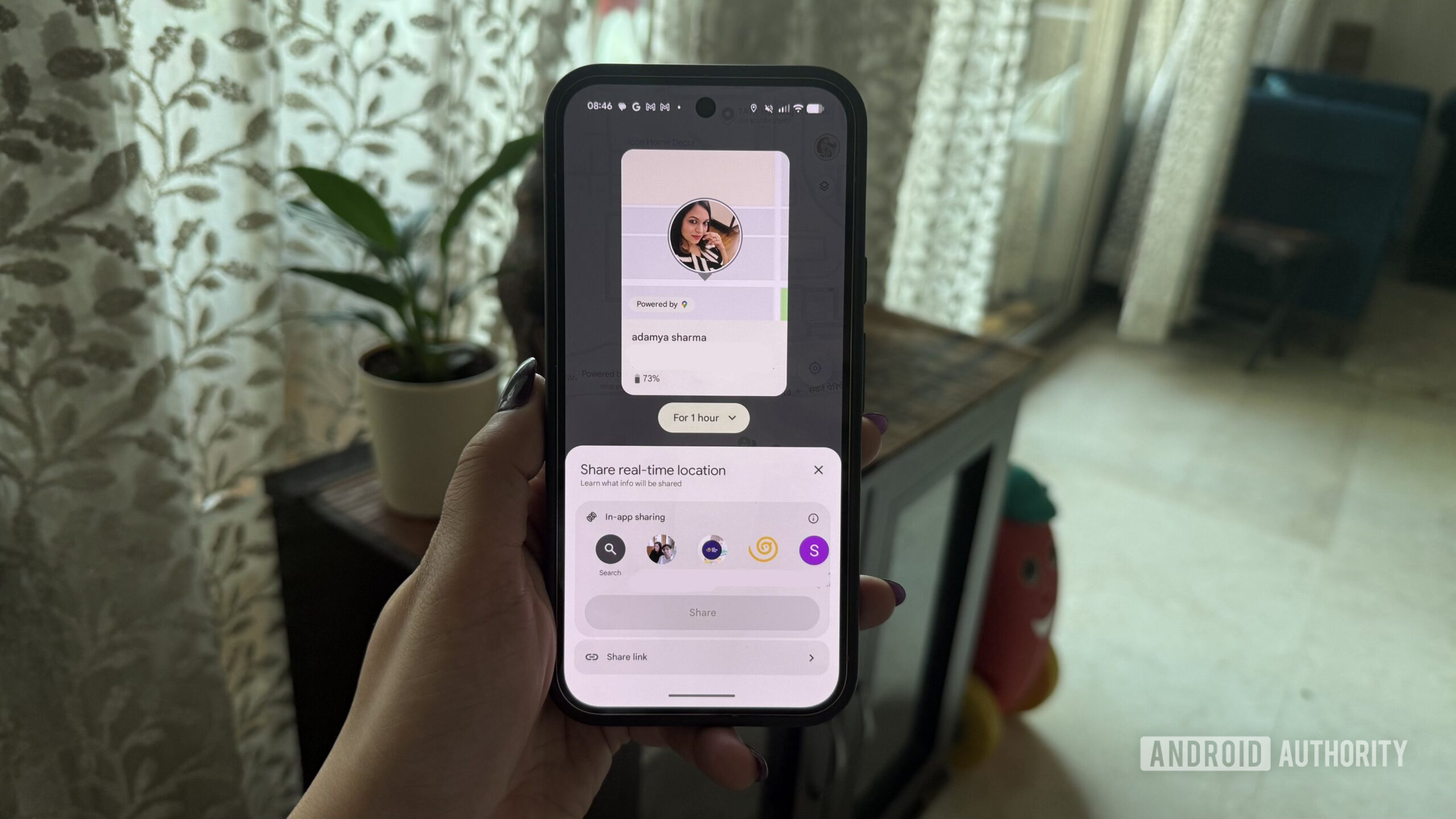
First look: Google Messages is finally catching up with live location sharing
Key takeaways
- Google Messages is set to integrate a new real-time location sharing feature directly into its chat interface.
- This upcoming functionality will enable users to share their dynamic location within ongoing conversations.
- The move positions Google Messages to offer a more comprehensive communication experience, aligning with features found in other popular messaging platforms.
- The feature is anticipated to roll out soon, enhancing the app's utility for coordinated activities and personal safety.
What happened
Google Messages, the default messaging application for many Android users, is preparing to introduce a significant new capability: Real-time Location sharing. According to information provided by Android Authority, this functionality is designed to seamlessly integrate into existing chat conversations. Users will soon have the ability to share their live location directly with contacts they are communicating with through the app.
This development signifies an evolution in Google Messages' feature set, moving beyond static location sharing to provide dynamic updates on a user's whereabouts. The integration "inside chats" suggests an intuitive user experience, allowing for quick access and management of shared location without needing to navigate away from the conversation.
Why it matters
The introduction of real-time location sharing is a pivotal update for Google Messages, addressing a long-standing feature gap when compared to competitors. Many leading messaging applications already offer similar capabilities, which have become essential for modern communication. For users, this means enhanced convenience and safety.
Live location sharing proves invaluable in numerous scenarios, from coordinating meetups with friends and family to ensuring the safety of loved ones by tracking their journey. By bringing this feature directly into Google Messages, the platform empowers users to manage their location sharing needs within a single, unified communication hub. This not only streamlines user experience but also reinforces Google Messages' position as a more robust and competitive messaging solution within the Android ecosystem and beyond. The absence of such a feature previously often required users to resort to third-party apps or less integrated solutions.
Key details / context
The upcoming feature is explicitly named "Real-time Location sharing." Its core functionality will revolve around providing continuous updates of a user's geographical position. This capability will be accessible and manageable "inside chats" within the Google Messages application itself, implying a user-friendly interface for activation and deactivation.
While the source confirms the imminent arrival of this feature – stating it "will soon work" – specific operational details remain undisclosed. This includes aspects such as the duration for which location can be shared (e.g., for 15 minutes, 1 hour, or until manually stopped), the precision of the location data, privacy controls beyond the chat context, or any visual indicators within the chat interface. Further information on these granular elements is expected to emerge as the rollout approaches.
What happens next
Google Messages users can anticipate the rollout of the new Real-time Location sharing feature in the near future. As the announcement indicates that it "will soon work," it suggests an impending release rather than an immediate, widespread deployment. Users should keep their Google Messages application updated to ensure they receive the feature as soon as it becomes available.
Following its launch, the feature is expected to become a standard tool for enhancing coordination and communication among contacts. As is common with new feature rollouts, Google may initially deploy it to a subset of users or regions before a broader release. Further official communications from Google or detailed reports from technology outlets like Android Authority are likely to provide more specific instructions on how to use the feature and its full range of capabilities.
Related articles
Android 17 QPR2 Beta 7.1: The Performance Relief You've Been Waiting
Android 17 QPR2 Beta 7.1: Finally Fixing the QPR1 Performance Woes Verdict: Android 17 QPR2 Beta 7.1 is a crucial and highly anticipated software update for Google Pixel users, specifically targeting and resolving the

Stop Android Auto Battery Drain: Essential Features to Disable and
Android Auto offers unparalleled convenience, bringing your phone's most useful features directly to your car's display. From navigation and calls to messages and music, it keeps you connected without distracting you
Google Gemini Task Update: Automation Just Got Smarter
Google Gemini Task Update: Automation Just Got Smarter Verdict: Google's latest update to Gemini, focused on its task automation capabilities, is a significant step forward in user experience. By rebranding 'Spark' as

Turn Your Android Phone into a Powerful Desktop Replacement
Learn how to transform your Android phone into a full-fledged desktop computer using external displays and accessories, providing a cost-effective and integrated alternative to new Googlebooks.
Android Auto 18 Beta: Glimpse into Google's Car Makeover
Verdict: A Sneak Peek at Tomorrow's Drive Android Auto 18.0 beta isn't the flashy, fully-realized redesign many might be hoping for, but it offers an invaluable look under the hood. What Google is signaling here,
How to Connect Your Googlebook to a Printer - Print Documents with
Learn to quickly connect your Googlebook to a printer via Wi-Fi, USB, or Bluetooth and print documents in minutes. This guide covers direct printing, app-specific connections, troubleshooting, and even printing screenshots as a workaround.