
Fix YouTube's Broken Search: 3 Extensions That Work
Transform your YouTube search with three browser extensions. Gain precise control, remove clutter, and personalize results for a more efficient video discovery experience in just a few steps.
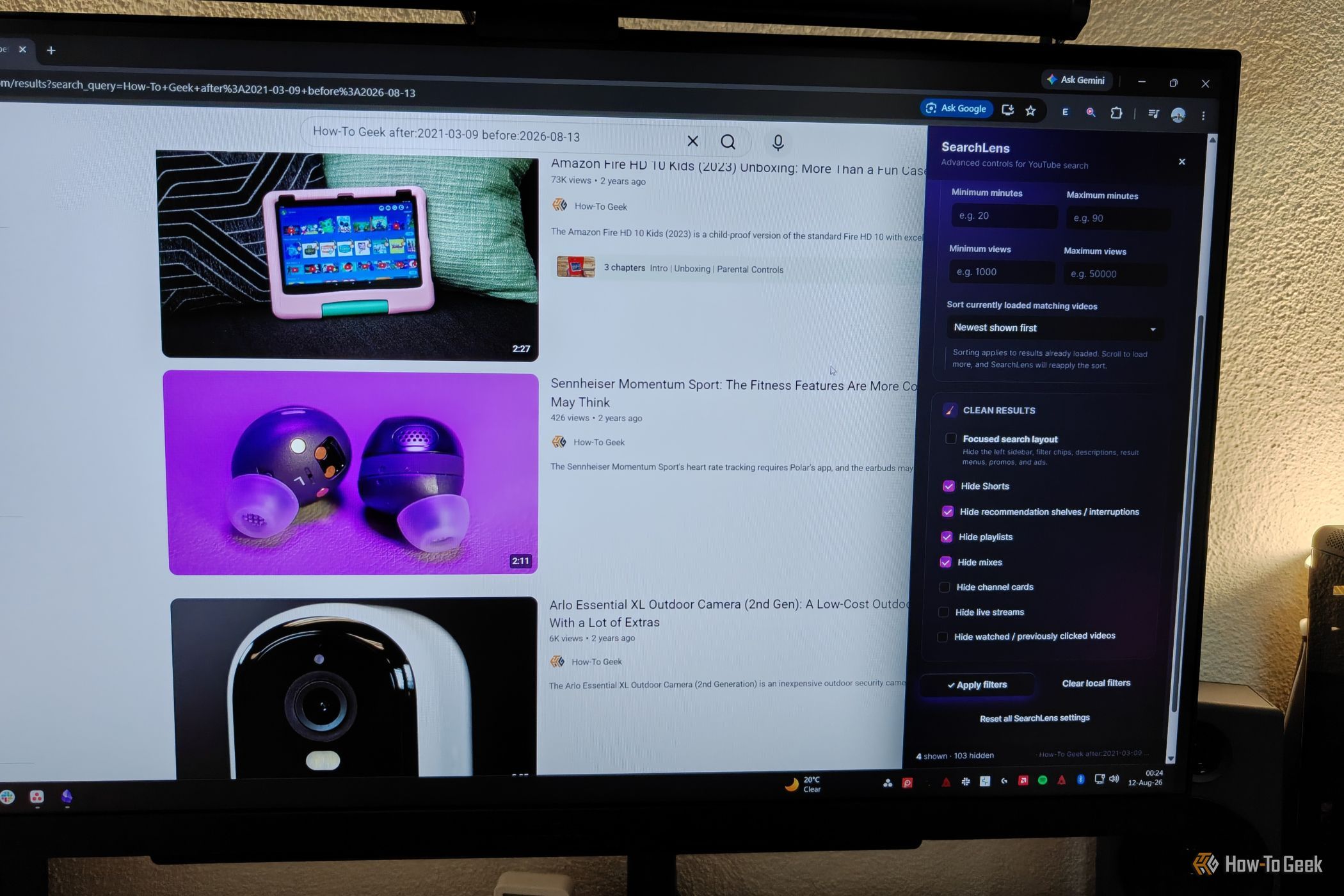
YouTube is a vast source of videos, from tutorials to entertainment, making it one of the largest search engines. However, its search system has become cluttered with Shorts, live streams, and playlists, making it challenging to find specific videos. If you're frustrated with limited filters and messy results, browser extensions can drastically improve your search experience, making it precise and clean.
What You'll Accomplish
This guide will help you install and configure three unique browser extensions designed to enhance YouTube's search. You'll gain precise control over filters, remove unwanted content, and customize your search results page for a more efficient video-finding experience.
Prerequisites
Before you start, ensure you have:
- A desktop web browser (Chrome or Firefox).
- An active internet connection.
- Basic knowledge of installing browser extensions.
SearchLens: Advanced Filters for Precision Searches
YouTube's default search filters often fall short for specific needs. SearchLens provides a powerful toolbar that adds granular control, perfect for users requiring precise results.
Using SearchLens for Better Search
- Installation: Add 'SearchLens for YouTube' from the Chrome Web Store or Firefox Add-ons page to your browser.
- Access: After a YouTube search, click the extension icon or its sidebar to open the filters.
- Key Filters: Utilize features such as:
- Precise Date: Specify exact upload dates with a calendar.
- Keyword Include/Exclude: Force results to contain or omit specific words/phrases.
- Duration & Views: Set min/max video lengths or view counts.
- Custom Sort: Order results by "most viewed" or "most recent."
- Clean Results: Hide Shorts, recommendations, playlists, mixes, live streams, and watched videos.
SearchLens transforms basic YouTube search into a powerful, controlled tool for finding exactly what you need.
Search Fixer: Declutter Your Search Experience
If you prefer a simpler way to remove clutter without an extensive toolbar, Search Fixer is a free, open-source, 'set-it-and-forget-it' solution that streamlines your YouTube search by eliminating distractions.
Setting Up Search Fixer
- Installation: Add 'Search Fixer for YouTube' (Chrome) or 'YouTube Suite Search Fixer' (Firefox).
- Configuration: Open the extension's options in a new tab.
- Hide Content: Toggle options to hide various elements: 'People Also Watched,' music mixes, Shorts, playlists, courses, and live content. You can also hide verified creators, official music videos, or watched videos.
- Appearance: Personalize the look by removing capital letters from titles, hiding descriptions, or enabling grid view for results.
Search Fixer offers a lightweight, efficient way to achieve a clean YouTube search, reducing page load and enhancing focus.
YT Tweaks: Your All-in-One YouTube Customization Hub
For broad customization beyond just search, YT Tweaks is a comprehensive "Swiss Army knife" extension. With over 100 settings, it personalizes almost every aspect of your YouTube experience, including search.
Customizing YouTube with YT Tweaks
- Installation: Get 'YT Tweaks' from the Chrome Web Store or Firefox Add-ons page.
- Access Settings: Open the extension's robust settings panel.
- Search Page Optimization: Customize search results by:
- Grid View: Display results in a compact grid.
- Hide Elements: Remove the right sidebar, Shorts, mixes, live streams, and 'People Also Watched.'
- Watched Videos: Hide or dim videos based on your viewing progress.
- Granular Control: Uniquely, you can apply settings selectively (e.g., hide Shorts from search but keep them in subscriptions), allowing tailored content visibility across the platform.
YT Tweaks provides deep, platform-wide customization for a truly personalized YouTube environment.
Tips for a Smoother Experience
- Choose Wisely: Select the extension that best matches your main goal (e.g., SearchLens for advanced filtering, Search Fixer for decluttering, YT Tweaks for overall site customization).
- Experiment: Explore each extension's settings to find what works best for you. Most changes are easily reversible.
- Keep Updated: Regularly update your extensions for new features, bug fixes, and security.
Troubleshooting Common Issues
- Not Working? Refresh your YouTube page or restart your browser. Confirm the extension is enabled in your browser's extension manager.
- Conflicts: If using multiple YouTube extensions, they might conflict. Temporarily disable others to pinpoint the issue.
- Performance: Extensions might slightly affect browser speed, especially on older systems. Search Fixer is designed to be lightweight.
- Filtering Inaccuracies: Occasionally, a filter (like SearchLens's channel filter) might not be 100% accurate due to YouTube's changes. Report these to developers if possible.
Next Steps
After enhancing your YouTube search, consider further optimizing your viewing. You can fine-tune YouTube's internal settings to improve recommendations or learn broader methods to disable YouTube Shorts across the platform if they frequently appear.
FAQ
Q: Can I use several YouTube search extensions simultaneously?
A: While possible, it's often best to choose one primary extension or a combination with minimal overlap to avoid conflicts or browser slowdowns. Test combinations carefully to ensure compatibility.
Q: Are these extensions secure?
A: The listed extensions are from official browser stores (Chrome Web Store, Firefox Add-ons), which generally implies a vetting process. Always review an extension's requested permissions and user reviews before installation as a best practice.
Q: Do these extensions function on the YouTube mobile app?
A: No, these browser extensions are exclusively for YouTube accessed through a desktop web browser. Mobile apps do not support browser extensions.
YouTube's vast content is undeniable, but its search can be frustrating. By using browser extensions like SearchLens, Search Fixer, or YT Tweaks, you can regain control. Choose the tool that fits your needs for powerful filtering, a clean interface, or deep personalization, and transform your desktop YouTube search experience.
Related articles

Ditch Merge & Center: The Better Way to Align Text in Excel
Learn to use Excel's "Center Across Selection" to align text across cells without merging, avoiding common data manipulation issues. This guide provides steps to utilize this newly accessible feature and add it to your Quick Access Toolbar.

Kojima Compares Divisive New Film 'Digger' to MGS2's Prescient Vision
Gaming icon Hideo Kojima has praised the divisive 2026 film *Digger*, drawing intriguing parallels to his own prophetic game, *Metal Gear Solid 2*. Both works, he explains, uniquely explore the dangers of misinformation and a fragmented digital reality, anxieties he shares with *Digger*'s director, Alejandro González Iñárritu.

Ephemeral PR Preview Environments on GKE: A Deep Dive
Every development team eventually grapples with the limitations of shared staging environments. The familiar scenario: multiple features deployed simultaneously, database migrations clashing, and the phrase "it works on

Ubisoft Proposes German Studio Workforce Reduction Amidst
Ubisoft is planning a voluntary departure program for about 100 employees across its Düsseldorf, Berlin, and Mainz studios in Germany. This move is part of a larger, ongoing cost-reduction and restructuring effort by the publisher, aiming to better position its studios for future projects.

Stop Android Auto Battery Drain: Essential Features to Disable and
Android Auto offers unparalleled convenience, bringing your phone's most useful features directly to your car's display. From navigation and calls to messages and music, it keeps you connected without distracting you

Netflix is laying off around 1,000 employees: Layoffs — Key Details
Netflix is laying off approximately 1,000 employees, or six percent of its global workforce, in its largest-ever job cut. This move targets product, tech, HR, and legal teams to reduce costs and re-prioritize investments despite recent financial growth.