
Boost Your Old HDD's Life: What 400k Drives Reveal About Reliability
Discover how HDD reliability varies by brand, backed by a study of over 400,000 drives. Learn which manufacturers offer the most robust drives, understand age-related failure patterns, and get actionable tips to optimize drive temperature and safeguard your data for maximum longevity.
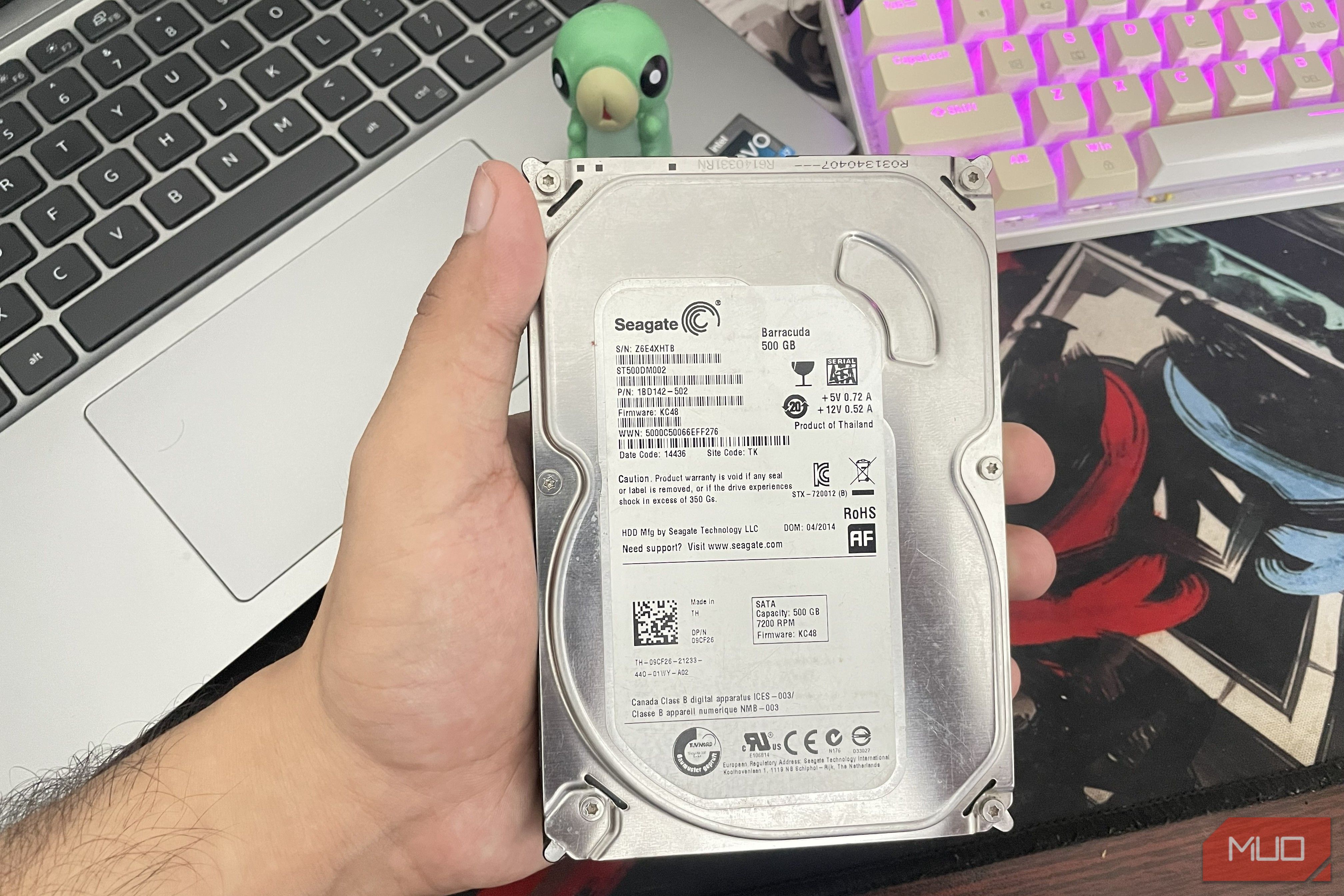
Even with the rise of lightning-fast SSDs, Hard Disk Drives (HDDs) still hold their own, especially for bulk storage, archiving less-accessed data, or powering a home NAS server. They offer excellent cost-per-gigabyte and, despite being mechanical, can last a long time if cared for. But did you know that your HDD's reliability might depend more on its manufacturer than its age? A comprehensive study involving over 400,000 drives uncovers fascinating insights into which brands stand the test of time and the critical role environmental factors play.
This guide will walk you through the key findings of this extensive research, helping you understand the reliability landscape of major HDD brands. You'll learn which brands tend to be more robust, how their failure patterns change with age, and, most importantly, actionable steps you can take to significantly extend the lifespan of your own hard drives.
What You'll Accomplish
By the end of this guide, you will:
- Understand the comparative reliability of major HDD brands (HGST, Western Digital, Seagate, Toshiba).
- Recognize how different brands exhibit unique failure patterns over time.
- Grasp the critical impact of operating temperature on HDD longevity.
- Learn practical tips to monitor and maintain your HDDs for optimal health and data safety.
Prerequisites
To get the most out of this guide, you'll need:
- Basic familiarity with computer hardware and storage devices.
- Access to your computer or NAS system where your HDDs are installed.
- (Optional but recommended) Software to monitor HDD S.M.A.R.T. health and temperature (many free options are available for Windows, Linux, and NAS platforms).
Unpacking the 400k Drive Reliability Study
A recent research paper by economists Christoph Siemroth and Yeomyung Park, using a massive dataset from Backblaze, analyzed 443,156 HDDs over 1.66 million drive-years. This deep dive aimed to identify which drives lasted longest and which failed earliest from four major manufacturers: HGST, Seagate, Toshiba, and Western Digital.
The researchers tracked each drive from its installation until failure or retirement, adjusting for factors like capacity, form factor, and operating temperature to ensure a fair comparison across brands and ages. They established Seagate's adjusted failure rate as a baseline (100%) to measure others against.
Which Brands Fail Least, and Which Fail Most?
The study's findings present a clear hierarchy of reliability among the tested brands. Here's how the brands stacked up in terms of relative failure rates, with Seagate serving as the 100% baseline:
| HDD Brand | Relative Failure Rate |
|---|---|
| HGST | 39-41% |
| Western Digital | 51-52% |
| Seagate | 100% (Baseline) |
| Toshiba | 107% |
Key Takeaways:
- HGST emerged as the most reliable, showing a failure rate approximately 60.5% lower than Seagate's. For every 100 Seagate failures, you'd expect around 40 from HGST.
- Western Digital also demonstrated strong reliability, with about a 48.6% lower failure rate than Seagate, translating to roughly 52 Western Digital failures for every 100 Seagate failures.
- Seagate served as the middle-ground baseline in this study.
- Toshiba exhibited the highest failure rate, about 7% higher than Seagate's baseline, meaning approximately 107 Toshiba failures for every 100 Seagate failures.
How Age Impacts Different HDD Brands
Beyond overall failure rates, the study uncovered distinct patterns in how different brands fail as they age:
- Seagate drives tended to fail more often early in their operational lives. However, once past this initial period, their failure rates stabilized with age.
- Toshiba drives showed low failure rates when new. However, after the five-year mark, their failure rates increased significantly, even surpassing Seagate's.
- Western Digital and HGST drives consistently maintained minimal failure rates across all ages, with HGST drives exhibiting the longest overall lifespan.
It's important to note that HGST has not been sold as a separate brand since Western Digital acquired the company in 2012. Therefore, many newer HGST-level drives might now be marketed under the Western Digital brand, particularly their enterprise or NAS-focused lines.
Critical Context and Limitations
While these results offer valuable insights, remember a few key factors:
- Data Center Environment: The study's statistics are based on commercial data center usage, where drives operate under constant load and specific environmental controls. Your personal HDD's failure rate at home might differ, but the relative reliability trends between brands are likely to hold true.
- Retired Drives: Roughly one-third of the drives (146,943) left the dataset due to reasons other than failure, such as being retired for capacity upgrades.
- Batch Differences: The study involved different batches of HDDs. Seagate and HGST drives dated back to 2014-2020, while Western Digital and Toshiba drives were from a newer batch.
These caveats don't negate the findings but suggest that individual results may vary, and the data provides a strong indication of overall brand tendencies rather than absolute predictions for a single drive.
The Unsung Hero: Temperature Control
Regardless of brand, one factor consistently and significantly impacts HDD longevity: temperature. The study found a clear correlation: for every 1°C increase in operating temperature, the risk of drive failure rose by approximately 2% across all brands.
Why Heat is a Killer: Elevated temperatures stress the delicate mechanical components inside an HDD, including the bearings, lubricants, and sensitive electronics. This stress accelerates wear and tear, leading to premature failure.
Optimal Temperatures: For HDDs, the ideal operating temperature range is around 40°C. They can generally tolerate up to 50°C, but sustained temperatures beyond this can cause significant damage and reduce lifespan.
Actionable Steps to Protect Your Drives
- Ensure Proper Ventilation: Make sure your PC case or NAS enclosure has adequate airflow. Drives should not be crammed together without space for heat dissipation.
- Keep it Dust-Free: Dust accumulates and acts as an insulator, hindering cooling. Regularly clean your system's fans and vents to maintain efficient airflow.
- Monitor Drive Temperatures: Use monitoring software (like CrystalDiskInfo for Windows,
smartmontoolsfor Linux, or built-in NAS tools) to keep an eye on your HDD temperatures. If they consistently run above 45°C, investigate your cooling setup. - Monitor S.M.A.R.T. Health: S.M.A.R.T. (Self-Monitoring, Analysis, and Reporting Technology) is a built-in feature that monitors various drive health attributes. Regularly check S.M.A.R.T. status for any warnings, which can indicate an impending drive failure.
- Follow the 3-2-1 Backup Rule: This is paramount: 3 copies of your data, on 2 different types of media, with 1 copy offsite. Even the most reliable drive can fail, and unexpected events happen. Don't rely on a single drive, no matter how good its brand reputation.
Troubleshooting High Drive Temperatures
If your HDD temperatures are consistently high (above 45°C under normal load):
- Check Case Fans: Ensure all case fans are working correctly and are oriented to create good airflow (intake at front/bottom, exhaust at rear/top).
- Cable Management: Poor cable management can obstruct airflow. Tidy up internal cables to allow air to move freely around your drives.
- Consider Additional Cooling: If your case allows, adding an extra fan (especially one that blows air directly over your drive cage) can make a significant difference.
- Relocate Drives: If possible, move drives to cooler bays within your PC or NAS.
Next Steps
- Install Monitoring Software: If you don't already have one, download and install an HDD health monitoring tool to keep track of S.M.A.R.T. data and temperatures.
- Review Your Backup Strategy: Take time to assess your current backup routine and ensure it aligns with the 3-2-1 rule. Your data is irreplaceable, so proactive protection is key.
- Research Newer Drives: If you're considering a new HDD, look for reviews that emphasize endurance, enterprise-grade features, or NAS-specific designs, as these often reflect the lessons learned from studies like this.
FAQ
Q: Does this study mean I should immediately replace all my Seagate or Toshiba drives?
A: Not necessarily. The study highlights general reliability trends. If your drives are currently functioning well and showing good S.M.A.R.T. health, there's no immediate need to replace them. The most important actions are proactive monitoring (especially temperature) and maintaining robust backups. These steps are more impactful than blindly replacing a working drive based solely on brand statistics.
Q: How accurate are these data center results for home users or small NAS setups?
A: While the absolute failure rates won't directly map to a typical home environment (data centers often have higher loads and temperatures), the relative reliability rankings between brands and the impact of temperature are generally applicable. The underlying engineering and manufacturing quality that makes one brand more reliable in a data center environment will likely also translate to better performance and longevity in a home setup.
Q: What's the single most important thing I can do to extend my HDD's life?
A: Maintaining optimal operating temperatures is arguably the most critical factor within your control. Keeping your HDDs cool (ideally around 40°C) through good ventilation and regular cleaning can significantly reduce stress on the mechanical components and extend their lifespan. Coupled with this, regular S.M.A.R.T. monitoring will give you early warnings of potential issues.
Related articles

CNET's NYT Connections Guide: A Reliable Daily Lifeline
CNET's NYT Connections Hints and Answers: A Reliable Daily Lifeline For fans of the New York Times' increasingly popular Connections puzzle, finding that daily solution can be both a satisfying triumph and a frustrating

Understanding Why a Tiny Kindle Isn't Coming Soon - Amazon's
Understand Amazon's official stance on small e-readers and the key reasons why a tiny Kindle isn't in their immediate plans, from market focus to design compromises.

GTA 6's Jason & Lucia: A Visual Journey From 2023 to Launch
Grand Theft Auto VI, a title we've collectively been counting down to for what feels like an eternity, is almost here! Next month, we finally get our hands on Rockstar's latest magnum opus. As the hype machine ramps

regional: Startup Spotlight: Porchlight uses AI to help foster human
Porchlight, a new AI-powered tool by Patrick Donahue, aims to bridge the gap between senior care residents and staff by capturing life stories. It generates 'Know Your Resident' briefings for caregivers and private audio feeds for families, fostering deeper human connection in assisted living and memory care communities. The platform uses AI to transcribe and summarize memories, ensuring personal histories are preserved and shared.
How to Unlock Dynamic Lighting with Linkind Smart Light Sticks
Learn to set up, use, and troubleshoot Linkind Smart Light Sticks to unlock their dynamic 50-zone multi-color lighting effects and integrate them with your smart home system.

Gears of War: E-Day Devs Face Job Fears & Bonus Scramble
As *Gears of War: E-Day* prepares for its October 6th launch, developers at The Coalition are facing significant uncertainty. Recent layoffs and widespread cuts across Xbox studios have led to fears for their jobs and potential Metacritic bonuses post-release, creating a somber mood for what should be a triumphant launch.