
Unlock Advanced AI Reading Features with KOReader Assistant on Kindle
Are you ready to transform your Kindle reading experience? While the idea of adding AI to an e-reader might sound like unnecessary complexity, the free Assistant plugin for KOReader proves otherwise. For those with a
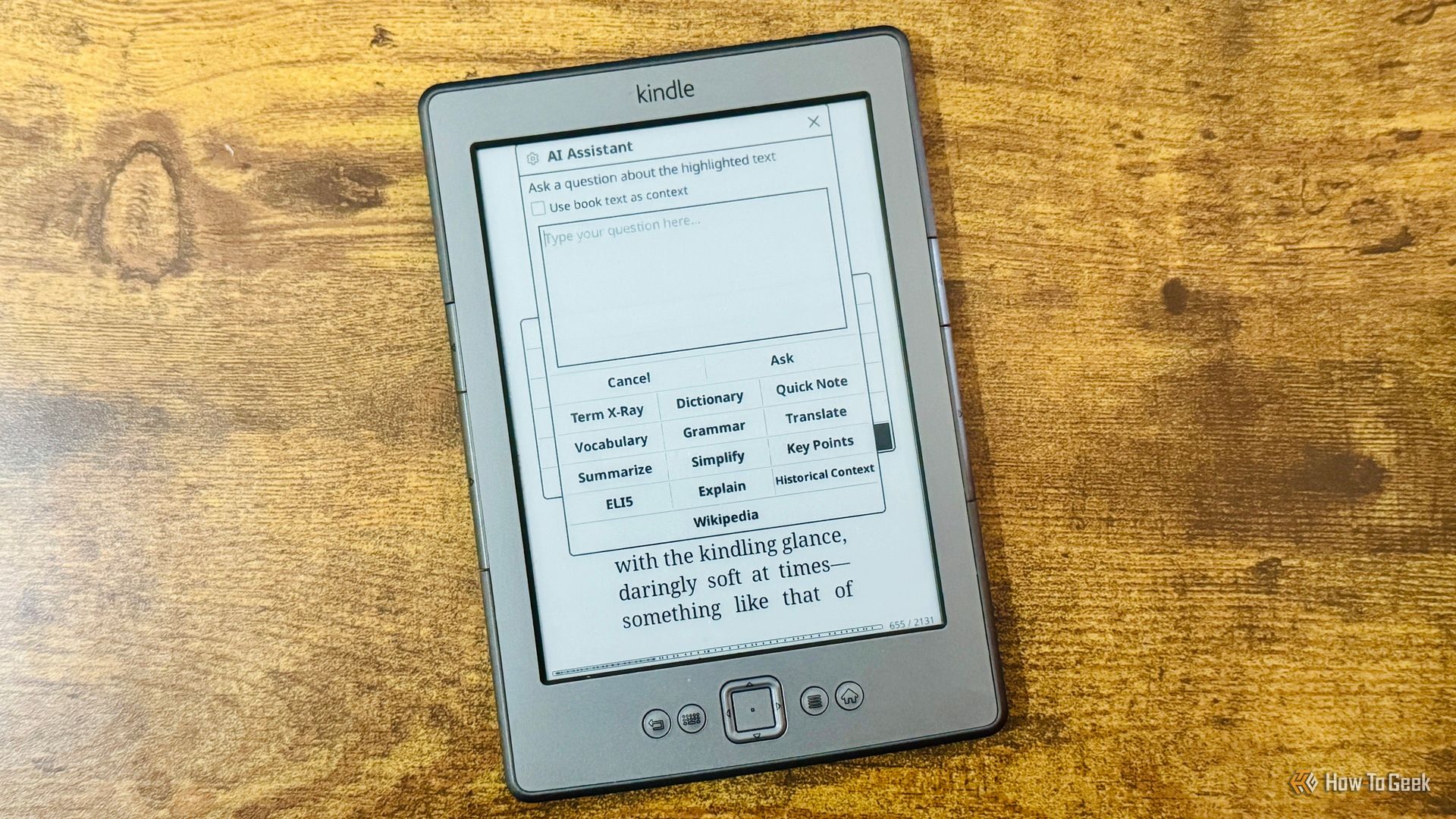
Are you ready to transform your Kindle reading experience? While the idea of adding AI to an e-reader might sound like unnecessary complexity, the free Assistant plugin for KOReader proves otherwise. For those with a jailbroken Kindle, this powerful tool offers a suite of AI-driven features that elevate your interaction with any book, making your reading sessions more insightful and seamless. Forget the limitations of standard Kindle features; Assistant brings intelligent summaries, contextual explanations, and smart translations directly to your fingertips.
This guide will walk you through the incredible functionalities of the KOReader Assistant plugin, demonstrating why it's a compelling reason to jailbreak your Kindle and how to leverage its capabilities to enhance your reading journey.
What You'll Accomplish
By the end of this guide, you will understand how to utilize the KOReader Assistant plugin to:
- Get quick, spoiler-free recaps of your current book.
- Access character, location, and theme overviews for any book, including sideloaded ones.
- Receive clear explanations for confusing passages, even simplified "Explain Like I'm 5" versions.
- Obtain context-aware definitions for individual words.
- Translate text passages with a deep understanding of idioms and phrasing.
Prerequisites
Before you can dive into the powerful features of the KOReader Assistant plugin, ensure you have the following in place:
- A Jailbroken Kindle: The Assistant plugin is designed for use on Kindles that have been jailbroken. This process allows for the installation of third-party software like KOReader.
- KOReader Installed: KOReader is an open-source document viewer that replaces the default Kindle reading software. The Assistant plugin operates within KOReader.
- KOReader Assistant Plugin Installed: The specific "Assistant" plugin (found at github.com/omer-faruq/assistant.koplugin) must be installed within your KOReader setup.
- AI Service Connection: Assistant requires a connection to an AI service to function. You can configure it to use popular cloud providers such as Claude, OpenAI, or Gemini. Alternatively, for a more private solution, you can connect it to a local Large Language Model (LLM) through Ollama.
- Internet Connection (for Cloud AI): If you opt for a cloud-based AI service, your Kindle will need an active internet connection to send requests and receive responses.
How to Use the KOReader Assistant Plugin
Once KOReader and the Assistant plugin are set up on your jailbroken Kindle, you can start exploring its intelligent features. The core interaction typically involves highlighting text and accessing the AI Assistant menu.
Get a Spoiler-Free Recap of Your Book
Ever put a book down for a while and forgotten where you were or who the characters are? The recap feature is incredibly useful for getting back up to speed without rereading chapters. Assistant can automatically generate a summary of the book up to your current reading point if it hasn't been opened in 28 hours and is less than 95% complete. You can also manually trigger a recap at any time.
To get a recap:
- While reading your book in KOReader, tap the screen to bring up the menu.
- Navigate to the AI Assistant menu (the exact location might vary slightly based on your KOReader configuration, but it's usually accessible via the main menu or a long-press context menu).
- Select Recap.
- The plugin will generate a summary of the book's events and characters up to your current position, attempting to avoid future spoilers. Be aware that AI isn't perfect, and occasionally minor spoilers might appear.
Access X-Ray Functionality for Any Book
Kindle's built-in X-Ray feature is great, but it's limited to books purchased from the Kindle Store. Assistant extends this powerful functionality to any book you're reading in KOReader, including those you've sideloaded. It provides a structured overview of key elements.
To use X-Ray:
- While reading your book, access the AI Assistant menu.
- Select X-Ray.
- Assistant will generate a list of important characters, locations, themes, terms, and events that have appeared in the book up to your current reading position, offering a comprehensive overview.
Clarify Confusing Passages (Explain & ELI5)
Encountering a complex sentence or an unfamiliar concept can disrupt your reading flow. Assistant offers on-demand explanations to clarify difficult text.
To explain a passage:
- Highlight the confusing passage in your book.
- From the context menu that appears (or by navigating to the AI Assistant menu), select AI Assistant.
- Choose Explain.
- The AI will provide a clear explanation of the highlighted text.
- If the initial explanation is still too complicated, you can often find an ELI5 (Explain Like I'm 5) option within the explanation interface, which simplifies the text even further. This eliminates the need to switch to another device for quick look-ups, keeping you immersed in your book.
Understand Words in Context
Standard dictionaries provide long lists of definitions, making it challenging to find the meaning relevant to your specific text. Assistant uses AI to define words based on their context within the passage.
To define a word in context:
- Highlight the individual word you want to understand.
- Access the AI Assistant option from the context menu.
- Select Define (or a similar option, depending on the plugin's exact naming).
- Assistant will analyze the surrounding text and provide a definition tailored to how the word is used in that specific passage, offering a much quicker and more precise understanding than a general dictionary.
Translate Text with Contextual Accuracy
For language learners, or anyone reading a book in a foreign language, the translation feature is invaluable. Unlike simple word-for-word translation tools, Assistant understands context, including idioms and colloquialisms.
To translate text:
- Highlight the phrase or passage you wish to translate.
- Open the AI Assistant menu.
- Select Translate.
- The AI will provide a translation that considers the broader context and meaning of the phrase, rather than just a literal interpretation. This is particularly helpful for understanding idiomatic expressions that wouldn't make sense when translated directly.
Tips and Best Practices
- Choose Your AI Model Wisely: Experiment with different cloud AI providers (Claude, OpenAI, Gemini) or a local LLM via Ollama to find the balance of speed, quality, and privacy that best suits your needs.
- Manage Expectations for Spoilers: While the recap feature attempts to be spoiler-free, AI models are not infallible. Be prepared for the occasional unintentional spoiler.
- Internet Connection for Cloud Services: Remember that cloud-based AI models require a stable internet connection for optimal performance. If you plan to read offline frequently, a local LLM setup might be preferable.
Troubleshooting
- Features Not Appearing: Ensure the KOReader Assistant plugin is correctly installed and enabled within KOReader's settings. Also, verify your AI service connection details are accurate.
- Slow Responses: If using a cloud AI, check your internet connection. For local LLMs, the speed can depend on your Kindle's processing power and the chosen model's complexity.
- Incorrect Explanations/Translations: AI models are constantly improving, but they can still make errors. If an explanation or translation seems off, try rephrasing your request or consult an alternative source if available.
Next Steps
With the KOReader Assistant plugin mastering your reading experience, you might be interested in exploring other customizations for your jailbroken Kindle. KOReader itself offers a wide array of plugins and settings to further tailor your e-reading device. Look into font customization, advanced file management, or other utilities available through the KOReader community.
FAQ
Q: Can I use the KOReader Assistant plugin on a standard, non-jailbroken Kindle?
A: No, the KOReader Assistant plugin, and KOReader itself, require a jailbroken Kindle to be installed and run. It cannot be used on a Kindle running only Amazon's default software.
Q: Does the plugin always provide entirely spoiler-free recaps?
A: The plugin is designed to attempt to avoid spoilers when generating recaps. However, because AI models are not perfect, there is always a slight chance that some unintentional spoilers may sneak through. It's generally very good, but not 100% foolproof.
Q: Do I need an active internet connection to use the Assistant plugin?
A: If you configure the Assistant plugin to use a cloud-based AI service (like Claude, OpenAI, or Gemini), then yes, an active internet connection is required for it to send requests and receive responses. However, if you set it up to connect to a local LLM via Ollama, you would not need an internet connection for its core functions, only for initial setup and model downloads.
Related articles

Apple Unveils iPhone Duo: Pricey Foldable Sees Soaring Demand
Apple has officially entered the foldable smartphone arena with the long-anticipated launch of the iPhone Duo. Priced starting at a hefty $1,999, the device features a 5.4-inch outer display and a larger 7.6-inch inner

TCG Pocket Responds: A Much-Needed Pace Shift for Pokémon Fans
Pokémon TCG Pocket is rolling out a major update for its second anniversary, primarily addressing player concerns about overwhelming content releases by shifting to a six-week set schedule. This aims to curb player decline and improve overall engagement by giving trainers more time to collect and strategize. The update also adds new collection methods, improved deck-building features, and enhanced trading functionality.

Ditch Merge & Center: The Better Way to Align Text in Excel
Learn to use Excel's "Center Across Selection" to align text across cells without merging, avoiding common data manipulation issues. This guide provides steps to utilize this newly accessible feature and add it to your Quick Access Toolbar.

Amazon Prime Video Launches AI-Powered Prime 360 for NBA Coverage
Amazon Prime Video is elevating its NBA coverage with the introduction of Prime 360, an AI-powered replay system offering immersive, 'fly through' views of the action. Kicking off its second season, Prime Video also adds Yahoo fantasy integration and gains exclusive Eastern Conference Finals rights, expanding its tech-driven sports broadcast. The new features aim to deliver a unique and interactive viewing experience for basketball fans.

Ephemeral PR Preview Environments on GKE: A Deep Dive
Every development team eventually grapples with the limitations of shared staging environments. The familiar scenario: multiple features deployed simultaneously, database migrations clashing, and the phrase "it works on

Stop Android Auto Battery Drain: Essential Features to Disable and
Android Auto offers unparalleled convenience, bringing your phone's most useful features directly to your car's display. From navigation and calls to messages and music, it keeps you connected without distracting you