
Tiimo App Review: Your Daily Focus Finally Fixed
Tiimo, the iPhone App of the Year 2025, effectively solves daily focus problems with its AI-powered visual planner. It simplifies task management, offers realistic time estimates, and dynamically adapts schedules, making it a powerful tool for enhanced productivity.
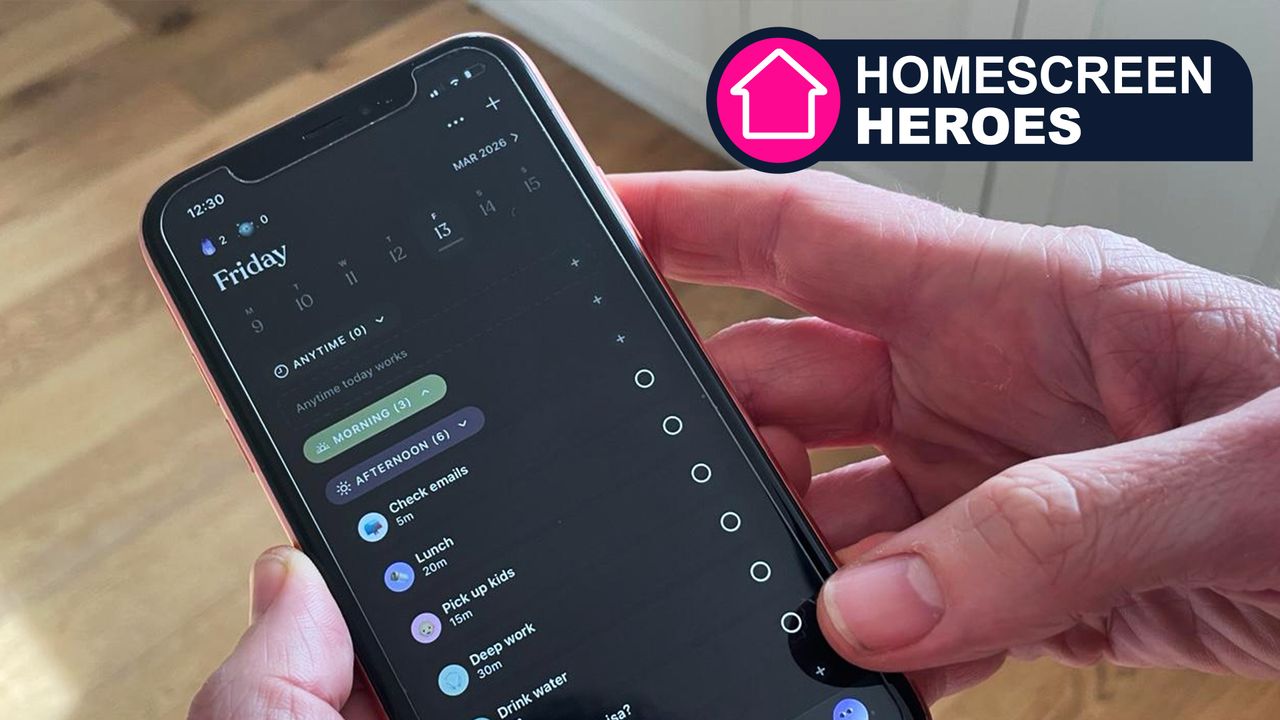
Tiimo: Your Daily Focus Finally Fixed
Quick Verdict: The iPhone App of the Year 2025, Tiimo, lives up to its hype. This visual planner, designed to aid executive functioning, genuinely transforms daily task management. Its AI-powered co-planner streamlines scheduling, provides realistic time estimates, and effortlessly adapts to changing plans, making it a powerful tool for anyone struggling with focus and organization. While pro features come with a subscription, a generous free trial and basic version offer a great starting point.
Having earned the coveted title of iPhone App of the Year 2025, Tiimo immediately piqued my interest. Marketed as a visual planner catering to various neurotypes, its core mission is to tackle executive functioning hurdles, helping users maintain focus, get organized, and achieve their objectives. It's important to state upfront that I am not neurodivergent, and my experiences, while challenging, may not fully represent those of individuals who are. However, I have close family members with neurodivergence and understand the profound difficulties they face in staying on task. Based on user feedback, many neurodivergent individuals have found Tiimo to be exceptionally beneficial.
My personal struggle with focus, while perhaps less extreme than some, is nevertheless a daily reality. I often find it difficult to concentrate on a single task for extended periods. With each day packed with responsibilities, a lack of an effective management system inevitably leads to missed deadlines and overlooked priorities. Over the years, I've dabbled with other planning apps such as Todoist, Asana, and Google Tasks. However, it wasn’t until I encountered Tiimo that I realized the true potential of a sophisticated schedule planner. Tiimo stands out by transforming abstract to-do lists into actionable, visual timelines with remarkable ease, leveraging AI and an intuitive interface to simplify schedule management complexities.
The Genius of the Tiimo Co-Planner
The fundamental brilliance of Tiimo lies in its ability to offload the mental burden of remembering every single task. For me, there's a clear link between the volume of information I'm trying to juggle in my head and my stress levels. Often, the relief comes not just from completing a task, but from the reassurance of knowing I have a concrete plan to address it at a specific time. This is precisely where Tiimo's co-planner becomes indispensable.
Users can simply perform a 'brain dump' of all their pending tasks into the app. The co-planner then takes these raw ideas and intelligently structures them into defined tasks, breaks them down into smaller, manageable steps, and even estimates the time required for each. This automation is a game-changer, allowing you to move from overthinking to efficient action. These tasks are then seamlessly integrated into your calendar, complete with customizable icons, colors, and layouts. The app encourages personalization, ensuring that using Tiimo feels like an enjoyable and supportive experience rather than a chore.
Realistic Timelines and Dynamic Adjustment
One of the most common pitfalls in personal planning is an optimistic, often unrealistic, estimation of how long tasks will take. I'm frequently guilty of overcommitting, cramming more into my day than is humanly possible, which inevitably leads to frustration and missed goals. Tiimo directly addresses this by providing task-specific time estimates, fostering smarter planning and helping to prevent over-scheduling. While these estimates are a solid starting point, they are also easily adjustable. I personally found myself adding more 'breathing room' into my schedule, building in flexibility for unexpected changes.
For instance, Tiimo initially suggested 15 minutes for picking up my children, but I knew I needed 25 minutes. Instead of manually navigating through menus to adjust the task, a quick verbal instruction to the conversational assistant was all it took. The AI not only made the change but also offered to reshuffle my entire schedule to accommodate the alteration, demonstrating its proactive and intelligent support.
A Planner That Adapts to Life's Realities
Life is unpredictable, and plans often require immediate changes. In most conventional planning applications, these shifts demand a laborious process of manual adjustments – moving items, altering times, and re-evaluating the entire schedule. Tiimo liberates you from this tedious process. When your plans deviate, a simple communication with the AI tool is enough for it to recalibrate your schedule.
I tested this functionality by informing the app, “I’m running out of time, and my afternoon has been hijacked by other plans. Can you rejig what I was due to be doing?” Tiimo responded by prioritizing my critical tasks and intelligently shifting less urgent jobs to later in the day. While a minor amount of manual tweaking was still occasionally necessary, the core benefit was having an intelligent assistant ready to help in moments of unexpected change, significantly reducing stress and effort.
Tiimo vs. Traditional Planners
While apps like Todoist, Asana, and Google Tasks have their merits, Tiimo differentiates itself with its advanced AI capabilities and visual approach.
| Feature | Tiimo | Other Planning Apps (e.g., Todoist, Asana, Google Tasks) |
|---|---|---|
| Visual Timelines | Core to the experience, turns to-dos into doable visual plans | Less emphasis on visual timelines; often text-based lists |
| AI-Powered Task Breakdown | Automatically structures ideas into steps | Primarily manual task entry and structuring |
| AI-Powered Time Estimates | Provides realistic, task-specific time suggestions | Generally requires manual time input |
| Responsive Auto-Rescheduling | AI rejigs schedule based on conversational input when plans change | Requires significant manual adjustment for schedule changes |
Pricing and Availability
Tiimo offers a flexible pricing model. A basic version of the app is available for free, allowing users to experience its foundational features. For full access to all professional features, a subscription costs $11.99 / £11.99 per month or a more economical $45 / £45 per year. To help you decide if Tiimo is the right fit, a 7-day free trial is available upon downloading the app.
Buying Recommendation
If you're someone who consistently struggles with maintaining focus, organizing tasks, or accurately estimating task durations, Tiimo is a highly recommended solution. Its AI-driven features—from automatically breaking down tasks and suggesting realistic timelines to dynamically adjusting your schedule in real-time—make it a significant upgrade over more traditional planning tools. The visual aspect is a clear strength, particularly for those who benefit from seeing their day laid out. While the premium subscription unlocks its full power, the free basic version and the 7-day trial provide ample opportunity to evaluate its value for your personal workflow. It’s an investment in your productivity and peace of mind, potentially saving you more time and stress than its cost.
FAQ
Q: Is Tiimo only for neurodivergent individuals?
A: While Tiimo is described as a visual planner for every neurotype and has been highly praised by many neurodivergent users, the reviewer, who is not neurodivergent, found it incredibly helpful for general focus and organizational challenges. Its core features are beneficial for anyone looking to improve executive functioning.
Q: What does Tiimo cost?
A: Tiimo offers a free basic version. For access to all pro features, it costs $11.99 / £11.99 per month or $45 / £45 per year. A 7-day free trial is available for new users to test out the pro features.
Q: Can Tiimo adjust my schedule automatically?
A: Yes, one of Tiimo's standout features is its AI-powered conversational assistant. You can simply tell it about changes to your plans or if you're running out of time, and it will intelligently re-prioritize and rejig your schedule to fit everything in, often minimizing the need for manual adjustments.
Related articles
How to Use Kodi: The Simple, Server-Free Way to Watch Your Media
Learn to set up Kodi to watch your personal media library directly on your TV, bypassing complex servers and subscription fees, in just a few steps.

Crystal Lake Series on Peacock: A Deep Dive into Horror's Past
Crystal Lake Series Review: A Deep Dive into Horror's Past Verdict: Is Crystal Lake Worth the Dive? The long-awaited Friday the 13th prequel, Crystal Lake, is finally arriving on Peacock, promising a fresh, in-depth

Tesla Set to Finally Unveil Second-Generation Roadster on October 1
The much-anticipated second generation of the Tesla Roadster, a halo vehicle promising revolutionary performance, is finally slated for a public unveiling on October 1. After years of delays and a protracted development
Google's AI Branding Fix: A Clearer Vision for Gemini
This article critiques Google's fragmented AI branding, proposing a unified 'Gemini Intelligence' system to simplify user experience and strengthen Gemini's identity.

in-depth: The Best 3-in-1 Apple Charging Stations After Testing 30
Wired has released its top picks for 3-in-1 Apple charging stations, extensively tested for iPhone, Apple Watch, and AirPods. The guide highlights six leading models, from premium speedy options to budget-friendly and compact designs, all focused on decluttering and optimizing charging for Apple users.

Chuwi UniBox AI495 Pro Review: A Mini AI Powerhouse
Chuwi's UniBox AI495 Pro review: A powerful mini workstation with 192GB RAM and an AMD Ryzen AI chip for local LLM processing, packed into a compact, Mac Pro-esque design.