
ReFrame: An Open-Source EPaper Camera for Deliberate Photography
Reclaiming Intentionality in Digital Photography In an era of ubiquitous digital photography, developers often reflect on the paradox of endless captures diluting the significance of each frame. reFrame, an experimental
Reclaiming Intentionality in Digital Photography
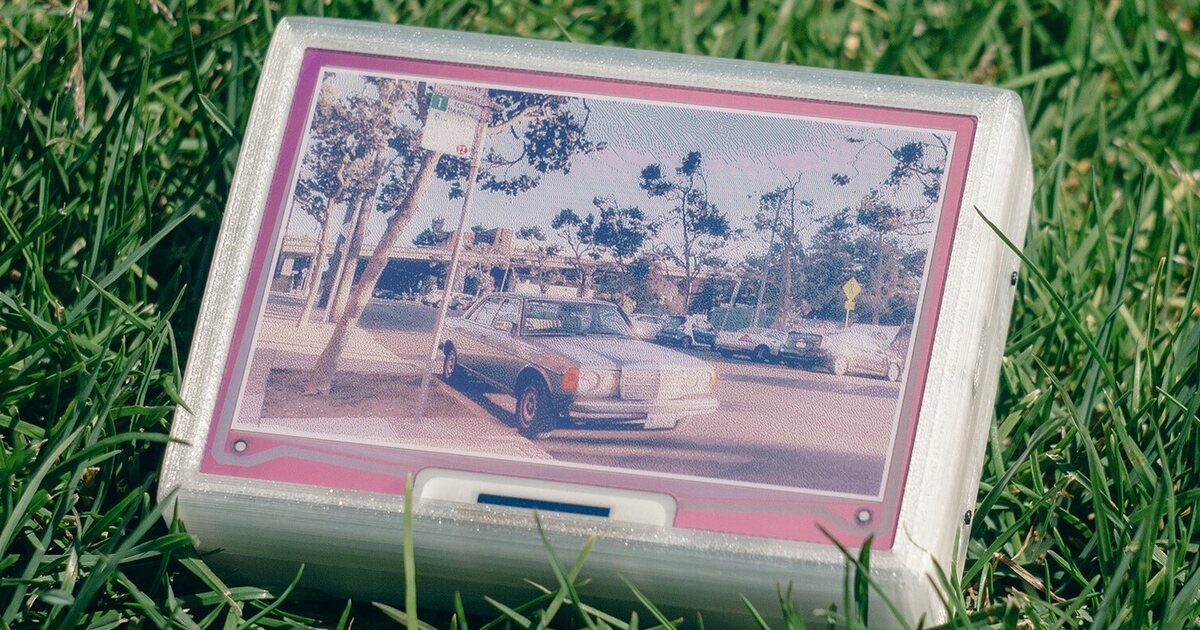
In an era of ubiquitous digital photography, developers often reflect on the paradox of endless captures diluting the significance of each frame. reFrame, an experimental camera, directly challenges this by merging open-source hardware with ePaper technology to foster deliberate, memorable photography. Designed to capture and display one photo at a time, reFrame inherently promotes intentionality, a philosophy deeply woven into its technical design, especially its unique display.
The Unique Canvas: ePaper and Dithering
reFrame's most striking feature is its color ePaper display, which operates with six distinct pigments. This presents a unique technical challenge for image rendering, as reFrame must faithfully represent the world's colors on a limited palette. It achieves this through a sophisticated dithering process. Before display, images undergo a computational transformation, reducing colors to the six-pigment capability while simulating a broader range via patterns. The aesthetic outcome is a captivating blend reminiscent of newspaper halftones and old video games—a deliberate artistic choice, not just a technical compromise.
The Digital Polaroid Experience
The processing, by design, isn't instantaneous. After the shutter press, colors gradually manifest, mirroring a Polaroid's development, taking about 15 seconds. This delay stems from ePaper technology's reliance on electrical charges to physically move ink particles. For developers, this constraint becomes an opportunity to craft an engaging UX, transforming a hardware limitation into a core product charm.
Persistence and Purpose: Beyond the Shutter
ePaper's inherent memory is a key advantage: an image, once rendered, persists indefinitely on screen, even when powered off, consuming no energy. This 'always-on' characteristic means a new photo is the only way to clear the display, reinforcing reFrame's deliberate approach. When idle, reFrame functions as a unique desk photo frame. The last dithered image becomes a tangible, static reminder, showcasing innovative use of low-power displays for both active creation and passive art display.
Under the Hood: An Open-Source Invitation
For technically curious developers and DIY enthusiasts, reFrame is an exemplary open-source project. Its hardware and software designs are freely available, inviting modification and customization. This transparency fosters a community of builders, aligning with the creator's vision.
The camera's internal architecture is built entirely from off-the-shelf components, making it accessible for anyone looking to assemble their own. The core components include:
- Raspberry Pi Zero: Serving as the brain, handling image processing, camera control, and managing the ePaper display.
- Pi Camera 3: The imaging sensor responsible for capturing the raw photographic data.
- 4-inch eInk Spectra 6 color display: The distinctive output device, defining reFrame's visual style and user experience.
- Battery: Providing portable power for the embedded system.
The availability of detailed guides and resources on GitHub transforms reFrame from a mere concept into a tangible build project. This not only democratizes access to specialized hardware but also provides an invaluable learning opportunity for developers keen on embedded systems, low-power computing, and custom device fabrication.
Data Preservation: Digital Beyond the Ink
While the ePaper display offers a unique experience, reFrame prioritizes digital preservation. Every photo is saved digitally, including both the original full-color capture and its dithered ePaper rendition. These files are accessible via a web dashboard (likely hosted on the Raspberry Pi), allowing users to download and manage their images. This hybrid approach blends the ePaper's analog-like experience with digital archiving convenience, ensuring deliberate frames are both enjoyed and securely stored.
Practical Takeaways for Developers
reFrame provides several compelling lessons for developers:
- Embracing Constraints: It demonstrates how technical limitations (e.g., ePaper's refresh rate, color palette) can become defining features, fostering creativity and unique UX.
- Open Source Power: An excellent example of how open-source hardware/software empowers individuals to build, learn, and innovate.
- Embedded Systems & IoT: A practical case study for physical computing enthusiasts, integrating off-the-shelf components into an aesthetic device.
- Image Processing: The dithering algorithm offers insights into adapting rich visual data for constrained display environments.
Ultimately, reFrame is a testament to thoughtful design and open collaboration, showing that prioritizing experience can lead to impactful innovation.
FAQ
Q: How are photos stored and retrieved from reFrame?
A: Photos taken with reFrame are saved digitally on the device. Both the original full-color image and its dithered ePaper rendition are stored. Users can access and download these files via a web dashboard, providing a digital backup of every frame.
Q: What specific ePaper display technology is used in reFrame?
A: reFrame utilizes a 4-inch eInk Spectra 6 color display. This display type is characterized by its six pigments, which necessitates the unique dithering process to render images on its limited color palette.
Q: Given its open-source nature, what are the primary hardware components required to build a reFrame?
A: The core components for building reFrame are a Raspberry Pi Zero, a Pi Camera 3 module, the aforementioned 4-inch eInk Spectra 6 color display, and a battery for power. All components are off-the-shelf, making the project accessible for DIY enthusiasts.
Related articles

Building Passkey Authentication with WebAuthn, Next.js, and NestJS
Password-based authentication has long been the default for digital identity, yet it presents a myriad of challenges for both users and developers. Users grapple with remembering complex passwords, often resorting to

Java's Enduring Foundations: Interconnectedness, Reliability, and
Java's origins, driven by creator James Gosling at Sun Microsystems, addressed critical challenges in early computing. The language tackled significant 'networking friction' to enable seamless interconnectedness across diverse systems. Simultaneously, the 'stringent reliability requirements' of consumer electronics inspired the robust design of the Java Virtual Machine (JVM) and its evolving garbage collectors, crucial for 'large-scale concurrent memory management.'

Under the Hood: How Real-Time Noise Cancellation Works
As software developers, we often find ourselves in environments far from ideal for focused work – be it a bustling open-plan office, a noisy commute, or a long-haul flight. In these situations, noise-cancelling

DeepSeek and MiniMax Cleared to Export AI Models Abroad
Chinese AI leaders DeepSeek and MiniMax have become the first firms cleared to export their AI models abroad under new, clarified national export controls. While the regulations target sensitive data, critical applications, and advanced computing power, they largely exempt commercial deployments like APIs and open-source technologies. This move signals China's intent to balance national security with global AI commercialization.

in-depth: Best Pet Camera of 2026: Furbo, Petcube, and Enabot: Pet
Wired's October 2026 review highlights the top pet cameras, featuring Furbo and Petcube models, alongside evaluations of devices like the Enabot Ebo Max FamilyBot. These cameras offer peace of mind through advanced features like treat dispensing, 360-degree views, and two-way audio for remote pet interaction and monitoring.
US Navy Drone Landing Software: Autonomous Ops Game-Changer
Quick Verdict The US Navy's groundbreaking new software for autonomous drone landings on moving ships, leveraging only onboard cameras and motion sensors, is nothing short of a game-changer. By completely removing