
Pixel 11 & Android 17 Pause Point: A Needed Friction, For Now
Quick Verdict Google's new Pause Point feature in Android 17 offers a genuinely innovative approach to combating mindless phone scrolling, introducing a timely 10-second friction before you dive into distracting apps.
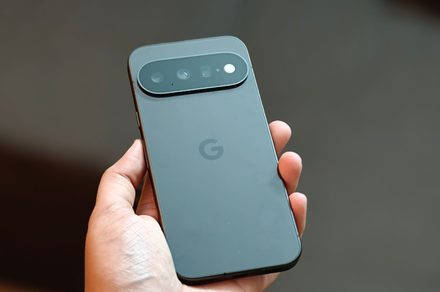
Quick Verdict
Google's new Pause Point feature in Android 17 offers a genuinely innovative approach to combating mindless phone scrolling, introducing a timely 10-second friction before you dive into distracting apps. This proactive intervention is a welcome evolution from traditional, reactive app timers. However, its current exclusivity to the Pixel 11 series is a significant drawback, limiting its reach and impact for most Android users.
Introduction: Halting the Scroll
In an age where our phones are constantly vying for our attention, the concept of "mindless scrolling" has become a familiar, often unwelcome, habit. Google aims to tackle this pervasive issue head-on with "Pause Point," a new Digital Wellbeing feature debuting with Android 17. Unlike existing tools that only kick in after you've already exceeded your screen time, Pause Point interjects before you even start, offering a critical moment for reflection. But there's a catch, as with many of Google's flagship software innovations: to experience this potentially game-changing feature, you'll need to be rocking the latest hardware — specifically, a Pixel 11 series device.
What is Pause Point?
Pause Point is a digital speed bump designed to give you a moment of conscious thought before engaging with apps you've identified as distracting. Here's how it works:
- Proactive Intervention: Instead of merely tracking your usage or locking you out after a limit, Pause Point activates the instant you tap to open an app you've flagged. This means the feature intervenes before any scrolling or usage occurs, making it a preventative measure rather than a punitive one.
- The 10-Second Delay: Once you tap a flagged app, a 10-second timer appears. During this window, you have a chance to pause, reflect, or pivot. You can choose to proceed and open the app, or you can decide it was a habitual tap and switch to a different task entirely, perhaps looking through photos or opening a productivity app instead.
- Intentional Friction: The core idea is to break the automatic, almost unconscious habit of opening certain apps. That brief delay is meant to allow your conscious mind to catch up and assess whether opening the app aligns with your current goals or if it's just a reflex born from boredom or habit.
- Designed to be Persistent: Google has deliberately made disabling Pause Point a bit inconvenient. To turn the feature off entirely, you need to restart your phone. This added hurdle is a smart design choice, preventing users from reflexively disabling it the moment they encounter the delay, thereby encouraging genuine engagement with the feature's purpose.
User Experience: A Psychological Speed Bump
The user experience of Pause Point is fascinating. Digital Wellbeing tools often feel like punishments, locking you out or chastising you for overuse. Pause Point, however, aims for a more gentle, yet firm, nudge. The 10-second delay isn't long enough to be infuriating, but it's certainly long enough to interrupt the flow of an impulsive app launch. In my experience, those ten seconds often felt like an eternity when I was reaching for social media out of habit, providing just enough time to think, "Do I really need to open Instagram right now, or am I just bored?" This proactive approach makes it considerably more effective than traditional app timers that only alert you after you've already lost time. The mental friction is tangible, and for those genuinely looking to reduce screen time on specific apps, it could be genuinely helpful.
The decision to make it difficult to disable is also commendable. While some might find it annoying, it underscores Google's commitment to making the feature impactful. It forces a more deliberate choice to bypass the system, rather than a casual tap.
The Pixel 11 Exclusivity: A Double-Edged Sword
Here's where the otherwise brilliant feature hits a snag. Despite being an Android 17 feature, Pause Point is, for now, exclusively available on the Pixel 11 series. Google's support page explicitly states it's "available on Pixel 11 series running Android 17 and later," while a promotional video for Android 17 vaguely mentions "select Android 17 devices." This inconsistent messaging fuels speculation that it might eventually roll out wider, but as of now, the vast majority of Android users are left out.
This exclusivity is a significant con. Digital wellbeing is a universal concern, not just one for Pixel owners. Limiting such an impactful feature to a single phone line, even if it's Google's own flagship, feels restrictive. It positions Pause Point not as a core Android innovation for all, but as a premium perk for Pixel users, potentially delaying widespread adoption of what could be a powerful tool for healthier tech habits.
Beyond Pause Point: Other Pixel 11/Android 17 Enhancements
While Pause Point is the star, the Pixel 11 running Android 17 brings other notable enhancements:
- Customizable Vibrations: Finally, a long-awaited feature! The Pixel 11 series introduces custom vibration patterns for calls and notifications. This means you can assign unique buzzes to specific contacts or app alerts, providing a much-needed layer of personalization and functionality that helps you differentiate between important and less urgent notifications without even looking at your screen. It's a small but significant quality-of-life improvement.
- Per-App Memory Limits: Android 17 also gets smarter about managing resources. It introduces per-app memory limits based on a device's total RAM. This intelligent feature is designed to prevent rogue apps from hogging too much memory, which can lead to UI stuttering, system slowdowns, and excessive battery drain. Apps that consistently exceed their budget can even be terminated, ensuring overall phone performance remains snappy and efficient. This is a crucial under-the-hood improvement for long-term device health and user satisfaction.
Pros and Cons
Pros:
- Effective Friction: The 10-second delay proactively breaks mindless scrolling habits.
- Pre-emptive: Intervenes before app usage, unlike reactive app timers.
- Deliberate Disabling: Requires phone restart, preventing impulsive turn-offs.
- Intuitive Design: Simple, clear interface for a helpful feature.
- Enhances Digital Wellbeing: A valuable tool for those seeking healthier phone habits.
- Complements other Android 17 features: Alongside custom vibrations and improved memory management, it contributes to a more personalized and efficient user experience on the Pixel 11.
Cons:
- Pixel 11 Exclusivity: Currently limited to Google's latest flagships, denying broader Android user base access.
- Inconsistent Messaging: Google's own communication on availability is vague, leading to uncertainty for non-Pixel 11 owners.
- Requires New Hardware: To experience it, users must purchase a Pixel 11, which is a high barrier to entry for a software feature.
Buying Recommendation
If you're an existing Pixel 10 owner or on another Android device and primarily interested in Pause Point, the necessity of upgrading to a Pixel 11 just for this feature is a tough pill to swallow. While Pause Point is an excellent addition to the Digital Wellbeing suite, it's not a standalone phone-selling feature for most. However, if you're already in the market for a new flagship phone and were considering the Pixel 11, the inclusion of Pause Point, along with customizable vibrations and Android 17's improved memory management, makes the Pixel 11 series a compelling choice for those who value software innovations and a more mindful digital life. For others, it’s a regrettable wait-and-see situation until (hopefully) Google rolls it out more broadly.
FAQ
Q: What is Pause Point and how does it work?
A: Pause Point is a new Digital Wellbeing feature in Android 17 that adds a 10-second delay before opening apps you've marked as distracting. This delay gives you a moment to reconsider whether you truly want to open the app, helping to curb mindless scrolling and fostering more intentional phone use.
Q: Is Pause Point available on all Android phones running Android 17?
A: No, currently Pause Point is exclusively available on the Pixel 11 series devices running Android 17 or later. Google's messaging suggests it might come to other devices later, but there is no confirmed timeline.
Q: How do I disable Pause Point if I don't like it?
A: Google has made it intentionally difficult to casually disable Pause Point to encourage its use. To turn it off completely, you need to restart your phone.
Related articles

TCG Pocket Responds: A Much-Needed Pace Shift for Pokémon Fans
Pokémon TCG Pocket is rolling out a major update for its second anniversary, primarily addressing player concerns about overwhelming content releases by shifting to a six-week set schedule. This aims to curb player decline and improve overall engagement by giving trainers more time to collect and strategize. The update also adds new collection methods, improved deck-building features, and enhanced trading functionality.

Ars Technica's Rocket Report: Your Essential Space Industry Briefing
Quick Verdict Ars Technica's Rocket Report, presented by veteran space reporter Stephen Clark, offers an invaluable and meticulously organized weekly (or similar frequency, implied by "Edition 9.15") digest of the most

Apple iPhone Duo: A Daring Debut with Notable Compromises
Apple's highly anticipated iPhone Duo, priced at $2,000, has gone on pre-order. While hailed as "Apple's most exciting device in a decade" for its innovative foldable design and immersive display, it comes with significant drawbacks like the absence of FaceID and a premium camera.

KDE Plasma 6.8: A Future-Focused 30th Anniversary Update
Quick Verdict KDE Plasma 6.8, arriving as the "30th Anniversary Edition," is a pivotal release that decisively pushes the desktop environment into the future. With a definitive farewell to native X11 sessions and a
Galaxy Watch One UI 9 Beta: Promising Progress, But Patience Needed
Galaxy Watch 8, Watch Ultra, and Watch 7 are receiving a new One UI 9 Watch beta build with bug fixes and a security patch. Active development signals progress, but a stable release date remains elusive.

Enterprise AI Beyond Chatbots: A Vision for Actionable Intelligence
Quick Verdict: Redefining Enterprise AI's Potential TechRadar Pro's opinion piece, "What it takes to move enterprise AI beyond the chatbot," delivers a refreshingly honest and vital perspective on the current state and