
My Pixel App: A Disappearing Act for Some Owners – Frustrating Retreat
Quick Verdict: A Frustrating Retreat The 'My Pixel' app, a seemingly innocuous but incredibly useful utility on Pixel devices, is facing a significant and sudden setback for some of its users. What was once a convenient
Quick Verdict: A Frustrating Retreat
The 'My Pixel' app, a seemingly innocuous but incredibly useful utility on Pixel devices, is facing a significant and sudden setback for some of its users. What was once a convenient hub for tips, support, and even the Google Store, has now, for an unspecified number of Pixel owners, become a stripped-down shell. The core issue revolves around the mysterious disappearance of the app's bottom navigation tabs, rendering most of its functionalities inaccessible. This isn't just a minor bug; it's a quiet erosion of a key part of the Pixel ownership experience, leaving users feeling frustrated and unsupported. While Google hasn't offered a public explanation, user reports suggest a potential region-based rollout of reduced functionality, though even that theory has inconsistencies.
The My Pixel App: A Core Pixel Utility (Or So It Was)
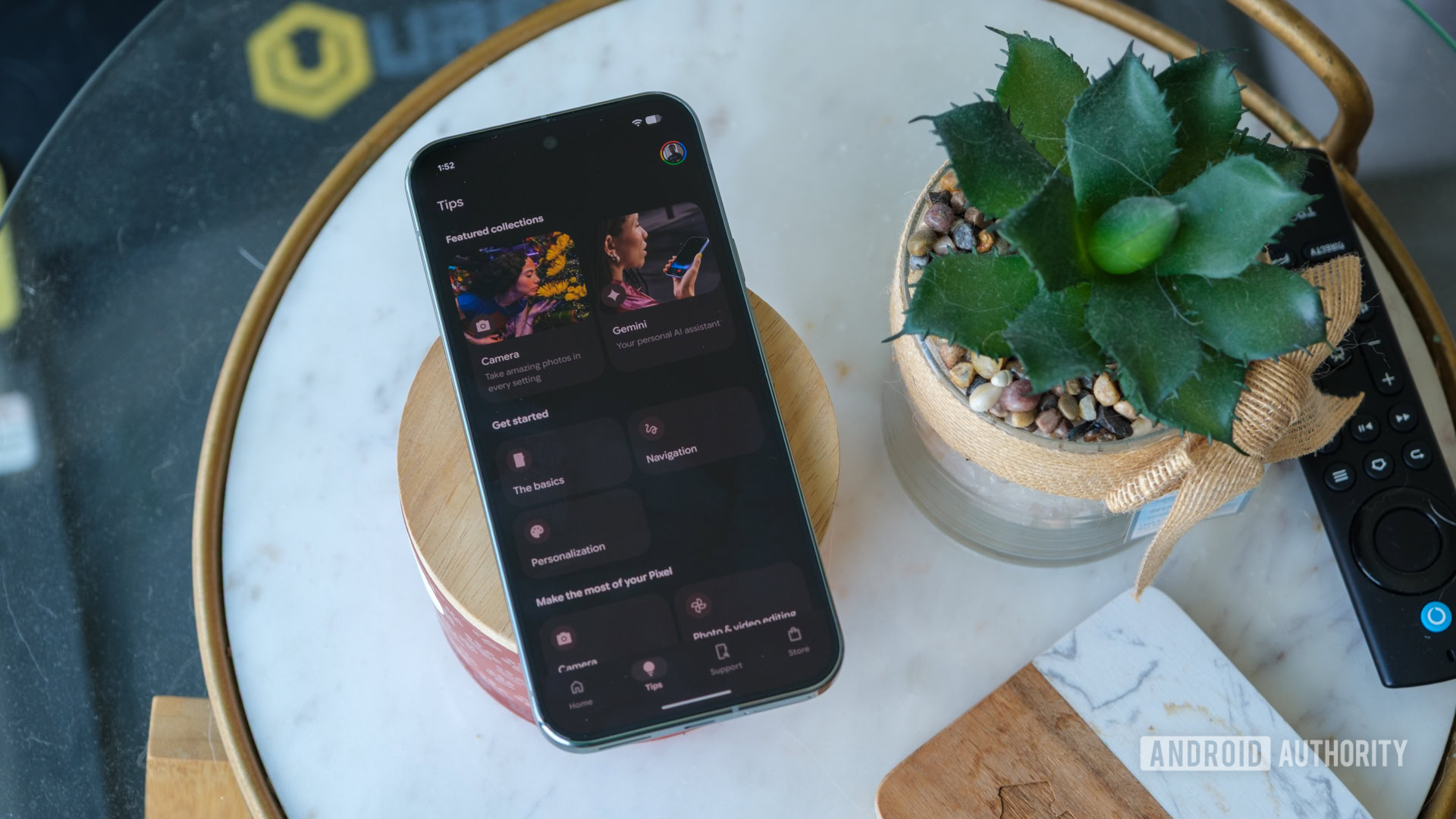
Preinstalled on every Google Pixel device, the 'My Pixel' app has traditionally served as a centralized digital concierge for owners. Imagine it as your go-to information desk and customer service portal, all wrapped into one seamless application. Its primary design was to enhance the Pixel experience by offering immediate access to a variety of helpful resources. Users could effortlessly check out what's new with their device, delve into tips and tricks to maximize its features, seek direct support if they encountered an issue, or even browse and purchase new Google products directly from the integrated Google Store section. This integration was a significant convenience, making it a handy and often indispensable tool for many, streamlining the process of device management and user engagement within the Google ecosystem.
The Unraveling: Disappearing Features and User Frustration
The sudden change affecting 'some Pixel owners' is alarmingly straightforward: the crucial bottom navigation bar, which hosts the 'Home', 'Tips', 'Support', and 'Store' tabs, has simply vanished. This isn't a glitch where the features are hidden; they are entirely gone from the user interface. Consequently, individuals facing this issue find themselves locked out of the majority of the app's previously lauded functions. They can no longer intuitively navigate to the invaluable 'Tips' section for self-help, nor can they easily access dedicated 'Support' channels for troubleshooting, and the convenience of the integrated 'Google Store' is also gone.
Reports from the Reddit community, where multiple Pixel owners have shared screenshots and experiences, paint a clear picture of this abrupt change. One user recounted dismissing a pop-up about 'something being unavailable' just before their tabs disappeared entirely. Another, experiencing the same problem, managed to capture a screenshot of a more explicit notification: "Support and Google Store features are not available in your region. You can manage your orders and repairs on the Google Store website." This suggests a targeted, possibly regional, removal of features, but the lack of clear communication from Google itself has amplified user frustration. The suddenness of this rollback, combined with the opaque reasoning, leaves users feeling bewildered and inconvenienced, undermining the smooth user experience Pixel devices aim to provide.
Analysis of Google's Stated (and Unstated) Intentions
The notification regarding regional unavailability of 'Support' and 'Google Store' features provides the most direct, albeit unofficial, insight into Google's possible strategy. It suggests that Google may be consolidating or streamlining its service offerings, perhaps directing users to web-based platforms for transactions and assistance in certain geographical areas. This could be a cost-saving measure, an attempt to standardize support channels globally, or a way to reduce redundant app functionality in favor of a more centralized web presence. For 'Support' and 'Google Store' functionalities, a region-specific approach isn't entirely illogical; compliance, localized product availability, and support infrastructure can vary significantly across different regions.
However, this explanation hits a snag when considering the 'Tips' tab. Tips on how to use a Pixel phone's features are generally universal and device-specific, not typically tied to geographical restrictions. The removal of this tab alongside region-specific services seems incongruous with the given notification. Its disappearance for affected users, without a clear regional rationale, implies either an oversight in the rollout, a broader unannounced change, or a more comprehensive deprecation of in-app functionalities. The lack of an official statement from Google only fuels speculation, raising questions about transparency and how user experience considerations weigh against operational decisions within the company. This inconsistency is a major point of contention and user concern.
Pros and Cons: A Shift in Value
Pros (Original My Pixel App Functionality):
- Centralized Convenience: The app acted as a one-stop shop for all things Pixel, from self-help guides to direct customer support and purchasing.
- Enhanced User Experience: By pre-installing a dedicated hub, Google aimed to offer a more integrated and supportive ecosystem for its device owners.
- Easy Access to Information: 'Tips' and 'What's New' sections were excellent for discovering features and keeping up-to-date with device capabilities without extensive searching.
Cons (Current State for Affected Users):
- Loss of Core Functionality: The primary complaint is the complete disappearance of crucial navigation tabs, making most of the app unusable.
- Inconvenience and Frustration: Users are forced to find alternative, often less streamlined, ways to access support, tips, and the Google Store (e.g., via web browsers).
- Lack of Transparency: Google has not issued a public statement, leaving users to piece together information from fragmented pop-ups and community reports.
- Inconsistent Rollout: The issue only affects 'some Pixel owners,' creating a disparity in experience and leading to confusion about why certain users are targeted.
- Erosion of Trust: The quiet, unannounced removal of features can lead to a sense of distrust in Google's commitment to its device owners and their ongoing software experience.
- Unexplained 'Tips' Tab Removal: The disappearance of the 'Tips' tab, which should not be region-locked, undermines Google's potential explanation for the changes.
Navigating the Change: Workarounds and Future Implications
For those Pixel owners suddenly finding their 'My Pixel' app barren, the immediate impact is a scramble for alternative solutions. While the app itself offered a convenient, integrated experience, the functionality hasn't vanished from the internet entirely. For managing orders and repairs, the notification explicitly points users to the Google Store website – a viable, albeit less integrated, workaround. Similarly, tips and support can still be found through general Google searches or by navigating directly to Google's support pages. However, this decentralization undoes the primary benefit of the 'My Pixel' app: a single, easy-to-access hub.
The long-term implications are concerning. If Google is indeed moving towards a model where essential support and informational tools are fragmented across various web interfaces, it could dilute the perceived value and premium feel of owning a Pixel. The convenience of a preinstalled, intuitive app is a subtle but important aspect of the overall user experience. This situation may force Pixel owners to rely more heavily on general web searches for device-specific information, potentially leading to a less personalized and more cumbersome support journey. It also raises questions about Google's future strategy for bundled apps and the level of direct, in-device support they intend to offer.
Buying Recommendation: Proceed with Caution
For current Pixel owners, this situation is undeniably frustrating. It's a reminder that even preinstalled, seemingly core features are subject to change without warning. For prospective Pixel buyers, this development should serve as a point of consideration. While Pixel phones continue to offer a compelling Android experience, Google's approach to app functionality and user support, particularly the lack of transparent communication around such significant changes, is noteworthy. If you value consistent in-app support and a centralized hub for device management, understand that Google's strategy in this area may be shifting. Evaluate whether relying on web-based alternatives for support and information aligns with your expectations for a modern smartphone ecosystem. Ultimately, the Pixel's hardware and software innovations remain strong, but the dependability of its accompanying service ecosystem, as evidenced by this 'My Pixel' app issue, warrants closer scrutiny.
FAQ
Q: What exactly has happened to the My Pixel app for some users? A: For certain Pixel owners, the bottom navigation bar with tabs for Home, Tips, Support, and Store has disappeared from the My Pixel app, making these sections inaccessible.
Q: Why are these features disappearing, and is it a bug or intentional? A: While Google hasn't officially commented, user reports suggest a notification appeared mentioning that "Support and Google Store features are not available in your region." This implies an intentional, possibly region-based, rollback, though the removal of the 'Tips' tab complicates this explanation.
Q: How can affected users access support or manage Google Store orders now? A: According to the reported notification, users can manage orders and repairs on the Google Store website. For tips and support, users will likely need to rely on general web searches or navigate directly to Google's support pages online, as the in-app access is gone.
Related articles
Android 17 QPR2 Beta 7.1: The Performance Relief You've Been Waiting
Android 17 QPR2 Beta 7.1: Finally Fixing the QPR1 Performance Woes Verdict: Android 17 QPR2 Beta 7.1 is a crucial and highly anticipated software update for Google Pixel users, specifically targeting and resolving the

DJI Solo Video Setups: Smart Choices for Lone Creators
This review delves into DJI's recommended solo video setups, highlighting the Osmo Pocket 3 Creator Combo as a top pick for its integrated camera, gimbal, and mic. It also covers stabilizers like the Osmo Mobile 8 and RS 4, and the DJI Mic Mini series for enhanced audio, providing honest pros, cons, and clear buying advice.

Ars Technica's Rocket Report: Your Essential Space Industry Briefing
Quick Verdict Ars Technica's Rocket Report, presented by veteran space reporter Stephen Clark, offers an invaluable and meticulously organized weekly (or similar frequency, implied by "Edition 9.15") digest of the most

Apple iPhone Duo: A Daring Debut with Notable Compromises
Apple's highly anticipated iPhone Duo, priced at $2,000, has gone on pre-order. While hailed as "Apple's most exciting device in a decade" for its innovative foldable design and immersive display, it comes with significant drawbacks like the absence of FaceID and a premium camera.

KDE Plasma 6.8: A Future-Focused 30th Anniversary Update
Quick Verdict KDE Plasma 6.8, arriving as the "30th Anniversary Edition," is a pivotal release that decisively pushes the desktop environment into the future. With a definitive farewell to native X11 sessions and a
Galaxy Watch One UI 9 Beta: Promising Progress, But Patience Needed
Galaxy Watch 8, Watch Ultra, and Watch 7 are receiving a new One UI 9 Watch beta build with bug fixes and a security patch. Active development signals progress, but a stable release date remains elusive.