
Lenovo Fingerprint USB: Security Mirage Exposed
Lenovo's ThinkPlus FU100 fingerprint USB, advertised with AES-256 encryption, was found to be a simple unencrypted SD card. Further research revealed critical vulnerabilities, backdoors, and hardcoded keys in other "secure" USB products from Lenovo and other vendors, turning supposed data protection into a dangerous illusion.
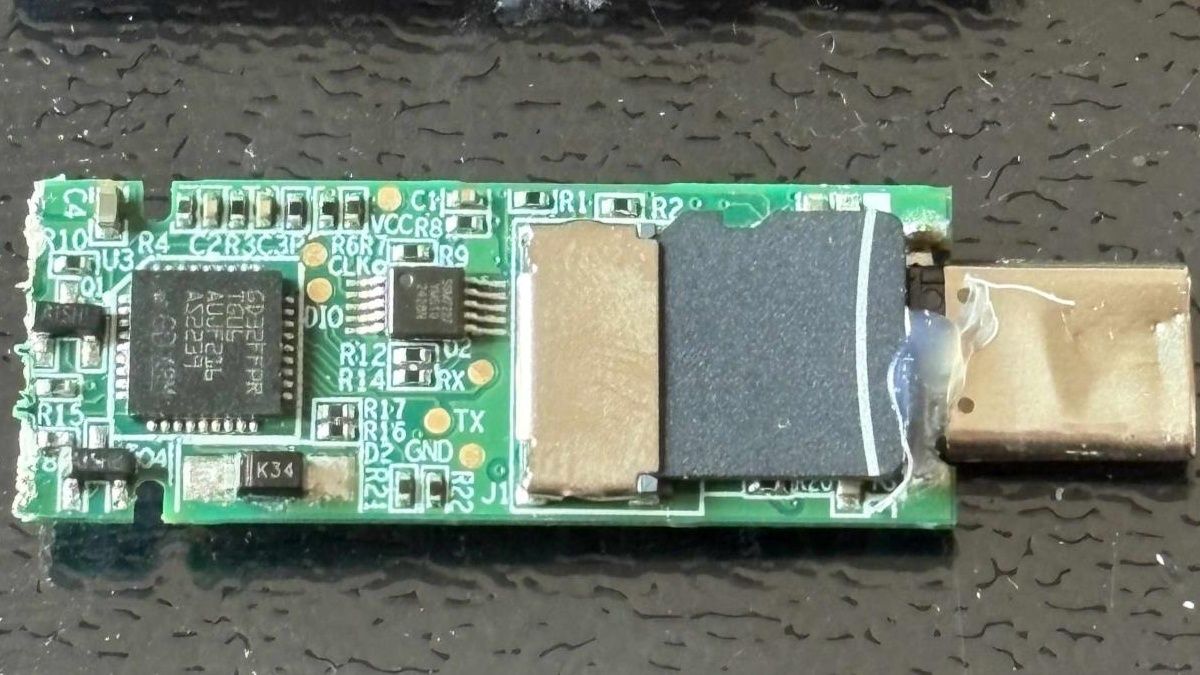
Quick Verdict
The Lenovo ThinkPlus FU100 fingerprint USB drive is a catastrophic failure in data security, actively misleading consumers with claims of AES-256 encryption. It's essentially an unencrypted SD card with a fingerprint reader that merely enables the USB connection, offering no real protection. This discovery, along with severe vulnerabilities in other "secure" USB drives from Lenovo and other manufacturers (including plaintext password transmission, backdoors, and hardcoded keys), paints a grim picture for hardware-based data encryption claims. Avoid these products if true data security is your concern.
The Illusion of Security: Lenovo's Broken Promise
In an era where data breaches are rampant and personal privacy is paramount, consumers often turn to products promising robust security features. Lenovo's ThinkPlus FU100 fingerprint USB stick entered the market with such a promise, boasting AES-256 encryption and biometric access control. The allure was simple: keep your sensitive data safe, locked behind your unique fingerprint. However, recent findings by security researcher Xusheng Li have shattered this illusion, revealing a fundamentally flawed product that offers virtually no real encryption and, disturbingly, points to a broader systemic issue within the "secure" USB drive market. What was marketed as a fortress for your data turns out to be a flimsy façade.
The FU100: A Plain SD Card in Disguise
The core revelation regarding the Lenovo ThinkPlus FU100 is staggering in its simplicity and profound in its implications. Despite being sold as an "AES-256-encrypted device," internal analysis showed the FU100 to be nothing more than a standard microSD card lodged inside a fancy casing. The sophisticated fingerprint reader, instead of acting as a gateway to securely encrypted data, served only one purpose: to enable the USB connection to the host computer. This means that if an attacker gained physical access to the device, extracting the microSD card would grant them immediate, unencrypted access to all stored data. There was no encryption layer at all. This isn't a bypass; it's a complete absence of the advertised feature. For anyone who purchased this drive believing their sensitive files were protected by industry-standard encryption, this discovery represents a profound breach of trust and a significant security risk. It underscores the researcher's stark warning: "‘Hardware security’ can be pure marketing."
Widespread Vulnerabilities: Beyond a Single Device
The investigation didn't stop with the FU100. Further AI-assisted analysis by Xusheng Li uncovered a troubling pattern of vulnerabilities across a range of other "secure" USB products, including other Lenovo devices and drives from unnamed vendors using the same vulnerable software development kit (SDK).
Take, for instance, Lenovo's TSD303 external SSD. While this drive did implement data encryption, it suffered from a critical flaw in its password verification process. The drive would send the correct password back to the host computer in plain text for the accompanying software to verify. This design choice created an open invitation for interception, making it trivial for a savvy attacker to capture the password during authentication. A later fix was implemented to address this, making the drive verify the password internally, but the initial vulnerability exposed sensitive user credentials unnecessarily.
The problem extended to nine other devices from multiple vendors, all sharing the same flawed SDK. Many of these products were found to be susceptible to similar password revelation techniques, while at least two others mirrored the FU100's failure by storing data unencrypted on a microSD card.
Further deep dives into specific products from other manufacturers revealed similar, if not worse, design flaws:
- Netac's drive: Broken in approximately seven minutes using AI tools, it contained a hardcoded key within its program and logged user passwords to diagnostic files – essentially a roadmap for attackers.
- KakaSoft's USB Copy Protection: Despite its name, AI was able to rebuild an internal, program-generated password to decrypt test files in about 26 minutes, bypassing user-set protections.
- Nexcopy's Copy Secure: Its key was found to be unlocked by a certificate built directly into its viewer application, rendering its "security" largely moot after a mere ten minutes of AI-assisted probing.
- SecZure's YutianDun: This device harbored two hidden "backdoor" accounts with simple, easily discoverable passwords, exposing data to anyone who knew or could guess these default credentials.
These pervasive issues suggest a troubling trend where manufacturers prioritize convenience or cost-cutting over actual, robust security, often relying on "security through obscurity" rather than proven cryptographic principles.
Lenovo's Remedial Efforts: A Troubled Path
Lenovo has acknowledged some of these severe issues, releasing advisories and attempting to provide fixes. For the FU100, FU200, TU800, and TSD303 drives, a fix was made available earlier this year. However, the remediation process itself highlights the depth of the problem and the inconvenience placed upon consumers. Owners are required to contact a China service line, potentially send their devices back for replacement, or arrange for an on-site firmware upgrade. Crucially, Lenovo advises users to back up and then strongly recommends wiping their data before sending in or upgrading the drive – an inconvenient and potentially risky process for what should have been secure devices from the outset. Lenovo rated the severity of these vulnerabilities as high, with one CVE (Common Vulnerabilities and Exposures) specifically addressing the FU100's configuration software, which could allow a local, logged-in user to bypass authentication and enroll an untrusted fingerprint. While a later, more robust fix was applied to the TSD303 to have the drive handle password verification internally, the initial vulnerability and the laborious update process for other devices cast a long shadow over Lenovo's commitment to security by design.
The Double-Edged Sword of AI in Cybersecurity
It's notable that these extensive security flaws were, in part, brought to light through the assistance of Artificial Intelligence. Researcher Xusheng Li utilized OpenAI's Codex, an AI programming tool, in conjunction with his employer’s reverse-engineering tools. This combination allowed for rapid identification and exploitation of vulnerabilities, demonstrating AI's growing capability in uncovering cybersecurity weaknesses. On one hand, this is a boon for white-hat hackers and security researchers, enabling quicker discovery and remediation of flaws. On the other hand, it also serves as a stark reminder that malicious actors can also leverage such powerful tools, making robust, unassailable security design more critical than ever. The increasing prevalence of AI-driven reverse-engineering means that simplistic or easily discoverable security flaws will be found and exploited with unprecedented speed.
Pros and Cons
Pros:
- (None specific to the "encrypted" functionality, as it was non-existent or fundamentally flawed)
- Physical appearance may offer a false sense of security (if unaware of flaws).
- Can function as a basic, unencrypted USB drive once the fingerprint "unlocks" it (for the FU100).
Cons:
- False Advertising: Sold as AES-256 encrypted, but the FU100 contained an unencrypted SD card.
- Critical Security Flaws: Passwords transmitted in plain text (TSD303), hardcoded keys (Netac, KakaSoft, Nexcopy), backdoors (SecZure YutianDun), and unencrypted data on other drives.
- Inconvenient Remediation: Lenovo's fixes require user effort (calling service, mailing device, wiping data) and were not immediately comprehensive.
- Trust Erosion: Significant breach of consumer trust for products marketed on security.
- Vulnerability to Physical Access: Simple extraction of an SD card negates all "security" for FU100.
- Local Authentication Bypass: FU100 configuration software flaw allows untrusted fingerprint enrollment.
Buying Recommendation
Given the severe and fundamental security flaws discovered across multiple products, including Lenovo's "encrypted" fingerprint USB drive and other supposedly secure storage solutions, we cannot recommend purchasing or relying on these devices for any sensitive data. The core promise of encryption and data protection is broken, often replaced by superficial measures or outright deception. If you own one of these affected drives, immediately transfer any sensitive data to a truly secure, independently verified storage solution, then wipe the drive. When considering "secure" USB drives or SSDs, always exercise extreme caution. Look for products with independently verified, open-source encryption implementations or those from reputable brands with a transparent track record in security, ideally featuring hardware-level encryption that cannot be easily bypassed or extracted. Always heed the expert advice: "client-side validation is never secure" and "always verify security claims on your own." Your data's safety is too important to leave to marketing promises alone.
FAQ
Q: If I own a Lenovo ThinkPlus FU100, is my data secure? A: No, your data is not secure on a Lenovo ThinkPlus FU100. Despite claims of AES-256 encryption, the device contains an unencrypted microSD card. The fingerprint reader only enables the USB connection, meaning anyone with physical access can remove the SD card and access your data without any encryption barrier.
Q: Are there any safe "secure" USB drives available? A: The research highlights that "hardware security" can often be misleading marketing. While the source mentions an open-source USB stick that properly derives its encryption key from a user's password, making data inaccessible even if the card is read directly, it does not name specific commercial products. It is crucial to look for devices with independently verified, robust encryption, ideally with open-source firmware or strong, transparent security audits, rather than relying solely on manufacturer claims.
Q: What should I do if I currently use one of these vulnerable "encrypted" drives? A: Immediately back up any sensitive data to a trusted, demonstrably secure storage method (e.g., a properly encrypted partition on your computer's drive or cloud storage with strong client-side encryption). Afterward, wipe the vulnerable drive completely. For Lenovo devices mentioned (FU100, FU200, TU800, TSD303), Lenovo has issued an advisory and offers firmware upgrades, but the process is inconvenient and requires prior data backup and wiping.
Related articles

Binance Reopens After Historic Heist: A Fragile Recovery
Verdict Binance, one of the world's largest cryptocurrency exchanges, has reopened transactions after suffering a staggering $6.3 billion crypto heist, one of the largest in history. While the platform has commendably

Touchscreen MacBook Pro: Uninspired and Unconvincing
Apple's new touchscreen MacBook Pro with its PROLED XDR Display feels like an uninspired addition. Despite the beautiful OLED panel, the touchscreen functionality is uncomfortable for extended use and doesn't justify its premium.

GeekWire Week in Review: A Curated Dose of PNW Tech News
Verdict: Your Weekly Dose of Pacific Northwest Tech Insights GeekWire's "Week in Review" for October 25, 2026, serves as a highly efficient digest for anyone looking to stay abreast of the significant tech and startup
Biwin M560 2TB SSD Review: A DRAM-less PCIe 5.0 Powerhouse
The Biwin M560 2TB SSD is a top-tier PCIe 5.0 DRAM-less drive, delivering exceptional application and gaming performance with impressive efficiency. Its SMI SM2504XT controller shines, making it a strong contender for next-gen storage.

SpaceX Starfall Cargo Drop Pods: Space-Delivered Logistics, Tested
The USAF and SpaceX Starfall cargo drop pods successfully demonstrated orbital delivery of military supplies, offering rapid, safe logistics. While current capacity is 2,200 pounds, future plans aim for tens of tons.
DJI Romo P Review: Drone Navigation Hits Your Floors with Impressive
Quick Verdict The DJI Romo P, our Home Device of the Year for 2026, marks an astonishing debut for DJI in the robot vacuum market. Leveraging its unparalleled drone-navigation technology, the Romo P offers class-leading