
InfiMaker K1 Review: Accessible 5-Axis CNC Milling for All
Quick Verdict The InfiMaker K1 stands out as a genuinely intriguing proposition for anyone fascinated by physical object creation but intimidated by the complexities of traditional CNC machining. Its core appeal lies in
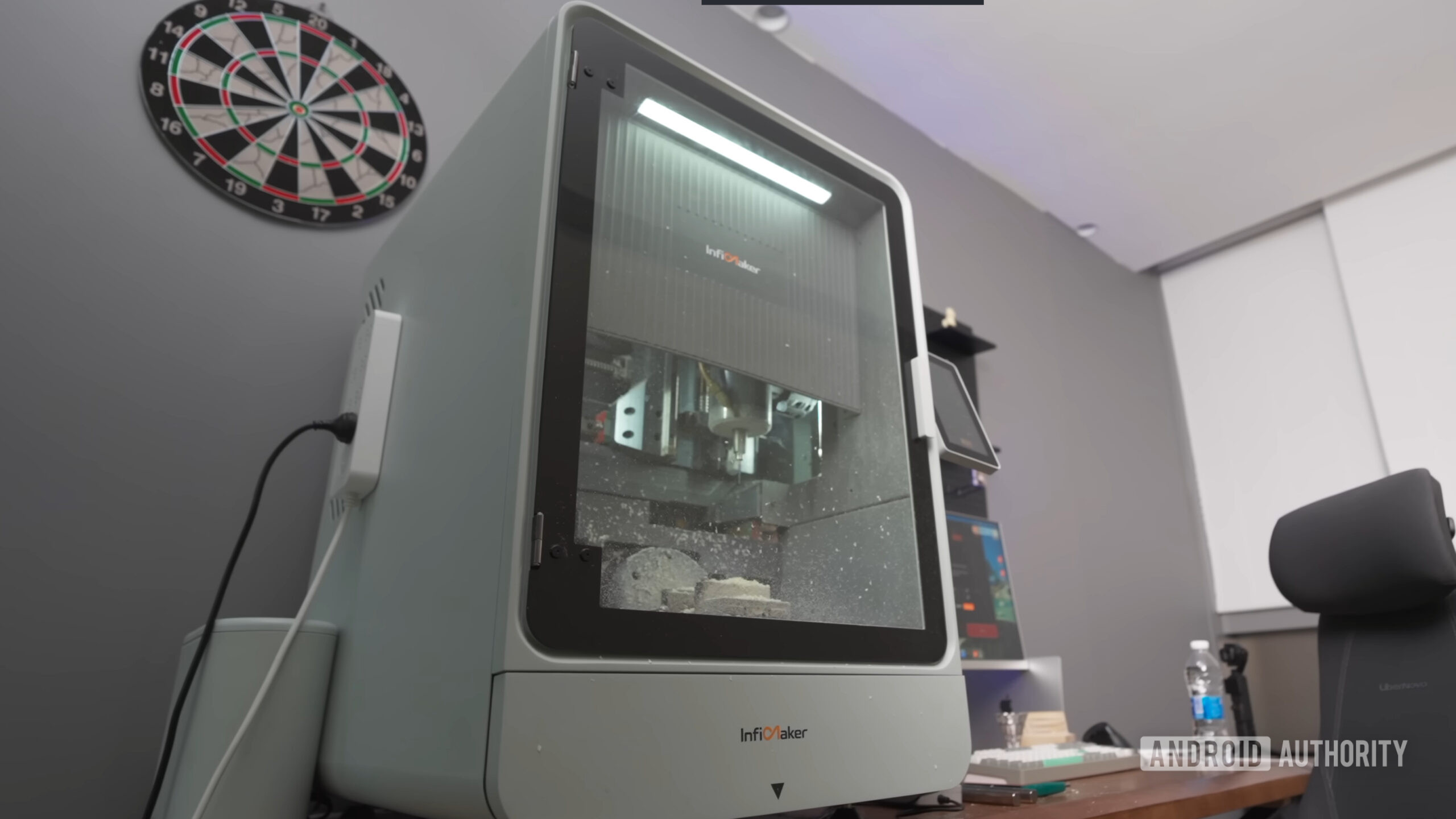
Quick Verdict
The InfiMaker K1 stands out as a genuinely intriguing proposition for anyone fascinated by physical object creation but intimidated by the complexities of traditional CNC machining. Its core appeal lies in bridging the gap between desire and execution, leveraging AI to simplify the notoriously steep learning curve associated with computer-aided manufacturing. With its impressive 5-axis capability, robust spindle, and wide material compatibility, the K1 promises professional-grade results from a desktop footprint. However, its premium price tag, even at the Kickstarter early bird rate, places it firmly in the enthusiast or small business category, demanding a significant investment. While the AI-driven workflow is a major draw, potential backers should approach crowdfunding campaigns with awareness of inherent risks.
Introduction to Desktop CNC and the InfiMaker K1
For years, 3D printing has held the crown as the go-to method for hobbyists and professionals alike to bring digital designs into the physical world. However, a parallel revolution has been quietly brewing in the realm of Computer Numerical Control (CNC) milling. Historically confined to industrial settings due to their size, cost, and steep operational learning curve, CNC machines are increasingly making their way to the desktop, becoming more accessible and user-friendly. This shift is driven by more affordable hardware and sophisticated, easier-to-grasp Computer-Aided Manufacturing (CAM) software.
Enter the InfiMaker K1, a new desktop CNC mill that aims to democratize advanced milling, promising to let users carve intricate 3D figurines and objects with "zero experience." Its headline feature is the integration of artificial intelligence, designed to transform any 2D image into a 3D millable model, thereby eliminating the need for complex Computer-Aided Design (CAD) expertise. Currently, the InfiMaker K1 is seeking funding on Kickstarter, offering an early opportunity for those eager to embrace this new era of hands-on digital fabrication.
Key Features and Specifications
The InfiMaker K1 is not just another desktop CNC; it boasts a feature set that positions it as a powerful contender in its class, especially for its claimed ease of use:
- AI-Assisted CAM: The most significant innovation is its software, which uses AI to convert standard 2D images directly into 3D millable objects. This is a game-changer for accessibility, as it removes the traditional barrier of needing extensive CAD experience to design complex models. For those with existing 3D models, it also supports industry-standard file formats such as STL, STEP, and OBJ.
- 5-Axis Cutting Capability: Moving beyond the typical three axes (X, Y, Z) found in many desktop machines, the K1 offers 5-axis milling. This means the machine can cut while the workpiece is simultaneously tilted or rotated. Specifically, it supports tilts ranging from -30° to +110°, enabling the creation of highly complex geometries and undercuts that would be impossible with 3-axis machines. This is particularly valuable for detailed 3D figurines and intricate artistic pieces.
- Automatic Tool Changer (ATC): Equipped with an automatic tool changer capable of juggling five different tools, the K1 streamlines the milling process. This feature significantly reduces manual intervention, allowing for more continuous and automated operations, especially when a project requires multiple stages of carving with different tools.
- Ruby Centering Probe: The inclusion of a ruby centering probe enhances precision, allowing for accurate workpiece and tool calibration, which is crucial for achieving fine details and consistent results.
- Powerful Spindle: The machine features a 1.5kW (kilowatt) spindle that can reach speeds of up to 20,000rpm (revolutions per minute). This power and speed combination is essential for efficiently working with a wide range of materials, from soft waxes to harder metals.
- High Repeatability: InfiMaker claims a repeatability of 0.01mm, meaning the machine can consistently return to a specific point with exceptional accuracy. This level of precision is vital for detailed carving and ensuring the quality of finished objects.
- Wide Material Compatibility: The K1 is designed to mill an impressive array of materials, including acrylic, aluminum, brass, composites, copper, engineering plastics, jade, resin, steel, titanium, wax, and various types of wood. This versatility opens up a vast world of creative and practical applications for users.
User Experience and Ease of Use
The promise of "zero experience" and "no CAD experience" is where the InfiMaker K1 truly aims to differentiate itself. Traditional CNC operation involves a steep learning curve, requiring users to master CAD software for design, and then CAM software to generate toolpaths before the machine can even begin cutting. The K1's AI-assisted CAM intends to simplify or even bypass much of this complexity, allowing users to start from a 2D image and let the AI handle the intricate 3D conversion. This approach significantly lowers the barrier to entry, making advanced milling accessible to artists, hobbyists, and small businesses who might otherwise be deterred by the technical demands.
Our initial insights from a hands-on experience with a similar desktop CNC mill, as mentioned by the source, suggest that such simplified workflows can indeed deliver on their promise of creating complex objects without deep CAD expertise. The K1's ability to handle the complexities of 4- or 5-axis milling software conveniently, combined with its support for standard 3D model formats, indicates a thoughtful design aimed at maximizing user-friendliness without sacrificing advanced capabilities.
Performance and Versatility
Beyond its ease of use, the InfiMaker K1's specifications point to a capable and versatile machine. The 1.5kW spindle operating at 20,000rpm is well-suited for milling the diverse range of materials listed, from softer woods and plastics to more challenging metals like aluminum, brass, and even titanium. This broad material compatibility makes the K1 suitable for various projects, from crafting delicate jewelry and intricate artistic sculptures to prototyping functional parts.
The 5-axis cutting capability, coupled with a 0.01mm repeatability, means that the K1 isn't just easy to use; it's also highly precise. This level of accuracy is critical for producing high-quality 3D figurines and models where fine details are paramount. The automatic tool changer further enhances its performance by enabling multi-tool operations without constant manual intervention, allowing for more complex and polished finished products.
Pros and Cons
Pros:
- AI-Assisted CAM: Drastically lowers the barrier to entry by converting 2D images to 3D models, eliminating the need for prior CAD experience.
- 5-Axis Capability: Enables complex geometries and undercuts, offering greater creative freedom than 3-axis machines.
- Automatic Tool Changer: Enhances automation and efficiency, reducing manual work for multi-tool projects.
- High Precision: 0.01mm repeatability ensures fine details and high-quality finishes.
- Wide Material Compatibility: Works with a vast range of materials, from plastics and wood to various metals.
- Powerful Spindle: 1.5kW, 20,000rpm spindle handles diverse milling tasks effectively.
- Desktop Form Factor: Makes advanced CNC milling accessible for home workshops or small studios.
- Kickstarter Early Bird Discount: Offers a substantial saving over the planned retail price.
Cons:
- High Price Point: Even the early bird Kickstarter price of $5,199 is a significant investment for a desktop machine, placing it out of reach for many casual hobbyists. The planned MSRP of $8,599 is even more prohibitive.
- Crowdfunding Risks: As a Kickstarter project, there are inherent risks associated with crowdfunding, including potential delays, changes to specifications, or even non-delivery.
- Limited Information on Software Interface: While the AI functionality is highlighted, detailed information on the full software interface, user controls, and ongoing software support is not extensively provided in the source material.
- No Mention of Operational Noise/Dust Management: Typical concerns for CNC machines in a home or small workshop setting, such as noise levels and dust/chip management solutions, are not detailed in the provided information.
- Lack of Direct Competitor Comparison: The source doesn't offer specific comparable desktop 5-axis CNC mills for a direct feature-by-feature or price comparison, making it difficult to gauge its value against unnamed alternatives in the market.
Pricing and Availability
The InfiMaker K1 is currently available for backing on Kickstarter. Early bird supporters can acquire the machine for a pledge of $5,199, which represents a substantial 40% discount from its projected retail price of $8,599. Higher pledge tiers are also available, offering additional accessories such as a water coolant system, a set of vice jaws, and a wireless jog handwheel, which could enhance the machine's functionality and user experience.
Comparison to Alternatives
The source material does not provide specific, named desktop CNC mills that are directly comparable to the InfiMaker K1 in terms of features and price. While 3D printing is mentioned as a general alternative for creating physical objects, it operates on fundamentally different principles (additive vs. subtractive manufacturing) and offers different material capabilities and surface finishes. Without specific models to compare against the K1's unique combination of 5-axis milling and AI-assisted CAM, creating a direct comparison table would be speculative and not based on the provided facts.
It's important for potential buyers to research the broader desktop CNC market to understand how the K1, particularly with its AI and 5-axis capabilities, stacks up against other machines that might offer some, but perhaps not all, of its features at various price points.
Buying Recommendation
The InfiMaker K1 represents an exciting leap forward in desktop CNC accessibility, primarily due to its AI-driven simplification of the design and CAM process. For individuals or small businesses who have a strong desire to produce complex 3D carvings, figurines, or functional prototypes from a wide array of materials, and who value ease of use over deep technical expertise, the K1 could be an excellent investment. Its 5-axis capability and high precision mean serious creative and manufacturing potential.
However, the steep price tag, even at the Kickstarter discounted rate, means it's not a casual purchase. It's best suited for dedicated enthusiasts, educators, or small fabrication studios where the professional-grade features and simplified workflow will be utilized to their full potential. Prospective buyers must also weigh the typical risks associated with backing a crowdfunding campaign. If you're ready to commit to the cost and are comfortable with the crowdfunding model, the InfiMaker K1 promises to unlock a new dimension of creative possibility with unprecedented ease.
FAQ
Q: Is the InfiMaker K1 suitable for beginners with no prior CNC experience? A: Yes, the InfiMaker K1 is specifically designed for users with zero prior milling or CAD experience. Its AI-assisted software can convert 2D images directly into 3D millable objects, significantly simplifying the design and manufacturing process.
Q: What materials can the InfiMaker K1 mill? A: The InfiMaker K1 is highly versatile and can machine a wide range of materials, including acrylic, aluminum, brass, composites, copper, engineering plastics, jade, resin, steel, titanium, wax, and various types of wood.
Q: What is the price of the InfiMaker K1? A: During its Kickstarter campaign, the InfiMaker K1 starts at an early bird pledge of $5,199, which is 40% off its planned MSRP of $8,599. Higher tiers are available with additional perks.
Related articles
Android 17 QPR2 Beta 7.1: The Performance Relief You've Been Waiting
Android 17 QPR2 Beta 7.1: Finally Fixing the QPR1 Performance Woes Verdict: Android 17 QPR2 Beta 7.1 is a crucial and highly anticipated software update for Google Pixel users, specifically targeting and resolving the

DJI Solo Video Setups: Smart Choices for Lone Creators
This review delves into DJI's recommended solo video setups, highlighting the Osmo Pocket 3 Creator Combo as a top pick for its integrated camera, gimbal, and mic. It also covers stabilizers like the Osmo Mobile 8 and RS 4, and the DJI Mic Mini series for enhanced audio, providing honest pros, cons, and clear buying advice.

Ditch Merge & Center: The Better Way to Align Text in Excel
Learn to use Excel's "Center Across Selection" to align text across cells without merging, avoiding common data manipulation issues. This guide provides steps to utilize this newly accessible feature and add it to your Quick Access Toolbar.

Ars Technica's Rocket Report: Your Essential Space Industry Briefing
Quick Verdict Ars Technica's Rocket Report, presented by veteran space reporter Stephen Clark, offers an invaluable and meticulously organized weekly (or similar frequency, implied by "Edition 9.15") digest of the most

Apple iPhone Duo: A Daring Debut with Notable Compromises
Apple's highly anticipated iPhone Duo, priced at $2,000, has gone on pre-order. While hailed as "Apple's most exciting device in a decade" for its innovative foldable design and immersive display, it comes with significant drawbacks like the absence of FaceID and a premium camera.

AI's Confidence vs. Formal Methods' Rigor: Design Flaws & Verification
While AI accelerates code generation, formal methods remain critical for ensuring system correctness. Languages like TLA+ and tools like Quint enable developers to model and verify system designs before coding, catching subtle flaws. Quint makes formal methods more accessible with developer-friendly syntax and executability. This approach is vital for verifying AI-generated code through trace validation and model-based testing, ensuring reliability against real-world data.