
How to Discover Kobo: Your Best Kindle Alternative for Better Reading
Learn to explore the Kobo e-reader ecosystem and find out why it might be a superior alternative to Kindle for library users, open format fans, and those seeking physical controls.
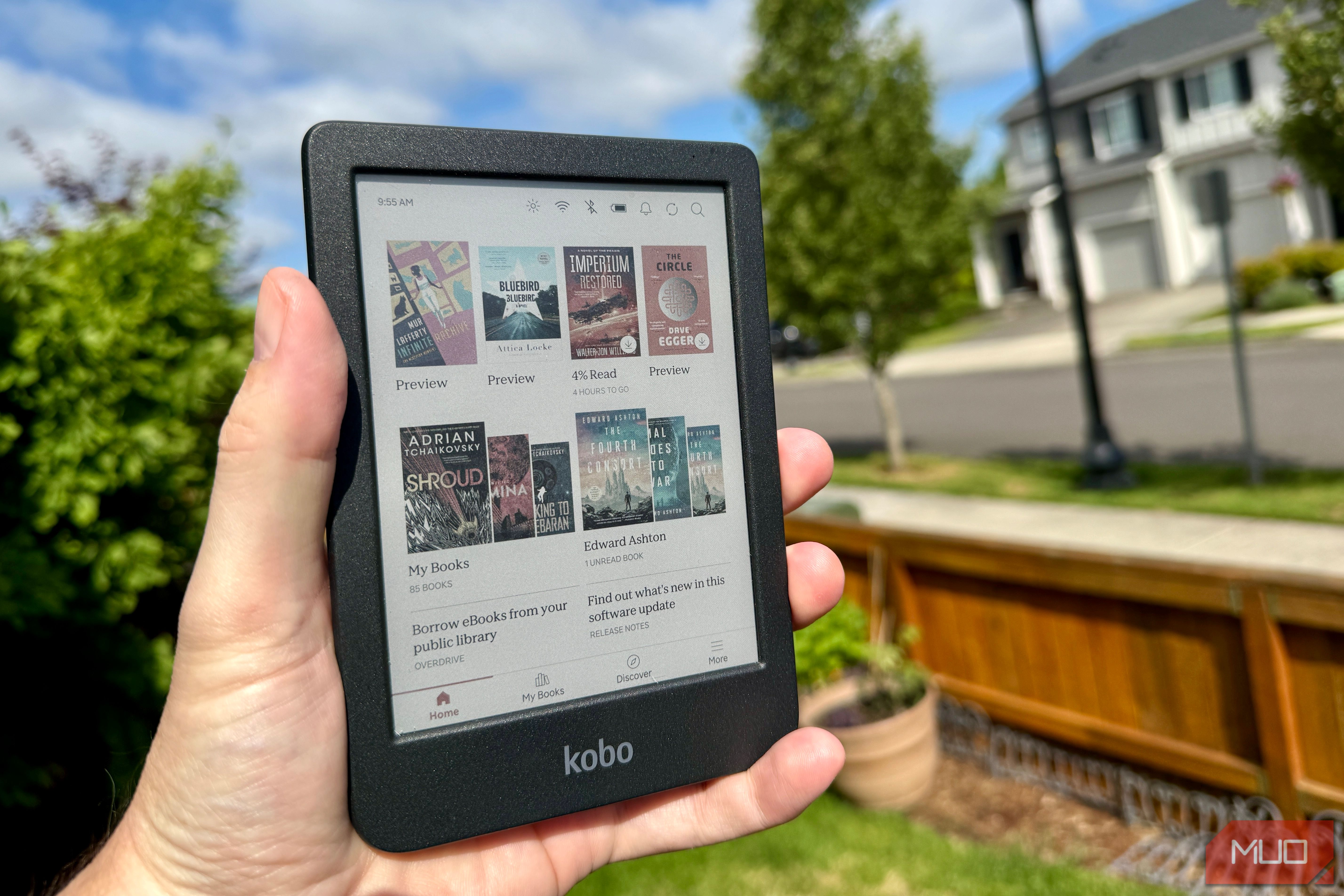
When you think of e-readers, Kindle often comes to mind first. But what if there was another option that better fits your reading habits, especially if you love borrowing books from the library or prefer an open digital ecosystem? Kobo e-readers offer compelling features that many readers never consider, providing a robust alternative to Amazon's popular devices.
This guide will walk you through the key advantages of Kobo, help you understand its hardware options, and compare its unique benefits to those of Kindle. By the end, you'll have a clear picture of why Kobo might just be the e-reader you've been searching for, especially if your goal is a more flexible and integrated reading experience.
Prerequisites for Exploring Kobo
To get the most out of this guide, all you need is an open mind about exploring new e-reading possibilities. Having a public library card can be a bonus, as Kobo's integration with libraries is one of its standout features. No prior technical expertise is required – we'll explain everything you need to know about Kobo's unique offerings.
Step 1: Uncover Kobo's Game-Changing Software Features
Kobo stands out with several software integrations that truly enhance the reading experience, particularly for avid readers who utilize public libraries or prefer diverse digital content sources.
Seamless Library Access with OverDrive
This is arguably Kobo's most significant advantage. Kobo e-readers feature OverDrive, the platform behind the popular Libby app, built directly into the device's interface. This means you can:
- Sign in once: Simply enter your library card details directly on your Kobo device.
- Browse and borrow seamlessly: Once signed in, browsing your local library's digital catalog works just like browsing Kobo's own bookstore.
- Read instantly: Tap a book, borrow it, and start reading – all from your Kobo.
This integrated workflow eliminates friction. Unlike Kindle, where borrowing library books typically requires a separate phone or computer running the Libby app, Kobo lets you manage your library loans entirely on your e-reader. This streamlined process is a huge win for anyone who frequently borrows books, making the switch worthwhile for many.
The Open Ecosystem: Beyond Proprietary Formats
Tired of proprietary formats? Kobo embraces an open ecosystem. It natively supports EPUB, which is the standard e-book format outside of Amazon's world. This flexibility means:
- Easy sideloading: If you purchase a book directly from a publisher, download a free title from Project Gutenberg, or acquire a novel from Bookshop.org, you can simply connect your Kobo to your computer via USB and drag the file directly onto your device. No conversions or third-party tools are needed.
- Wider content access: This open approach gives you the freedom to source your e-books from a vast array of vendors beyond Kobo's own store, without hassle. Kobo also supports CBZ and CBR comic book formats, making it a better option for graphic novel and manga readers.
While Kindle now supports EPUB, you still have to route these files through their 'Send to Kindle' platform, adding an extra layer between you and your files. Kobo's direct transfer method is far more convenient for personal files.
StoryGraph Integration for Seamless Reading Tracking
For those who track their reading progress, Kobo is the first e-reader with native StoryGraph integration, launched in June 2026. StoryGraph is a popular independent book-tracking platform, often preferred over Amazon's Goodreads. This integration automatically syncs your current reads, progress percentages, and finished books (both e-books and audiobooks) directly to your StoryGraph profile, providing a convenient and accurate way to manage your reading journey.
Step 2: Explore Kobo's Diverse Hardware Options
Kobo offers a range of devices, including color e-readers, that cater to different preferences, often with features not found on equivalent Kindles. Let's look at two prominent models:
Meet the Kobo Colour Lineup
- Kobo Libra Colour ($219.99): This model features a 7-inch E Ink Kaleido 3 color display, 32GB of storage, IPX8 waterproofing, Bluetooth for audiobooks, physical page-turn buttons, and optional stylus support via the Kobo Stylus 2. It's an excellent main home reader for its screen size and annotation capabilities.
- Kobo Clara Colour ($149.99): A more compact option, the Clara Colour runs the same E Ink Kaleido 3 screen technology in a smaller 6-inch body with 16GB of storage and no physical buttons. Its light and portable design makes it ideal for travel and outdoor activities like kayaking or beach trips.
Both devices are IPX8 waterproof, ensuring durability and peace of mind wherever you take them.
The Power of Physical Buttons and Stylus Support
One significant hardware differentiator for the Kobo Libra Colour is the inclusion of physical page-turn buttons. This tactile control is entirely absent from current Kindle models and is a highly valued feature for many readers. Additionally, the Libra Colour offers optional stylus support, allowing for direct annotations on your e-books – a feature neither comparable Kindle offers.
Color That Works for Readers (Kaleido 3)
Both Kobo Colour models utilize E Ink's Kaleido 3 panel, the same underlying technology found in the Kindle Colorsoft. Kobo's black and white text is sharp and paper-like (at 300 PPI). While the color mode (at 150 PPI) is a bit limited for highly detailed artwork or small comic text, it handles book covers and illustrated non-fiction content well. For most readers who want color for visual elements while doing the bulk of their reading in black and white, Kobo's implementation is more than adequate and often comes at a more competitive price point than the Kindle Colorsoft, especially when factoring in Kobo's additional hardware features.
Step 3: Deciding If Kobo is Right for You
Now that you understand Kobo's unique strengths, let's consider who benefits most from switching or trying a Kobo e-reader.
Kobo is an Excellent Fit If You:
- Are a heavy public library user: The built-in OverDrive integration is a massive convenience.
- Buy e-books from various sources: Native EPUB support and easy USB transfer free you from proprietary formats.
- Value physical controls: The Libra Colour's page-turn buttons offer a tactile reading experience.
- Want a decent color screen at a competitive price: Kobo's Kaleido 3 screens provide good color for covers and illustrations.
- Prefer an open ecosystem: Less of your money and data goes directly to Amazon.
- Track reading on StoryGraph: The new native integration simplifies your reading journey.
When Kindle Might Still Be Preferred:
- Primary use case is highly detailed color artwork: If you primarily read comics, children's books, or magazines requiring very vibrant and detailed color, Amazon's ecosystem might offer a larger catalog of color-optimized content.
- Strongly tied to the Amazon ecosystem: If you already have a vast Kindle library and prefer Amazon's cloud backup for all your content, including sideloaded books.
Ultimately, while Amazon dominates in marketing and brand recognition, Kobo often comes out ahead in areas like library access, format flexibility, and desirable physical controls. The addition of color screens on Kobo models makes its advantages even more compelling.
Tips for a Smooth Kobo Experience
As you explore Kobo, keep these tips in mind for a smooth experience:
- Sideloaded Book Management: Kobo does not offer cloud backup for books you transfer via USB. Always keep a backup copy of these files on your computer or personal cloud storage to prevent loss.
- Choosing Your Kobo: Consider your primary reading environment. The Libra Colour is great for home use with its buttons and stylus, while the Clara Colour's portability makes it perfect for on-the-go reading.
- Leverage OverDrive: If you're a library member, make sure to sign into OverDrive on your Kobo as soon as you set it up. It truly is a killer feature.
Next Steps
Ready to explore Kobo further?
- Visit Kobo's Official Website: Check out the latest models and specifications directly.
- Explore Your Library's Digital Catalog: See what's available through OverDrive in your local library system.
- Consider Your Reading Habits: Think about how often you use the library, where you buy books, and if features like physical buttons or stylus support are important to you. This will help you decide if Kobo is the right fit.
FAQ
Q: Can I still use my local library with Kobo?
A: Yes, Kobo e-readers feature OverDrive built directly into the device's interface, allowing you to sign in with your library card once and then browse, borrow, and read books from your public library seamlessly on the device itself.
Q: Does Kobo support different e-book formats like EPUB?
A: Absolutely. Kobo natively supports EPUB, which is the standard format for e-books outside of Amazon's ecosystem. You can easily drag and drop EPUB files onto your Kobo via USB without needing conversions or third-party tools. It also supports CBZ and CBR comic book formats.
Q: Do Kobo e-readers have color screens?
A: Yes, models like the Kobo Libra Colour and Kobo Clara Colour utilize E Ink Kaleido 3 color displays. These screens offer sharp black and white text for general reading and provide adequate color rendering for book covers, illustrated non-fiction, and some comics.
Related articles

Ditch Merge & Center: The Better Way to Align Text in Excel
Learn to use Excel's "Center Across Selection" to align text across cells without merging, avoiding common data manipulation issues. This guide provides steps to utilize this newly accessible feature and add it to your Quick Access Toolbar.

Ars Technica's Rocket Report: Your Essential Space Industry Briefing
Quick Verdict Ars Technica's Rocket Report, presented by veteran space reporter Stephen Clark, offers an invaluable and meticulously organized weekly (or similar frequency, implied by "Edition 9.15") digest of the most
%20102026%20top%20art%20SOURCE%20Govee.jpg)
in-depth: The Best Permanent Outdoor Lights (2026): Govee, Eufy
WIRED, a leading voice in technology journalism, has just released its updated guide for 2026 on the best permanent outdoor lights, spotlighting top contenders Govee, Eufy, and Cync. These innovative eave lights are

Stop Android Auto Battery Drain: Essential Features to Disable and
Android Auto offers unparalleled convenience, bringing your phone's most useful features directly to your car's display. From navigation and calls to messages and music, it keeps you connected without distracting you
Turn Your Android Phone into a Powerful Desktop Replacement
Learn how to transform your Android phone into a full-fledged desktop computer using external displays and accessories, providing a cost-effective and integrated alternative to new Googlebooks.

howto: Four Ways the Fitbit Edge Is Better Than the Charge 6, and Two
Learn the key differences between the Fitbit Edge and Charge 6, including four advantages of the Edge and two areas where it falls short, to help you choose the best fitness tracker for your needs.