
How to Choose the Right ASUS PC for Your Home or Business Needs
Welcome to your comprehensive guide on navigating ASUS's latest desktop offerings in India! ASUS has recently expanded its lineup with the robust V501 desktop series and the sleek AiO V400 all-in-one PCs. If you're
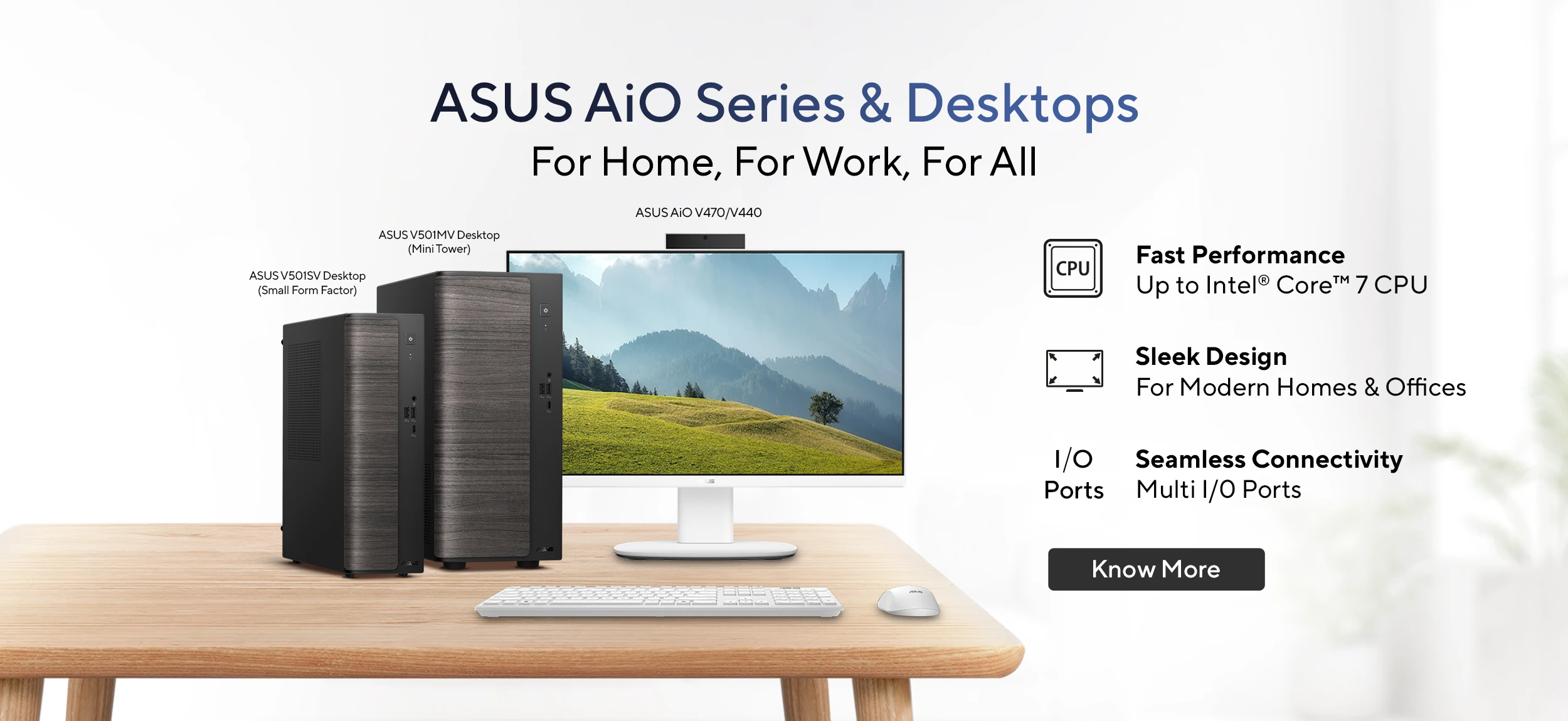
Welcome to your comprehensive guide on navigating ASUS's latest desktop offerings in India! ASUS has recently expanded its lineup with the robust V501 desktop series and the sleek AiO V400 all-in-one PCs. If you're looking to upgrade your current setup or equip a new workspace, understanding the unique features and target audiences for these new machines is key.
By the end of this guide, you’ll be able to confidently identify which ASUS V501 or AiO V400 PC best suits your specific requirements, whether for a bustling small business, a creative studio, or a clutter-free home office.
Before You Begin: What You'll Need
To make the most informed decision, it's helpful to have a clear understanding of your needs upfront. Consider the following points:
- Primary Use Case: Will this PC be predominantly for business tasks (accounting, documentation, online meetings, light creative work) or for home use (web browsing, streaming, online learning, video calls, basic productivity)?
- Performance Requirements: How demanding are your typical daily tasks? Do you need robust multitasking capabilities, or is reliable everyday performance sufficient?
- Space Constraints: Do you have ample desk space for a traditional tower, or do you require a compact small form factor or an all-in-one solution to minimize clutter?
- Budget: While we'll cover starting prices, having a general budget range in mind will help narrow down your options.
With these considerations in mind, let’s dive into the specifics of each series.
Step 1: Defining Your Desktop Needs – Business vs. Home
The first crucial step is to determine the primary environment and tasks your new PC will be used for. ASUS has designed these new series with distinct users in mind, making this initial assessment paramount.
- For Business & Productivity: If your daily routine involves extensive documentation, frequent online meetings, managing finances, or even light graphic design, the ASUS V501 series is engineered to meet these demands. It’s built for sustained, reliable performance.
- For Home & Convenience: If your needs lean towards everyday computing, such as browsing the web, enjoying streaming content, facilitating online education, or video calls with family and friends, the AiO V400 series offers a streamlined, space-saving solution perfect for home environments.
Once you’ve identified your primary use case, you can then explore the features that align with it.
Step 2: Exploring the ASUS V501 Desktop Series for Work and Small Businesses
The ASUS V501 series is specifically designed to be a dependable workhorse for SOHOs (Small Office/Home Office), startups, creative studios, and other small organizations. These desktops are engineered for stability and performance during long working hours.
Key Features and Benefits:
- Powerful Processing: Equipped with up to Intel Core 7 240H processors, the V501 series delivers substantial power for demanding workloads. This means smooth multitasking across various applications without slowdowns, crucial for business productivity.
- Ample Memory: Supporting up to 64GB of DDR5 RAM, these desktops are capable of handling multiple applications simultaneously, making them ideal for data-intensive tasks, complex spreadsheets, and moderate creative software.
- Advanced Thermal Design: ASUS has incorporated an advanced thermal setup, including copper heat pipes, to ensure the system remains cool even under heavy loads. This design helps maintain consistent performance and extends the lifespan of components.
- Quiet Operation: Operating with noise levels as low as 38dB under load, the V501 series is designed to be remarkably quiet. This makes it an excellent choice for open-plan offices, client-facing areas, or any environment where minimizing distraction is important.
- Fast Storage and Efficient Power: Featuring fast SSD storage for quick boot times and rapid data access, these desktops enhance overall responsiveness. An 80+ Bronze-certified power supply ensures improved energy efficiency, which can lead to cost savings for businesses running systems throughout the day.
Models and Availability:
- ASUS V501MV Mini Tower: This model comes with a 15L chassis, offering a balance of expandability and a relatively compact footprint for a tower PC.
- ASUS V501SV Small Form Factor (SFF): For tighter spaces, the V501SV boasts a compact 9L design, making it a great option where desk space is at a premium without compromising on core performance.
The ASUS V501MV and V501SV desktops have a starting price of Rs 42,990. They became available from March 16 via ASUS Exclusive Stores, the ASUS eShop, Amazon, Flipkart, and other authorized retail partners.
Step 3: Discovering the ASUS AiO V400 Series for Homes and Hybrid Work
For those seeking a minimalist setup and efficient performance for everyday tasks, the ASUS AiO V400 series is an excellent choice. These all-in-one PCs are perfect for home users, students, or anyone looking to reduce desk clutter in compact living spaces or hybrid work environments.
Key Features and Benefits:
- Clutter-Free Design: As an All-in-One (AiO), the monitor and computer components are integrated into a single unit. This design significantly reduces cable management headaches and frees up valuable desk space, creating a clean and organized workspace.
- Reliable Everyday Performance: Powered by up to Intel Core 3 processors and supporting up to 8GB DDR5 RAM, the AiO V400 series provides reliable performance for common tasks such as web browsing, streaming high-definition content, participating in online learning, making video calls, and managing productivity applications.
- Fast SSD Storage: The inclusion of SSD storage ensures quick application loading and system responsiveness, enhancing the overall user experience for daily computing needs.
- Versatile Connectivity (HDMI In/Out): A standout feature is the support for both HDMI In and HDMI Out. This allows the AiO V400 to function not only as a complete computer but also as a standalone monitor for other devices, such as gaming consoles or laptops, adding significant flexibility to your setup.
Models and Availability:
- ASUS V440 & V470: These models form the AiO V400 series, each designed to offer a streamlined experience with slight variations in specifications (V470 having higher starting price implies higher configuration).
The ASUS V470 AiO starts at Rs 71,990 and is currently available via ASUS Exclusive Stores, Croma, the ASUS eShop, Amazon, and other authorized retailers. The V440 model will be available for purchase starting April 14.
Step 4: Making Your Informed Decision and Where to Purchase
Now that you have a clear picture of both series, let's consolidate the information to help you finalize your choice.
- Choose ASUS V501 if: You prioritize raw processing power, extensive RAM capacity, expandability, and a dedicated machine for business-critical applications. You need a system that can handle long hours of work with advanced cooling and quiet operation. Space is less of a concern, or you prefer a traditional tower setup (even if compact).
- Choose ASUS AiO V400 if: You value minimalism, a clutter-free desk, and a simplified setup. Your primary tasks are general home computing, entertainment, online learning, and basic productivity. The ability to use it as a secondary monitor is a major plus.
Where to Buy:
Both series are widely available through ASUS's official channels and major retailers:
- ASUS V501 Series: ASUS Exclusive Stores, ASUS eShop, Amazon, Flipkart, and authorized retail partners.
- ASUS AiO V400 Series: ASUS Exclusive Stores, Croma, ASUS eShop, Amazon, and other authorized retailers.
Always compare prices and check for any bundled offers across different platforms before making your final purchase.
Tips for a Smart Purchase
- Consider Future Needs: While an entry-level model might suffice now, think about your computing needs in the next 2-3 years. Investing slightly more upfront might save you from needing an upgrade sooner.
- Check for Bundles: Retailers often offer deals that include a keyboard, mouse, or even software. Factor these into your overall cost.
- Read Reviews: Although this guide provides factual information, looking at user reviews for specific models can offer insights into real-world performance and satisfaction.
- Warranty and Support: Ensure you understand the warranty terms and available customer support for your chosen model.
Troubleshooting Your Decision Process
Sometimes, even with all the information, making a choice can be tough. If you're still undecided, try these tips:
- Re-evaluate Your Core Needs: If you're stuck between a V501SV (small form factor) and an AiO V400, revisit whether dedicated power and potential for upgrades (V501) are more important than integrated design and monitor functionality (AiO V400).
- Budget as a Tie-Breaker: Note that the starting price for the V501 series (Rs 42,990) is significantly lower than the starting price for the V470 AiO (Rs 71,990). If budget is a primary constraint, the V501 offers powerful options at a more accessible entry point.
- Physical Space Test: If possible, measure your desk area. Imagining the actual footprint of each PC in your intended space can often clarify the best fit.
Next Steps After Your Purchase
Congratulations on selecting your new ASUS PC! Once you've made your purchase, here are some recommended next steps:
- Setup and Installation: Follow the provided instructions to set up your new PC. For AiO models, this is typically very straightforward. For V501 desktops, connect your monitor, keyboard, and mouse.
- Initial Configuration: Go through the Windows setup process, install any necessary updates, and personalize your settings.
- Install Essential Software: Download and install your preferred web browser, productivity suite, and any specialized software required for your work or hobbies.
- Data Transfer: If you're replacing an old PC, plan how you'll transfer your important files and documents.
FAQ
Q: What is the fundamental difference between the ASUS V501 series and the AiO V400 series?
A: The ASUS V501 series consists of traditional tower desktops (mini-tower and small form factor) designed for robust performance in business and demanding productivity tasks. The AiO V400 series comprises all-in-one PCs, integrating the computer into the monitor for a clutter-free setup, ideal for home users and general everyday tasks where space and simplicity are key.
Q: Can I use the AiO V400 PC as just a monitor for another device?
A: Yes, a notable feature of the ASUS AiO V400 series is its support for HDMI In, which allows you to use the all-in-one PC's screen as a standalone monitor for external devices like laptops, gaming consoles, or other media players.
Q: Are these new ASUS PCs available internationally?
A: Based on the source information, the launch and availability details provided specifically pertain to the Indian market. Availability in other regions would need to be confirmed through local ASUS channels.
Related articles
Android 17 QPR2 Beta 7.1: The Performance Relief You've Been Waiting
Android 17 QPR2 Beta 7.1: Finally Fixing the QPR1 Performance Woes Verdict: Android 17 QPR2 Beta 7.1 is a crucial and highly anticipated software update for Google Pixel users, specifically targeting and resolving the

Ditch Merge & Center: The Better Way to Align Text in Excel
Learn to use Excel's "Center Across Selection" to align text across cells without merging, avoiding common data manipulation issues. This guide provides steps to utilize this newly accessible feature and add it to your Quick Access Toolbar.

Mark Wahlberg on using AI in film ‘the right way’ and being open to
Actor Mark Wahlberg believes AI has a place in filmmaking if used responsibly for enhancement, not script generation or actor replacement. At TechCrunch Disrupt, he expressed openness to an AI likeness carrying on his legacy, managed by his family, and emphasized storytelling.

Ars Technica's Rocket Report: Your Essential Space Industry Briefing
Quick Verdict Ars Technica's Rocket Report, presented by veteran space reporter Stephen Clark, offers an invaluable and meticulously organized weekly (or similar frequency, implied by "Edition 9.15") digest of the most

Amazon Prime Video Launches AI-Powered Prime 360 for NBA Coverage
Amazon Prime Video is elevating its NBA coverage with the introduction of Prime 360, an AI-powered replay system offering immersive, 'fly through' views of the action. Kicking off its second season, Prime Video also adds Yahoo fantasy integration and gains exclusive Eastern Conference Finals rights, expanding its tech-driven sports broadcast. The new features aim to deliver a unique and interactive viewing experience for basketball fans.

Stop Android Auto Battery Drain: Essential Features to Disable and
Android Auto offers unparalleled convenience, bringing your phone's most useful features directly to your car's display. From navigation and calls to messages and music, it keeps you connected without distracting you