
Gemini Notebooks: Unexpectedly Indispensable
Quick Verdict I’ll admit it: I was ready to write off Gemini’s new Notebooks feature. My expectations for a project organization tool were rooted in a more traditional folder-based system, and Gemini’s initial
Quick Verdict
I’ll admit it: I was ready to write off Gemini’s new Notebooks feature. My expectations for a project organization tool were rooted in a more traditional folder-based system, and Gemini’s initial presentation felt… different. However, after spending some dedicated time with it, particularly in conjunction with NotebookLM, I’ve had a complete change of heart. What started as a perplexing integration has become an utterly invaluable tool, especially for injecting real-world context into my AI-driven research. It's not the organizational tool I envisioned, but it’s arguably more powerful for specific use cases.
What are Gemini Notebooks?
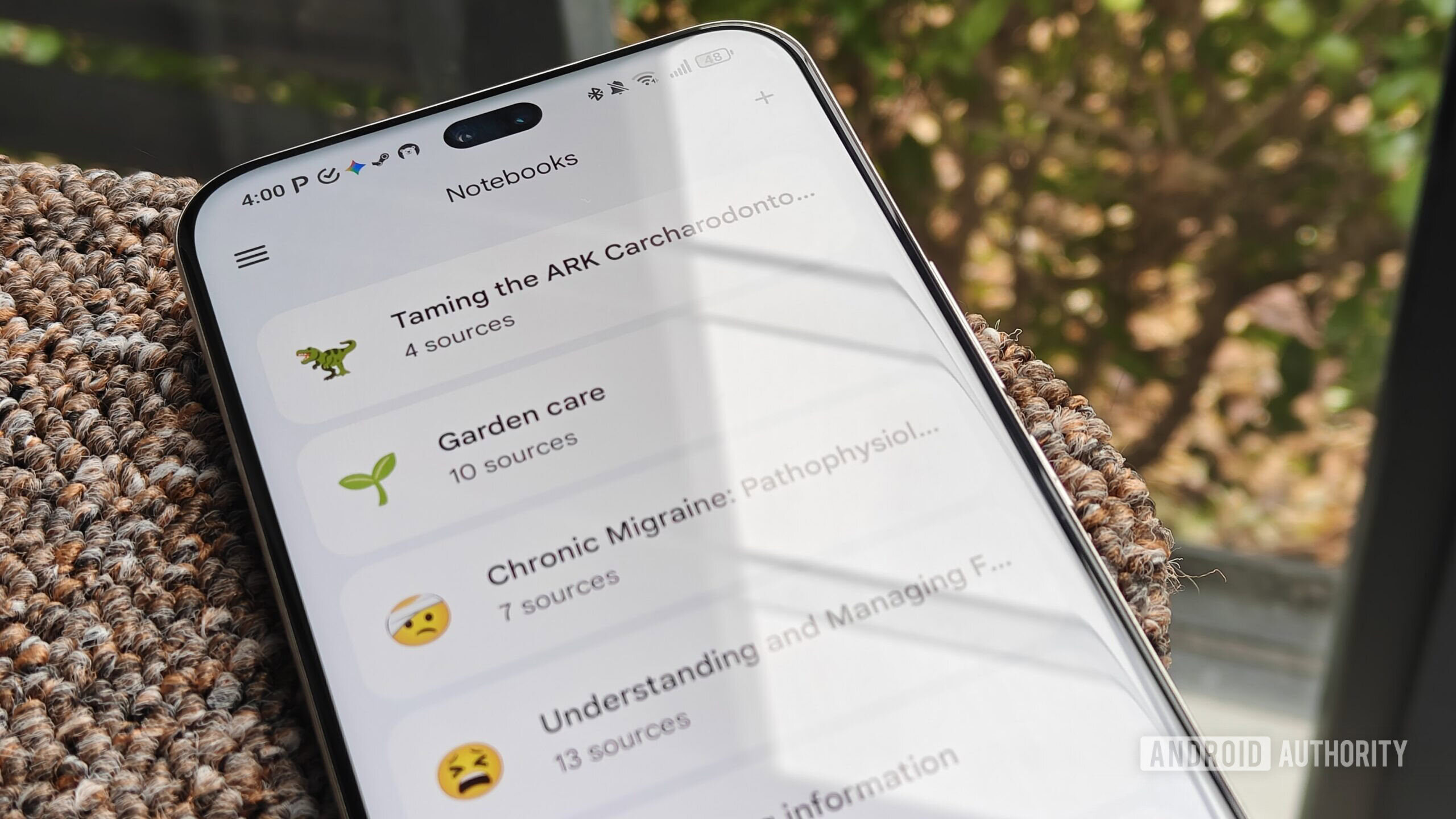
At its core, Gemini Notebooks aims to provide a structured way to manage your interactions and information within the Gemini ecosystem. Essentially, it allows you to create distinct "notebooks" for different topics or projects. The crucial element, and what initially caused my confusion, is its deep, automatic synchronization with Google's NotebookLM. When you create a notebook in Gemini, it automatically becomes a synchronized entity in NotebookLM, and vice-versa. This means that your chats and any files you add within a Gemini Notebook can be pulled directly as sources within NotebookLM.
Key Details & Functionality:
- Cross-Platform Sync: Notebooks created in Gemini automatically appear in NotebookLM, fostering a connected workflow.
- Chat as Source: A pivotal feature is Gemini’s ability to use its web-connected conversational capabilities to generate “sources” for NotebookLM.
- Contextual Bridging: Gemini leverages its real-time web access to provide external context to the more rigidly source-grounded NotebookLM.
- Selective Integration: Only chats within specific Gemini Notebooks are synced. Users can also select which individual chats NotebookLM uses, offering a degree of control.
- Limited Notebooks: Users should be aware that there isn’t an unlimited supply of notebooks available, which might be a drawback for extensive organization.
User Experience: From Skepticism to Essential
My journey with Gemini Notebooks was anything but straightforward. Initially, my vision for a “projects” feature was heavily influenced by tools like Claude, where organizing files and chats into neat, distinct folders is a seamless experience. When Gemini Notebooks arrived, its tight integration with NotebookLM felt less like a refined organizational tool and more like an attempt to push users towards adopting both products simultaneously. This initial impression was largely driven by the fact that it didn’t fulfill my preconceived notion of a simple file and chat manager.
The early days were marked by disappointment. I craved straightforward folders, a clear separation of concerns. Instead, I found a system that seemed to conflate my Gemini conversations with my NotebookLM research, and the automatic syncing — while potentially convenient — felt like it was consuming my limited notebook allowance for purposes I hadn’t intended. It wasn’t intuitive from my perspective, and the learning curve involved understanding Google's overarching vision for these interconnected tools.
However, the real turning point, the "aha!" moment that transformed my perception, occurred when I fully grasped the profound utility of Gemini's web-enabled chats feeding into NotebookLM as sources. This isn't just about moving data; it's about adding a layer of dynamic, web-sourced context to a tool that is deliberately grounded to prevent AI hallucinations. NotebookLM, by design, relies solely on the sources you provide, meaning it cannot access the broader internet for insights. This is excellent for factual accuracy within defined parameters but can severely limit its ability to provide nuanced, real-world context, especially for niche or location-specific queries.
The Superpower: Bridging the Context Gap
This is where Gemini Notebooks reveals its true brilliance. By having my Gemini chats synced as NotebookLM sources, I effectively gained a powerful bridge to the web. Instead of laboriously searching for specific articles or data points to upload to NotebookLM, I could simply converse with Gemini. I could ask Gemini questions that required real-time web knowledge or location-specific information, and those conversations, rich with external context, would then be available for NotebookLM to draw upon. This eliminated the clunky process of finding and uploading external sources, particularly when dealing with topics that aren't well-documented online or are highly localized. It also proved invaluable for troubleshooting, allowing me to resolve issues with Gemini and have those solutions instantly integrated into my NotebookLM projects.
Real-World Applications
This synergistic capability truly shone in practical scenarios. My "garden care" notebook in NotebookLM was a prime example. Previously, I had uploaded various gardening guides, but they often lacked the critical local context for my specific environment. With Gemini, I could explicitly state my location – Cape Town, South Africa – a region known for its dry summers and unique climate. When I asked Gemini about watering schedules for a particular plant during summer, it could factor in the region's lack of rainfall and local conditions to provide a highly accurate, tailored recommendation. Similarly, when a plant’s leaves began yellowing, generic sources pointed to root rot. But by feeding Gemini the context of a recent heatwave and my established watering habits, the AI correctly identified heat stress as the more probable cause.
This dynamic input allowed NotebookLM to generate an incredibly precise watering schedule, far more aligned with my plants’ actual needs than any standalone source could offer. I even managed to get a viable watering schedule for my lawn, something no previous individual source had been able to determine effectively.
Looking ahead, I plan to leverage this feature for a complex health-related project. My cat recently progressed to Stage 2 chronic kidney disease, and I intend to create a comprehensive NotebookLM hub for research. Gemini’s ability to easily incorporate specific details about my cat – its age, weight, other conditions, etc. – directly into the knowledge base, without requiring separate file uploads, will be immensely helpful. While Gemini can sometimes be overly inquisitive, its propensity to ask follow-up questions can also serve as a useful prompt, highlighting areas where my initial context might be insufficient.
Pros and Cons
Pros:
- Powerful Contextual Integration: Seamlessly bridges Gemini's web access with NotebookLM's grounded research, providing invaluable real-world and niche context.
- Simplified Source Addition: Eliminates the need for manual uploading of diverse external sources, especially for localized or troubleshooting information.
- Enhanced Research Accuracy: Allows NotebookLM to generate more precise and relevant insights by drawing from a richer, more dynamic context base.
- Identifies Context Gaps: Gemini's follow-up questions can help users refine their prompts and provide more comprehensive information.
- Organizational Framework: Provides a project-based structure for managing diverse information, even if it's not a traditional folder system.
Cons:
- Initial Learning Curve: The integration isn't immediately intuitive for users expecting a traditional file/chat organizational tool.
- Limited Notebook Count: The finite number of available notebooks could be a constraint for users with many projects.
- AI Accuracy Issues: Gemini, like any AI, can still make mistakes (e.g., plant identification), necessitating user verification of its outputs.
- Not a Direct Folder System: If your primary need is simple, hierarchical folder-based organization for chats and files, this may feel less direct than alternatives.
Comparison to Alternatives
The most direct comparison mentioned in the source material is Claude’s projects feature. The reviewer's initial desire for Gemini Notebooks was to mirror Claude's approach: a straightforward folder-based system to organize chats and files. While Claude excels at this traditional organizational method, Gemini Notebooks takes a fundamentally different, integrated approach. Instead of simply compartmentalizing information, Gemini Notebooks leverages its connection to NotebookLM to enhance the data itself through dynamic web context. Therefore, while both offer forms of 'project' management, their core philosophies and practical strengths diverge significantly. Claude seems to prioritize neat, accessible data storage, whereas Gemini Notebooks prioritizes contextual depth and dynamic information integration.
Buying Recommendation
Gemini Notebooks, particularly in its synergy with NotebookLM, is an absolute game-changer for anyone engaged in research, planning, or complex problem-solving that benefits from combining AI-grounded analysis with real-time web context. If you find yourself repeatedly needing to inject specific, often niche or geographical, information into your AI projects, this feature will be indispensable. However, if your primary need is simply a static, folder-based system for categorizing past chats and uploaded documents without the need for dynamic web enrichment, it might feel like an over-engineered solution. For power users looking to maximize the contextual intelligence of their AI tools, Gemini Notebooks is a strong recommendation. Just remember that, as with any AI-powered tool, critical human oversight remains crucial for verifying accuracy.
FAQ
Q: Is Gemini Notebooks suitable for basic chat organization? A: While it offers an organizational framework, its primary strength lies in its integration with NotebookLM for adding dynamic web context to research. If you're simply looking for basic folder-like storage for chats, you might find it more complex than necessary, though it can still serve that function.
Q: What is the main benefit of syncing Gemini chats to NotebookLM? A: The main benefit is providing NotebookLM, which is grounded only in your uploaded sources, with access to the wider web via Gemini’s conversations. This allows for the inclusion of real-time, niche, or local context that NotebookLM wouldn't otherwise have, making its insights far more relevant and accurate.
Q: Are there any limitations to consider before using Gemini Notebooks? A: Yes, there are a few. You have a limited number of notebooks available for your account. Also, while powerful, Gemini (and AI in general) can still make errors, so always cross-check critical information. Finally, if you're expecting a direct file-and-folder management system like some alternatives, you might find Gemini's approach different from your initial expectations.
Related articles
Google's AI Branding Fix: A Clearer Vision for Gemini
This article critiques Google's fragmented AI branding, proposing a unified 'Gemini Intelligence' system to simplify user experience and strengthen Gemini's identity.

Chuwi UniBox AI495 Pro Review: A Mini AI Powerhouse
Chuwi's UniBox AI495 Pro review: A powerful mini workstation with 192GB RAM and an AMD Ryzen AI chip for local LLM processing, packed into a compact, Mac Pro-esque design.

Blood of The Dawnwalker’s True Foes Lurk in the Wilds
_Blood of The Dawnwalker_ from Rebel Wolves is an RPG that unexpectedly challenges players with fierce wildlife, drawing comparisons to _Dragon Age: Inquisition_'s early zones. Its unique directional combat system, while engaging, can lead to players being overwhelmed by animal ambushes. Despite the high difficulty, these encounters add a fun, dynamic layer to the game.
Pixel Connectivity: Battery Drain, Not Data Speed, Is the Real
Google's Pixel series has consistently offered a compelling Android experience, often earning a spot on recommendation lists for its clean software and camera prowess. However, a recurring shadow has loomed over the

CNET's NYT Connections: Sports Edition Hints & Answers - Daily Puzzle
CNET's daily guide for NYT Connections: Sports Edition offers clear, spoiler-protected hints and answers, making it an efficient and reliable resource for sports puzzle enthusiasts.
Unofficial Sony Headphone PC Apps: Ditch Your Phone, Take Control
Tired of Sony's mobile app? These unofficial, open-source PC tools like Sony Device Center and SonyBridge offer desktop control over your Sony headphones' ANC, EQ, and more. A convenient, albeit unofficial, solution for Windows, Linux, and Mac users looking to ditch their phone for audio adjustments.