
Gemini Device Help on Pixel 11: Promising but Inconsistent
Verdict: A Glimpse of the Future, But Not Ready for Prime Time Google's new Device Help feature, integrated into the Gemini app on the Pixel 11, presents a genuinely exciting vision for smartphone troubleshooting and
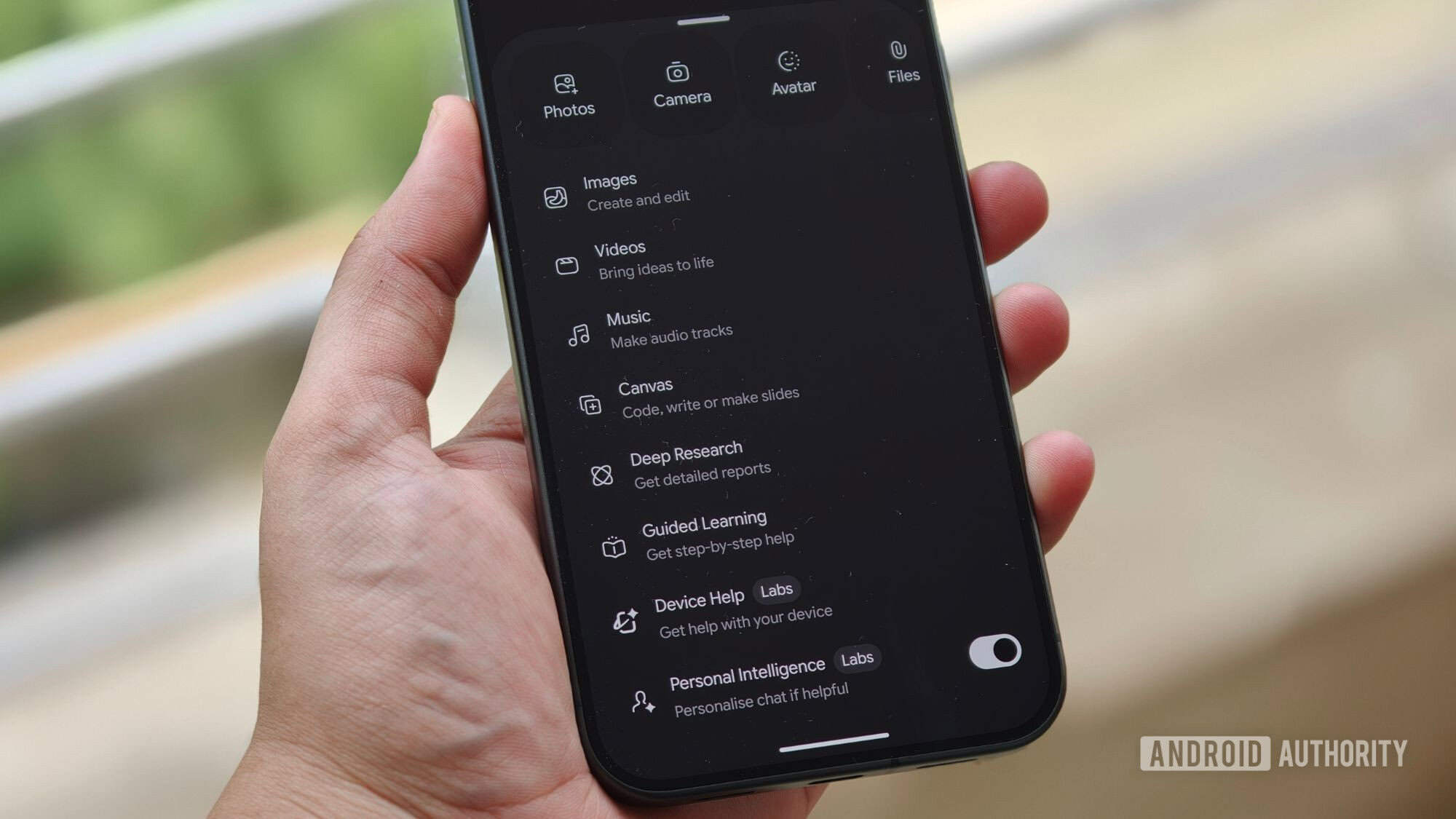
Verdict: A Glimpse of the Future, But Not Ready for Prime Time
Google's new Device Help feature, integrated into the Gemini app on the Pixel 11, presents a genuinely exciting vision for smartphone troubleshooting and interaction. The concept of using natural language to diagnose issues, access settings, and understand complex features is brilliant. However, in its current "Labs" state, the feature is plagued by inconsistencies that undermine its potential. While it shines in some areas, its unreliability makes it hard to recommend as a trusted diagnostic tool just yet.
What is Device Help?
Device Help is an experimental feature within the Gemini app designed to simplify how Pixel 11 users interact with and troubleshoot their devices. Instead of navigating through endless menus in the Settings app, users can articulate their needs or problems using natural language, and Gemini will attempt to provide relevant assistance. Currently, this functionality is rolling out to Pixel 11 and Pixel 11 Pro models, including the XL variants, and is clearly marked with a "Labs" badge, signifying its developmental stage.
This feature aims to be a smart assistant for your phone, capable of understanding queries like "My battery has been terrible lately" or "Take me to Developer Options." Beyond just answering questions, Device Help is designed to offer actionable steps, often providing direct buttons to jump to the exact setting or application required, streamlining the user experience significantly.
User Experience: The Good, The Bad, and The Inconsistent
The Promising Aspects
When Device Help works as intended, it's incredibly impressive and genuinely helpful. Our testing revealed several areas where Gemini truly shines:
-
Intuitive Navigation: For simple tasks like locating Developer Options, Gemini performed flawlessly. A quick command like "take me to Developer Options" immediately presented an "Open System Settings" button, transporting us directly to the desired screen. This level of direct access to often-buried settings is a huge time-saver.
-
Contextual Diagnostics: Unlike a generic troubleshooting guide, Gemini demonstrates the ability to analyze device-specific information. When asked about battery issues, it didn't just offer a standard checklist. Instead, it considered factors like the device's age (e.g., only six days of use) and charging cycles (e.g., two cycles) before suggesting specific settings like Adaptive Battery, complete with a direct link. This contextual awareness is a powerful differentiator.
-
Setting Adjustments and Feature Explanations: Device Help proved capable of basic device control, such as switching between light and dark modes or adjusting display brightness upon request. Furthermore, it can explain Pixel-exclusive features in an easy-to-understand manner. For instance, when asked about "Magic Capture," Gemini provided a clear explanation of its function and expected behavior, then offered an "Open Camera" button for immediate testing. This is particularly useful for new or less tech-savvy users struggling with Google's often abstract feature names.
-
Streamlined Troubleshooting: The ability to articulate problems in natural language and receive direct links to relevant settings has the potential to dramatically simplify troubleshooting. Whether it's Wi-Fi problems, suspect apps, or just understanding a new feature, Gemini aims to cut through the clutter of Android's ever-expanding Settings app.
The Concerning Inconsistencies
Unfortunately, the "Labs" badge is well-earned, as our testing revealed significant inconsistencies that hamper Device Help's reliability. This is the feature's biggest hurdle:
-
Conflicting Instructions: The most glaring issue surfaced when comparing experiences with the same query. For example, while one tester received accurate explanations and direct camera access for "Magic Capture," another tester, using an identical Pixel 11 Pro XL, was given entirely incorrect instructions by Gemini. This disparity is a major concern. A troubleshooting tool must be consistently accurate; if it provides confidently wrong information, it becomes untrustworthy and potentially misleading.
-
Reliability as a Core Problem: For a feature designed to help users fix their phones, inconsistency is a critical flaw. If Device Help directs a user to a non-existent setting or provides a procedure that doesn't apply, it wastes time and erodes confidence in the AI assistant. This makes it difficult to rely on Gemini for anything beyond the most basic and verifiable tasks.
Overall Thoughts and Future Potential
Despite its current shortcomings, the direction Google is taking with Device Help is commendable. Android's Settings app has indeed become a sprawling labyrinth, and an AI-powered guide that can intelligently navigate it, diagnose issues based on actual device data, and provide direct solutions is an incredibly appealing prospect. The potential to democratize troubleshooting, making it accessible even to those unfamiliar with the intricate workings of their smartphones, is immense.
However, potential and current reality are distinct. For Device Help to move beyond its "Labs" status and become a genuinely useful, trusted feature for Pixel owners, Google must prioritize ironing out these inconsistencies. The feature needs to deliver reliable, accurate information every single time, regardless of the user or specific phrasing of the query. Once that level of consistency is achieved, Device Help could transform the way we interact with and maintain our mobile devices.
Recommendation
Gemini's Device Help on the Pixel 11 is a fascinating preview of intelligent device management. For now, we recommend approaching it with cautious optimism. It's excellent for quickly finding settings you know exist or understanding features in a general sense. However, for critical troubleshooting or when seeking precise instructions, verify any information it provides, perhaps by cross-referencing with official support documentation or trusted online sources. It’s a work in progress, and while the foundation is strong, the construction still requires significant refinement before it can be considered a fully dependable tool.
FAQ
Q: What is Gemini's Device Help feature? A: Gemini's Device Help is an experimental feature on Pixel 11 devices that allows users to troubleshoot their phones, find settings, and understand features using natural language commands within the Gemini app. It can also provide direct links to relevant settings or apps.
Q: Which Pixel phones support this feature? A: The Device Help feature is currently appearing on Pixel 11 and Pixel 11 Pro models, including the Pixel 11 Pro XL.
Q: Is Device Help reliable for troubleshooting? A: In its current "Labs" state, Device Help shows promise but is not entirely reliable for critical troubleshooting. While it excels at basic tasks and direct settings navigation, it can sometimes provide inconsistent or incorrect instructions, which undermines its trustworthiness for complex problem-solving.
Related articles

Apple Unveils iPhone Duo: Pricey Foldable Sees Soaring Demand
Apple has officially entered the foldable smartphone arena with the long-anticipated launch of the iPhone Duo. Priced starting at a hefty $1,999, the device features a 5.4-inch outer display and a larger 7.6-inch inner
Android 17 QPR2 Beta 7.1: The Performance Relief You've Been Waiting
Android 17 QPR2 Beta 7.1: Finally Fixing the QPR1 Performance Woes Verdict: Android 17 QPR2 Beta 7.1 is a crucial and highly anticipated software update for Google Pixel users, specifically targeting and resolving the

DJI Solo Video Setups: Smart Choices for Lone Creators
This review delves into DJI's recommended solo video setups, highlighting the Osmo Pocket 3 Creator Combo as a top pick for its integrated camera, gimbal, and mic. It also covers stabilizers like the Osmo Mobile 8 and RS 4, and the DJI Mic Mini series for enhanced audio, providing honest pros, cons, and clear buying advice.

in-depth: Chicago-Area Cops Helped HSI Spy on Minnesota Anti-ICE
Chicago-area law enforcement, including local police and HSI agents, conducted undercover surveillance on Minnesota anti-ICE activists at an April 2, 2022, talk in Chicago. This operation was part of a federal conspiracy probe into 15 Minnesota activists facing felony charges related to immigration enforcement resistance. Civil liberties advocates have condemned the surveillance as a troubling intrusion into protected political activity.

Ars Technica's Rocket Report: Your Essential Space Industry Briefing
Quick Verdict Ars Technica's Rocket Report, presented by veteran space reporter Stephen Clark, offers an invaluable and meticulously organized weekly (or similar frequency, implied by "Edition 9.15") digest of the most

Apple iPhone Duo: A Daring Debut with Notable Compromises
Apple's highly anticipated iPhone Duo, priced at $2,000, has gone on pre-order. While hailed as "Apple's most exciting device in a decade" for its innovative foldable design and immersive display, it comes with significant drawbacks like the absence of FaceID and a premium camera.