
DIY External Storage: A Smart Move in Today's Pricey Market
Quick Verdict With storage prices soaring, repurposing your dusty old hard drives (HDDs), SATA SSDs, or NVMe SSDs into external storage is a brilliantly practical and cost-effective strategy. For as little as $10 for an
Quick Verdict
With storage prices soaring, repurposing your dusty old hard drives (HDDs), SATA SSDs, or NVMe SSDs into external storage is a brilliantly practical and cost-effective strategy. For as little as $10 for an enclosure, you can transform unused hardware into functional storage, offering a spectrum of performance from basic backups to high-speed data transfers. While top-tier dedicated external drives might offer peak performance, your DIY solution can be surprisingly competitive and is an excellent way to breathe new life into forgotten tech.
The Smart Alternative to Pricey Storage
In a market where the best external SSDs and flash drives are not only expensive but often out of stock due to surging AI-driven demand, a clever workaround emerges for those who've been in the PC game for a while: using your old drives as external storage. Many of us have retired SATA SSDs, older laptop M.2 NVMe drives, or even traditional spinning hard drives tucked away. This review delves into the viability, performance, and practicality of this approach, leveraging insights from tests conducted on various drive types paired with modern enclosures.
Drives on the Bench
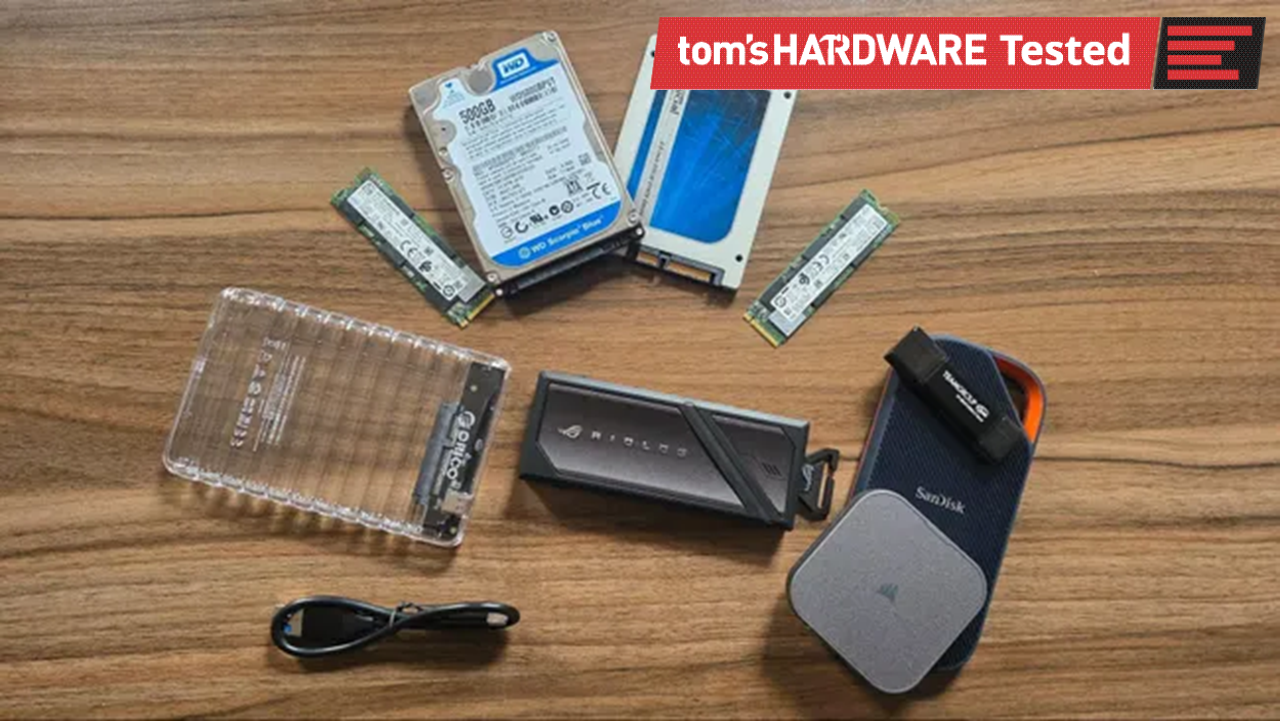
To understand the performance spectrum, several drives were put to the test, representing different eras and technologies:
Western Digital WD5000BPVT 2.5-inch Hard Drive (500GB)
This 2011-era, 500GB 2.5-inch hard drive serves as a baseline for the slowest possible option. Likely sourced from an old laptop or previous testing, it's undeniably a low-tier choice for portable storage. Its performance will be limited by its mechanical nature, making it suitable only for the most basic tasks.
Samsung 850 Pro 2.5-inch SATA SSD (512GB)
Initially, a Crucial MX100 was intended for testing, but it tragically failed after years of dormancy. Its replacement, a Samsung 850 Pro from 2014, represents a significantly faster tier. While a high-end SATA SSD of its time, its speed is capped by the SATA interface, generally topping out around 550 MB/s. This makes it a solid middle-ground for general-purpose external storage, a vast improvement over an HDD.
Intel 660p PCIe 3.0 NVMe SSD (2TB)
Acquired in 2019 during a period of low SSD prices, this 2TB Intel 660p is a PCIe 3.0 NVMe drive rated for up to 1,800 MB/s read and write. It's an excellent candidate for 10 Gbps or 20 Gbps enclosures, providing a substantial speed boost over SATA SSDs. This drive highlights that even older NVMe drives can offer compelling performance when repurposed.
Gigabyte Aorus 12000 PCIe 5.0 SSD (1TB)
While not an "old" drive to be repurposed, this speedy PCIe 5.0 SSD (a recent purchase for comparative testing) was included to demonstrate the absolute peak performance achievable with the fastest M.2 NVMe drives and high-bandwidth enclosures (USB4 or Thunderbolt 3+). It sets the bar for professional workloads like 4K video editing, animation, or running local large language models (LLMs).
Enclosures and User Experience
The magic of this DIY solution lies in the enclosures. Available for as little as $10 (on sale), these devices are often designed for ease of use. The process is typically straightforward: open the enclosure, drop in your drive, and you're good to go – no screwdrivers needed for many models. The range of enclosures is broad, accommodating 2.5-inch HDDs/SATA SSDs and M.2 NVMe drives, with connectivity options up to 80 Gbps via USB-C ports. The user experience is generally hassle-free, transforming an internal drive into a portable one in minutes.
However, it's crucial to match the enclosure's capabilities to your drive and your host port. An 80 Gbps enclosure for an old HDD is overkill, and a fast NVMe drive will be bottlenecked by a slower enclosure or USB port. Similarly, high-performance NVMe drives can generate significant heat, so an enclosure with good thermal dissipation is a consideration for sustained heavy workloads.
Performance Expectations & Comparisons
The performance you can expect from a repurposed drive is directly tied to the drive type and the enclosure's bandwidth:
- Hard Drives: The WD5000BPVT, being a spinning platter, will be the slowest. Expect speeds suitable for occasional backups, storing archives, or non-critical file transfers. It's a significant step up from a basic USB 2.0 flash drive but far behind any SSD.
- SATA SSDs: The Samsung 850 Pro, with its ~550 MB/s theoretical limit, offers excellent general-purpose performance. It's quick enough for most everyday tasks, light gaming, or even booting an operating system in a pinch. This category often hits a sweet spot for price-to-performance when repurposing.
- PCIe 3.0 NVMe SSDs: The Intel 660p demonstrated speeds around 1,800 MB/s, making it highly capable for 10 Gbps and 20 Gbps USB-C connections. This is a very strong option for professionals needing fast access to large files, though not quite at the bleeding edge.
- PCIe 5.0 NVMe SSDs (and high-end PCIe 4.0): Drives like the Gigabyte Aorus 12000, when paired with an 80 Gbps USB4 or Thunderbolt 3+ enclosure, can deliver extreme speeds necessary for demanding applications like editing uncompressed 4K video or intensive LLM operations. This setup can rival or exceed the performance of many premium commercial external SSDs.
Comparison to Dedicated External SSDs and Flash Drives:
While this article primarily focuses on the DIY aspect rather than providing specific benchmark figures, it's acknowledged that purpose-built external SSDs and high-end flash drives exist as alternatives. The DIY solution's performance will vary. For instance, a basic HDD in an enclosure won't hold a candle to even a mid-range external SSD. However, an Intel 660p in a 20 Gbps enclosure can easily outperform many mainstream external SSDs and nearly all flash drives. A high-end NVMe in an 80 Gbps enclosure can be very competitive with, or even surpass, some of the fastest commercial external drives, especially when considering cost savings if you already own the NVMe.
The trade-off is often in form factor (some DIY enclosures might be bulkier), integrated features (like built-in cables or ruggedization), and the potential for an older drive to fail (as seen with the Crucial MX100). However, the price advantage, especially with current market conditions, is undeniable.
Buying Recommendation
Repurposing your old drives is a highly recommended strategy for several groups:
- Budget-Conscious Users: If you have an old drive lying around, investing $10-$30 in an enclosure is a fraction of the cost of a new external drive, especially during storage price hikes.
- Users Needing Basic to Mid-Range Storage: For backups, archiving, or general file transfers, an old HDD or SATA SSD in an enclosure is more than sufficient and provides a cost-effective solution.
- Creative Professionals & Power Users: If you possess a fast, older NVMe drive, pairing it with a suitable high-speed enclosure (10 Gbps or 20 Gbps) offers excellent performance for demanding tasks without the premium price of a new external NVMe.
- Eco-Minded Consumers: It's a great way to reduce e-waste by giving old hardware a second life.
Consider new external drives if: You need guaranteed top-tier performance without any hassle, prioritize an extremely compact and integrated design, or don't have suitable old drives to repurpose.
Ultimately, for most users with dormant drives, this DIY approach is a no-brainer. It's easy, affordable, and delivers performance that can range from perfectly adequate to surprisingly fast.
FAQ
Q: Is it worth using an old HDD as external storage? A: Yes, absolutely, if your needs are basic. An old 2.5-inch HDD in an enclosure (which can be very inexpensive) is perfect for simple backups, archiving large media files you don't access frequently, or as a general bulk storage drive where speed isn't critical. It's far better than letting it gather dust.
Q: How fast can a DIY external SSD be? A: The speed depends entirely on the type of SSD and the enclosure's capabilities. A repurposed SATA SSD will typically top out around 550 MB/s. An older PCIe 3.0 NVMe SSD can achieve speeds around 1,800 MB/s in a 20 Gbps enclosure. With a very fast PCIe 4.0 or 5.0 NVMe and an 80 Gbps USB4/Thunderbolt 3+ enclosure, you can expect speeds comparable to or even exceeding many high-end commercial external SSDs.
Q: What type of enclosure should I choose? A: Select an enclosure that matches your drive's interface (2.5-inch SATA for HDDs/SATA SSDs, or M.2 NVMe for NVMe SSDs). Then, consider the maximum speed your computer's USB-C port supports (e.g., 10 Gbps, 20 Gbps, USB4/Thunderbolt 3+) and choose an enclosure that supports that bandwidth to avoid bottlenecks. Many enclosures are tool-less for easy installation.
Related articles

Building a Python CLI Weather App: Fetching Data & Handling Input
This tutorial guides developers through building a command-line weather application using Python. It covers fetching current temperature and wind speed by interacting with external APIs, specifically for geocoding city names into coordinates and then retrieving weather data. Key learning points include making HTTP requests, parsing JSON, handling command-line arguments with `sys`, and implementing robust error handling.
MacBook Pro OLED Touch: Apple's Bold (and Pricey) New Direction
Verdict: A Premium Powerhouse Finally Embraces Touch Apple's latest MacBook Pro, featuring a long-anticipated OLED touchscreen and driven by the formidable M5 Pro and M5 Max chips, marks a significant departure from the

Xreal Unveils Aura Wired Smart Glasses Running Android XR
At the Android Dev Summit on Wednesday, Xreal, Google's smart glasses collaborator, officially introduced its new Xreal Aura wired smart glasses. The device, which had been teased earlier in the year at Google's I/O

Nothing CMF Clip Pro Review: Open-Ear Awareness at a Steal
The Nothing CMF Clip Pro offers a unique open-ear listening experience, designed for situational awareness and comfort. Now $30 off at $69, it's an appealing option for those seeking spacious sound without sealing off the world.

Apple's Touchscreen MacBook Pro: A Long-Awaited Touch
The Verdict Apple's rumored touchscreen MacBook Pro represents a long-overdue evolution, promising to blend the convenience of direct screen interaction with the powerful macOS laptop experience. While not an essential

CMF Watch 3 Pro: Affordable Style Meets Solid Performance
CMF Watch 3 Pro: Affordable Style Meets Solid Performance In the crowded market of smartwatches, finding a device that balances features, design, and affordability can be a challenge. Enter the CMF Watch 3 Pro, a