
Asus RT-BE92U Review: Tri-Band Wi-Fi 7 Powerhouse at a Great Price
The Asus RT-BE92U steps into the spotlight as a formidable contender in the Wi-Fi 7 router market, offering a compelling blend of cutting-edge speed and comprehensive features without breaking the bank. While its design
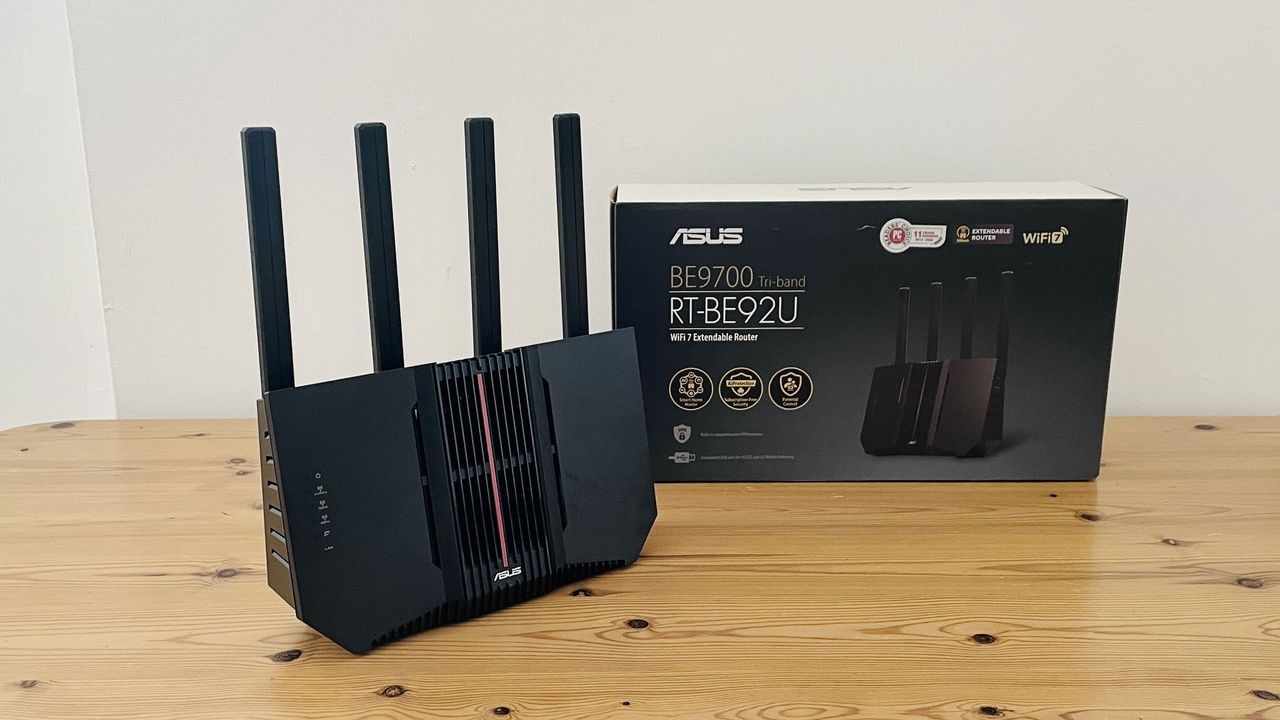
The Asus RT-BE92U steps into the spotlight as a formidable contender in the Wi-Fi 7 router market, offering a compelling blend of cutting-edge speed and comprehensive features without breaking the bank. While its design is understated and the accompanying app can be a navigational puzzle, the sheer performance, high-speed wired connectivity, and inclusion of valuable features like free parental controls make it a standout choice for those ready to upgrade their home or office network.
Quick Verdict
The Asus RT-BE92U delivers on its promise of a high-speed Wi-Fi 7 upgrade at a competitive price. Its impressive tri-band Wi-Fi performance, combined with a 10Gb Ethernet port, ensures your network is ready for the fastest broadband connections available. Although the Asus Router app could be more intuitive and the documentation is lacking, the core value proposition of robust connectivity and useful, subscription-free features is undeniable. It's a powerhouse for serious bandwidth needs, offering excellent range and stability.
Design and Build: Function Over Flash
Forget the aggressive, LED-laden aesthetics often associated with high-end gaming routers; the RT-BE92U opts for a purely functional approach. It presents as an upright black plastic slab, featuring four external antennas that protrude upward, complemented by a fifth antenna discreetly housed within its body. This unassuming design ensures it blends into most environments rather than demanding attention. Weighing 1.1kg and measuring 248 x 102 x 288mm, it’s a practical piece of hardware that prioritizes performance and connectivity over eye-catching looks.
Key Features and Connectivity: Ready for the Future
The RT-BE92U doesn't cut corners where it counts, packing a comprehensive suite of features to support demanding network environments:
- Tri-band Wi-Fi 7: It supports the latest Wi-Fi 7 standard across 2.4GHz, 5.0GHz, and the high-speed 6.0GHz frequency bands, boasting a combined theoretical speed of 9.7Gbps (9,678Mbps). This ensures compatibility with both older devices and new, high-bandwidth Wi-Fi 7 clients.
- High-Speed Wired Ports: For wired connections, the router is exceptionally well-equipped. It includes a versatile 10 Gigabit Ethernet port that can function as either a WAN (broadband) or LAN connection, providing future-proof connectivity for ultra-fast fibre broadband or high-speed devices. Additionally, there’s a 2.5 Gigabit port that also doubles as WAN/LAN, alongside three dedicated 2.5G LAN ports for other wired connections.
- USB 3.2 Port: This humble port offers impressive versatility. Beyond connecting external storage for network sharing, it can charge mobile devices and even enable USB tethering. This allows the router to utilize a smartphone's 4G or 5G mobile broadband as an emergency backup in case your primary internet service goes down.
- Advanced Network Controls: The router facilitates the creation of specific networks, including a standard Guest network, a dedicated ‘Kid’s Network’ with schedule-based internet access limitations, and a ‘VPN Network’ for seamless integration with popular VPN services like NordVPN and SurfShark.
- Free Parental Controls: A significant advantage of the RT-BE92U is its robust suite of parental controls offered completely free of charge. Users can create profiles for different age groups, which automatically block inappropriate content such as pornography, violence, or gambling. This stands in stark contrast to many rival routers that require paid subscriptions for similar functionality.
- Quality of Service (QoS): The device includes QoS settings, allowing users to prioritize specific activities like online gaming or 4K video streaming to ensure maximum performance for critical tasks.
Under the hood, the router is powered by a quad-core 2.0GHz processor, complemented by 1GB of DDR4 memory and 256MB of Flash storage, ensuring smooth operation even under heavy network load.
User Experience and Software: A Mixed Bag
The Asus Router app, available for iOS and Android, is the primary interface for managing the RT-BE92U. While it offers an impressive array of features, its usability can be challenging. The initial setup process is somewhat peculiar, as the router first establishes an unsecured network, requiring users to quickly add a password. Fortunately, a QR code scan option simplifies connecting to the router, after which you're prompted to secure your network with a name and password.
Once set up, navigating the app can feel like traversing a maze. Many of the router's advanced features, including the excellent parental controls, are buried within dense menus and sub-menus. This means finding and utilizing specific functions can take more time and effort than it should. However, the app does simplify Wi-Fi management by merging the three frequency bands (2.4GHz, 5.0GHz, and 6.0GHz) into a single network, intelligently connecting devices to the optimal band for the best speed in any given location within your home.
Performance: Unwavering Speed and Range
Despite the competitive price, the RT-BE92U delivers impressive performance. In testing, even when limited by a 150Mbps office broadband connection, the router demonstrated unwavering speed and exceptional range. Laptops connected to the network maintained the maximum 150Mbps download and upload speeds without issue, even when moving from the same room as the router to an office at the back of a building, through three partition walls. This consistent performance, particularly in areas where other routers typically struggle, highlights its robust signal strength and coverage.
While the theoretical 9.7Gbps top speed will be overkill for most current internet plans, it ensures the router is future-proof and capable of handling multiple high-bandwidth activities simultaneously without degradation. For those with high-speed fibre broadband or multiple demanding users, the RT-BE92U is clearly designed to deliver.
Pros and Cons
Pros:
- Competitively priced for a tri-band Wi-Fi 7 router.
- Exceptional Wi-Fi performance and impressive range.
- Includes a 10Gb Ethernet port for ultra-fast broadband and wired connections.
- Robust and free parental controls, a rarity among competitors.
- Useful USB tethering for 4G/5G mobile broadband backup.
Cons:
- The Asus Router app can be confusing and cumbersome to navigate.
- Initial setup creates a temporary unsecured network.
- Poor documentation for advanced features.
- Purely functional design may not appeal to those seeking aesthetics.
Value for Money
The Asus RT-BE92U stands out for its strong value proposition. For a tri-band Wi-Fi 7 router featuring a 10Gb Ethernet port and a plethora of advanced features, its competitive price point is genuinely appealing. The fact that it includes comprehensive parental controls and network customization options without requiring additional subscriptions further enhances its value, making it a cost-effective long-term investment for home users and office workers alike looking for a significant network upgrade.
Alternatives to Consider
While the Asus RT-BE92U offers a compelling package, here's how it stacks up against some alternatives:
| Feature | Asus RT-BE92U | D-Link Aquila Pro AI R95 | Netgear Nighthawk RS100 |
|---|---|---|---|
| Price (approx.) | $249.99 / £219.99 / AU$328.30 | $254.99 / £180.00 | $129.99 / £129.99 / AU$259.00 |
| Wi-Fi | Tri-band Wi-Fi 7 | Tri-band Wi-Fi 7 | Dual-band Wi-Fi 7 |
| Wi-Fi Speed | 9.7Gbps | 9.5Gbps | 3.6Gbps |
| Wired Connectivity | 1x 10GbE (WAN/LAN), 1x 2.5GbE (WAN/LAN), 3x 2.5GbE (LAN), 1x USB 3.2 | 1x 2.5GbE (WAN), 3x Gigabit E (LAN) | 1x 2.5GbE (WAN), 4x Gigabit E (LAN) |
| Processor | Quad-core 2.0GHz | Not Specified | Quad-core 2.0GHz |
| Memory | 1GB RAM | Not Specified | 1GB RAM |
| Storage | 256MB Flash | Not Specified | 512MB Flash |
The RT-BE92U clearly offers superior wired connectivity with its 10Gb Ethernet port compared to the 2.5GbE WAN on both D-Link and Netgear. While the D-Link is also tri-band Wi-Fi 7, its wired LAN ports are only Gigabit Ethernet. The Netgear Nighthawk RS100 is significantly more affordable but sacrifices tri-band Wi-Fi 7 for dual-band and lower overall Wi-Fi speed and wired port speeds, making it less comparable if future-proofing is a priority.
Buying Recommendation
Buy it if:
- You need a future-proof router with tri-band Wi-Fi 7 and impressive speeds.
- You have, or plan to get, fibre broadband and want to utilize 10 Gigabit Ethernet.
- You value comprehensive, subscription-free parental controls and advanced network features.
- You need excellent Wi-Fi range and stable performance throughout your home or office.
- You're looking for a high-performance router at a competitive price point.
Don't buy it if:
- You prioritize ease of use and a highly intuitive app interface above all else.
- You need extensive documentation to set up and manage advanced features.
- You're looking for a router with a flashy, aesthetic design.
- You have very basic internet needs and a much cheaper Wi-Fi 6 or 6E router would suffice.
FAQ
Q: Is the Asus RT-BE92U good for gaming? A: Yes, absolutely. With its tri-band Wi-Fi 7 (including the 6.0GHz band), high overall speed of 9.7Gbps, and Quality of Service (QoS) features that prioritize gaming traffic, the RT-BE92U is well-equipped to provide a low-latency, high-performance connection for online gaming, even when other devices are active on the network.
Q: Does the RT-BE92U require a subscription for its features? A: No, one of the significant advantages of the RT-BE92U is that it provides a good set of parental controls, network customization options, and security features free of charge. You do not need to sign up for any additional subscriptions to access these functionalities, which is a welcome departure from many competing routers.
Q: Can I use my old devices with this Wi-Fi 7 router? A: Yes, the Asus RT-BE92U is backward compatible with older Wi-Fi standards (Wi-Fi 6E, Wi-Fi 6, Wi-Fi 5, etc.) and devices. Its tri-band nature (2.4GHz, 5.0GHz, 6.0GHz) ensures that all your existing devices, regardless of their Wi-Fi generation, can connect to the network and benefit from the router's strong signal and broad coverage, even if they can't utilize the full Wi-Fi 7 speed.
Related articles

Crystal Lake Series on Peacock: A Deep Dive into Horror's Past
Crystal Lake Series Review: A Deep Dive into Horror's Past Verdict: Is Crystal Lake Worth the Dive? The long-awaited Friday the 13th prequel, Crystal Lake, is finally arriving on Peacock, promising a fresh, in-depth
Google's AI Branding Fix: A Clearer Vision for Gemini
This article critiques Google's fragmented AI branding, proposing a unified 'Gemini Intelligence' system to simplify user experience and strengthen Gemini's identity.

Chuwi UniBox AI495 Pro Review: A Mini AI Powerhouse
Chuwi's UniBox AI495 Pro review: A powerful mini workstation with 192GB RAM and an AMD Ryzen AI chip for local LLM processing, packed into a compact, Mac Pro-esque design.
Pixel Connectivity: Battery Drain, Not Data Speed, Is the Real
Google's Pixel series has consistently offered a compelling Android experience, often earning a spot on recommendation lists for its clean software and camera prowess. However, a recurring shadow has loomed over the

CNET's NYT Connections: Sports Edition Hints & Answers - Daily Puzzle
CNET's daily guide for NYT Connections: Sports Edition offers clear, spoiler-protected hints and answers, making it an efficient and reliable resource for sports puzzle enthusiasts.
Unofficial Sony Headphone PC Apps: Ditch Your Phone, Take Control
Tired of Sony's mobile app? These unofficial, open-source PC tools like Sony Device Center and SonyBridge offer desktop control over your Sony headphones' ANC, EQ, and more. A convenient, albeit unofficial, solution for Windows, Linux, and Mac users looking to ditch their phone for audio adjustments.