
ASUS ProArt KD300 & MD301: Creators' New Tools for Productivity
ASUS is expanding its ProArt ecosystem with two new peripherals designed specifically for the discerning creator: the ProArt Keyboard KD300 and the ProArt Mouse MD301. Unlike typical gaming peripherals laden with RGB or
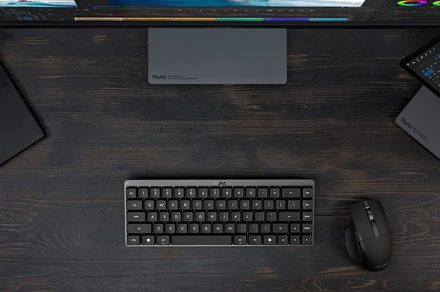
ASUS is expanding its ProArt ecosystem with two new peripherals designed specifically for the discerning creator: the ProArt Keyboard KD300 and the ProArt Mouse MD301. Unlike typical gaming peripherals laden with RGB or ultra-high polling rates, these new additions are meticulously crafted for sustained productivity, comfort, and efficiency during long work sessions. This review dives into how ASUS aims to empower designers, editors, and creators with a desktop setup that truly understands their unique workflow.
The Verdict: Purpose-Built for Creative Professionals
For years, creators have had access to powerful laptops and high-fidelity monitors, but the humble keyboard and mouse often lagged behind, offering either general-purpose designs or gaming-centric features ill-suited for professional work. The ASUS ProArt KD300 keyboard and MD301 mouse arrive as a refreshing change, offering a cohesive, compact, and feature-rich accessory duo. They prioritize comfort, customizability, and efficient workflow, making them an excellent choice for any creator seeking to optimize their workspace and enhance their daily productivity.
ProArt Keyboard KD300: Compact Yet Capable
The ProArt Keyboard KD300 immediately stands out with its compact 65% layout. This design choice makes it considerably smaller than a traditional full-size keyboard, freeing up valuable desk real estate. Crucially, it manages to retain the essential navigation keys that most creators rely on daily, striking a smart balance between portability and functionality. This means you get a streamlined footprint without sacrificing critical shortcuts or ease of use.
Underneath the keycaps, ASUS has implemented its RX Red low-profile optical switches. These switches are engineered to deliver a fast, responsive, and smooth linear keystroke feel. The low-profile nature contributes to a slimmer, quieter design, which is a significant advantage during extended editing sessions where comfort and minimal distraction are paramount. The linear travel ensures a consistent feel across all keys, promoting accuracy and reducing typing fatigue.
Beyond its physical attributes, the KD300 is packed with productivity-enhancing features. It boasts tri-mode wireless connectivity, offering flexibility to switch between multiple computers or tablets. Users can pair up to five devices simultaneously, making it ideal for professionals working across various setups or devices. Customization is another strong suit, with programmable keys and an innovative touch panel. These features integrate seamlessly with ASUS' new web-based Gear Link interface, which allows for quick and intuitive configuration of profiles, key mappings, and macros tailored to specific creative applications. This level of customization ensures that the keyboard can adapt to individual workflows, enhancing efficiency and personalizing the user experience.
ProArt Mouse MD301: Precision and Endurance for Every Creator
Complementing the KD300 is the ProArt Mouse MD301, an ergonomic wireless mouse meticulously designed with the needs of photo editors, video creators, and graphic designers in mind. Its ergonomic form factor is built for comfort during long hours, minimizing strain and promoting natural hand positioning.
At its core, the MD301 features an 8,000 DPI optical tracking sensor, capable of precise tracking even on challenging surfaces like glass. This high-resolution sensor ensures fluid and accurate cursor movement, which is critical for detailed creative tasks. A standout feature for creators is the inclusion of dual scroll wheels: a primary top wheel and a dedicated side wheel. The side wheel is particularly useful for navigating large timelines in video editing software or extensive spreadsheets, providing an intuitive way to scroll horizontally without resorting to awkward key combinations. The primary scroll wheel further enhances productivity with ASUS' SmartShift technology, which automatically transitions between precise line-by-line scrolling and a faster, free-spin mode based on the speed of the flick, offering versatility for different scrolling needs.
Functionality is further extended by six programmable buttons, allowing users to assign frequently used commands or macros directly to the mouse. Perhaps one of the most innovative and user-centric features is the hot-swappable main buttons. This allows users to easily replace worn-out left and right click switches, significantly extending the lifespan of the mouse. Moreover, it offers the flexibility to customize the click feel using standard Push-Fit sockets, catering to individual preferences for click resistance and sound. This is a game-changer for durability and personalization.
Battery life is another area where the MD301 excels, promising up to an impressive 180 days on a full charge. For those unexpected low-battery moments, a quick one-minute USB-C charge provides roughly eight hours of light use, ensuring minimal downtime for professionals who rely on their tools all day long. This blend of endurance and rapid charging makes the MD301 a dependable companion for any demanding creative workflow.
A Cohesive Creator Experience
ASUS's strategy with the KD300 and MD301 is clear: to provide tools that genuinely serve the creative professional. Rather than chasing fleeting trends like extensive RGB lighting configurations or ultra-high gaming polling rates, these devices are designed around the core tenets of long work sessions, compact desk setups, and efficient creative workflows. Comfort, precision, and longevity are prioritized, recognizing that for creators, their peripherals are extensions of their thought process, not just input devices.
The combined offering of the KD300 and MD301 creates a desktop environment where every element is geared towards maximizing productivity. The compact keyboard saves space, the precise mouse offers nuanced control, and both are built for sustained use. The integration with the Gear Link interface further solidifies their place in a professional's arsenal, allowing for a personalized and optimized experience across various applications. This focus on practical utility and user-centric design truly sets the ProArt lineup apart in a market often saturated with general-purpose or gaming-focused accessories.
Buying Recommendation
The ASUS ProArt Keyboard KD300 and Mouse MD301 are highly recommended for designers, video editors, photographers, and any creative professional who spends extensive hours at their desk. If you prioritize comfort, efficiency, precision, and a clutter-free workspace, this duo is an excellent investment. Their unique features, such as the keyboard's touch panel and customizable shortcuts, and the mouse's dual scroll wheels and hot-swappable switches, directly address common pain points in creative workflows. These peripherals are not for casual users or gamers looking for flashy aesthetics, but rather for serious professionals seeking reliable, ergonomic, and highly functional tools to elevate their craft.
FAQ
Q: Who are the ProArt KD300 and MD301 primarily designed for?
A: They are primarily designed for designers, editors, and creators who require comfortable, efficient, and precise input devices for long work sessions and demanding creative workflows. They are built for productivity, not gaming.
Q: What makes the ProArt Mouse MD301 particularly unique for creators?
A: The MD301 stands out with its dual scroll wheels (including a side wheel for horizontal navigation), SmartShift scroll technology, six programmable buttons, and notably, hot-swappable main click buttons that extend lifespan and allow for click feel customization.
Q: How does the ProArt Keyboard KD300 prioritize productivity in its design?
A: The KD300 features a compact 65% layout to save space while retaining essential navigation keys, uses quiet and smooth ASUS RX Red low-profile optical switches for comfort, offers tri-mode wireless connectivity for up to five devices, and includes customizable keys and an innovative touch panel integrated with the Gear Link interface for personalized shortcuts and macros.
Related articles
Android 17 QPR2 Beta 7.1: The Performance Relief You've Been Waiting
Android 17 QPR2 Beta 7.1: Finally Fixing the QPR1 Performance Woes Verdict: Android 17 QPR2 Beta 7.1 is a crucial and highly anticipated software update for Google Pixel users, specifically targeting and resolving the

DJI Solo Video Setups: Smart Choices for Lone Creators
This review delves into DJI's recommended solo video setups, highlighting the Osmo Pocket 3 Creator Combo as a top pick for its integrated camera, gimbal, and mic. It also covers stabilizers like the Osmo Mobile 8 and RS 4, and the DJI Mic Mini series for enhanced audio, providing honest pros, cons, and clear buying advice.

Ars Technica's Rocket Report: Your Essential Space Industry Briefing
Quick Verdict Ars Technica's Rocket Report, presented by veteran space reporter Stephen Clark, offers an invaluable and meticulously organized weekly (or similar frequency, implied by "Edition 9.15") digest of the most

Apple iPhone Duo: A Daring Debut with Notable Compromises
Apple's highly anticipated iPhone Duo, priced at $2,000, has gone on pre-order. While hailed as "Apple's most exciting device in a decade" for its innovative foldable design and immersive display, it comes with significant drawbacks like the absence of FaceID and a premium camera.

AI's Confidence vs. Formal Methods' Rigor: Design Flaws & Verification
While AI accelerates code generation, formal methods remain critical for ensuring system correctness. Languages like TLA+ and tools like Quint enable developers to model and verify system designs before coding, catching subtle flaws. Quint makes formal methods more accessible with developer-friendly syntax and executability. This approach is vital for verifying AI-generated code through trace validation and model-based testing, ensuring reliability against real-world data.

KDE Plasma 6.8: A Future-Focused 30th Anniversary Update
Quick Verdict KDE Plasma 6.8, arriving as the "30th Anniversary Edition," is a pivotal release that decisively pushes the desktop environment into the future. With a definitive farewell to native X11 sessions and a